How to A/B Test the Checkout Page Without Hurting Conversions

The checkout page is the most fragile part of any ecommerce store.

You can experiment freely on homepages, banners, product pages, and even category layouts. But the moment you touch checkout, anxiety sets in. Teams worry about breaking something, slowing things down, or accidentally hurting conversions during peak traffic.

That fear is understandable.

The checkout page sits at the end of the funnel, where intent is highest and tolerance for friction is lowest. One unclear message, one unnecessary field, or one unexpected change can undo all the effort that went into bringing a shopper this far.

At the same time, checkout is where many ecommerce and D2C brands lose the most money. Cart abandonment remains one of the biggest revenue leaks, especially on mobile. Shipping surprises, form fatigue, trust concerns, and unclear payment options quietly push buyers away.

This creates a difficult question for growth teams.

How do you A/B test the checkout page without hurting conversions?
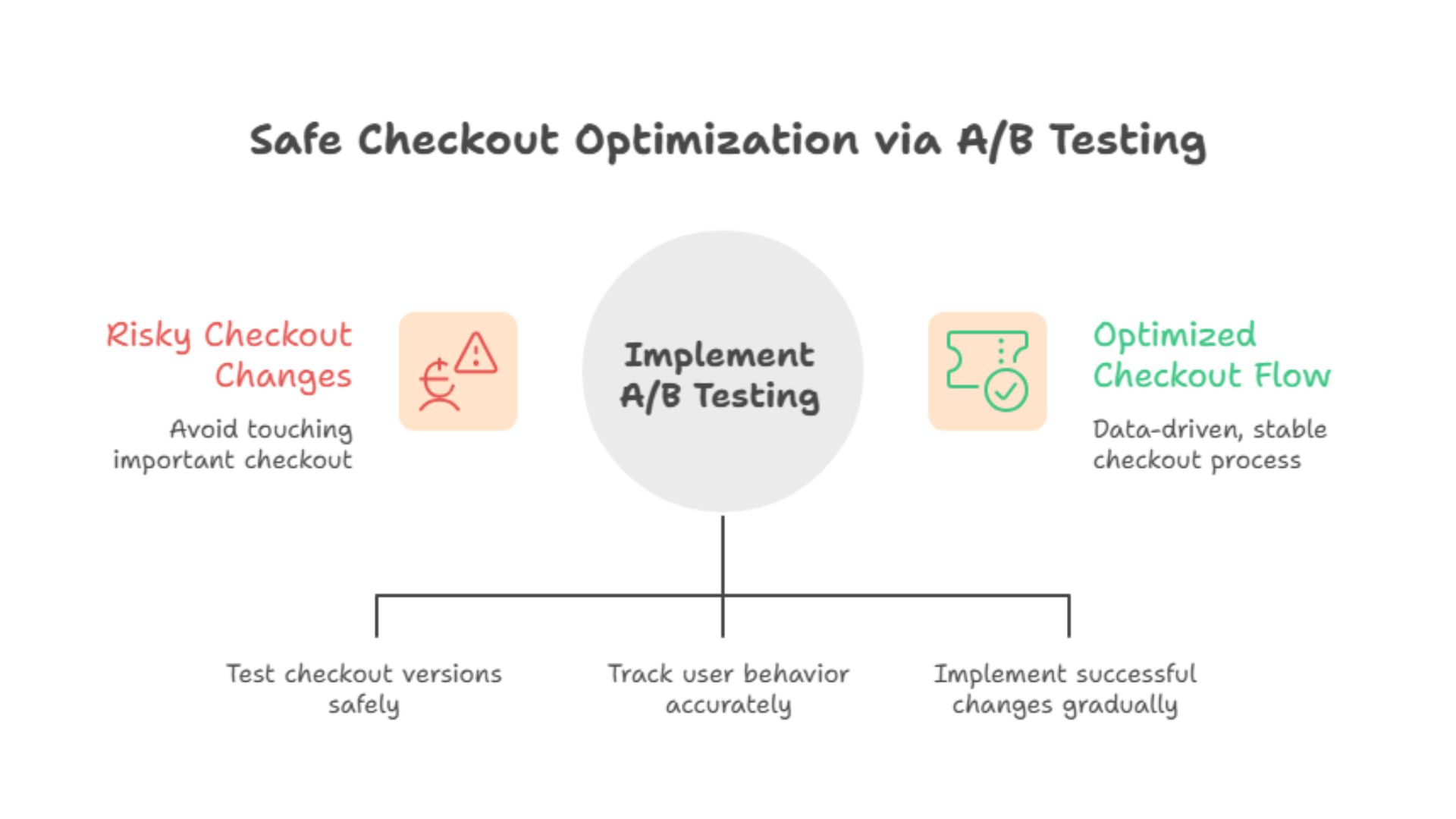
Safe Checkout Optimization via A/B Testing

This guide answers that question in detail. We will cover how to run checkout A/B tests safely, what to test first, which tools and platforms make this easier, and how to validate results before scaling. We will also address common concerns around checkout testing, including performance, SEO, and platform limitations.

Along the way, we will reference how a conversion rate optimization company like CustomFit.ai supports checkout experimentation without forcing risky code changes or heavy development work.

This is not about aggressive experimentation. It is about controlled, responsible optimization that helps your ecommerce store increase conversion rate without breaking trust.

Why Checkout Page A/B Testing Feels Risky but Is Necessary

Most ecommerce brands know their checkout can be better. Fewer steps. Clearer messaging. Less friction. Yet many avoid testing because checkout feels too important to touch.

Ironically, this avoidance often costs more than cautious testing ever would.

Checkout abandonment rarely comes from a single big problem. It comes from small uncertainties that compound. An unexpected shipping fee. A form field that feels unnecessary. A payment option that is missing. A trust badge that appears too late.

Without A/B Testing, teams rely on assumptions. They redesign checkout flows based on what feels right or what competitors are doing. Sometimes that works. Often it does not.

A/B Testing provides a safer alternative. Instead of changing checkout for everyone, you compare versions. You measure behavior. You scale only what proves it can survive real traffic.

The key is knowing how to do this without introducing instability.

How Can I Run an A/B Test on My E-commerce Checkout Page?

Running an A/B test on a checkout page requires a more careful setup than testing other parts of the site, but the principles are the same.

You create two versions of a checkout experience, show them to different groups of users, and compare performance against a clear goal such as completed purchases or revenue per visitor.

The difference lies in how controlled the changes must be.

For checkout testing, best practice looks like this:

  • Test one change at a time

  • Keep the rest of the checkout identical

  • Prioritize stability and speed

  • Use a reliable A/B Testing Platform

  • Monitor results continuously

Most checkout tests focus on experience rather than visual flair. You are not trying to impress. You are trying to remove doubt.

Tools like CustomFit.ai allow ecommerce teams to test checkout messaging, layout, and flow without rebuilding the checkout logic itself. This reduces risk while still unlocking meaningful improvements.

What You Should Test on the Checkout Page First

Not all checkout elements carry the same risk. Some changes are safer and more impactful than others.

If you are testing checkout for the first time, start with areas that influence clarity and trust rather than core payment logic.

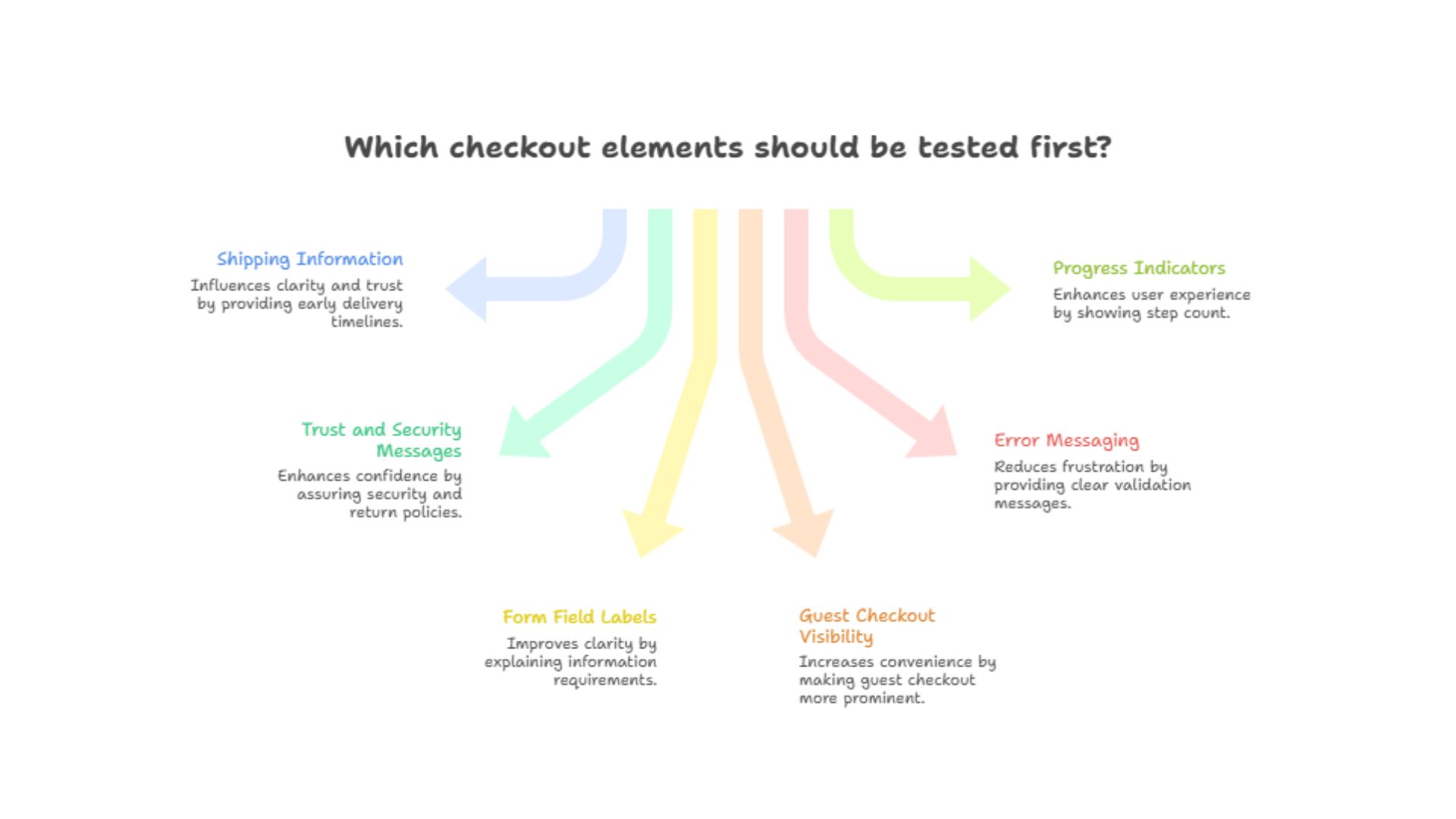
High-impact, lower-risk checkout test ideas

Shipping information placement
Showing delivery timelines earlier versus later

Trust and reassurance copy
Adding short security or return messages near payment steps

Form field labels and helper text
Clarifying why certain information is required

Guest checkout visibility
Making guest checkout more prominent

Which checkout elements should be tested first

Error messaging
Testing clearer validation messages versus generic errors

Progress indicators
Showing step count versus no progress indicator

These elements influence confidence without changing how money flows through your system.

A/B Testing Platforms designed for ecommerce understand these nuances and allow teams to isolate changes safely.

Step-by-Step Guide to A/B Test Checkout Page User Experience

Let us walk through a practical, low-risk framework you can apply to almost any ecommerce store.

Step 1: Identify the Checkout Friction Point

Start with data, not opinions.

Look at:

  • Checkout abandonment rate

  • Drop-off by step

  • Error frequency

  • Support tickets related to checkout

  • Session recordings if available

You are not looking for everything that could be better. You are looking for the one thing most likely causing hesitation.

For example:

  • Users abandon when shipping costs appear

  • Users drop off after address entry

  • Users hesitate at payment selection

This becomes your test hypothesis.

Step 2: Define a Clear Hypothesis

A good checkout A/B test starts with a clear statement.

For example:

If we show delivery timelines before payment selection, then more users will complete checkout because uncertainty is reduced.

This keeps your test focused and measurable.

Step 3: Choose the Right Metric

Checkout testing should focus on outcomes, not proxies.

Primary metrics usually include:

  • Completed purchases

  • Conversion rate

  • Revenue per visitor

Secondary metrics may include:

  • Time to complete checkout

  • Error rate

  • Drop-off at specific steps

Avoid optimizing checkout for clicks or engagement alone. What matters here is completion.

Step 4: Create the Variation Carefully

This is where many teams make mistakes.

Your variation should change only one thing.

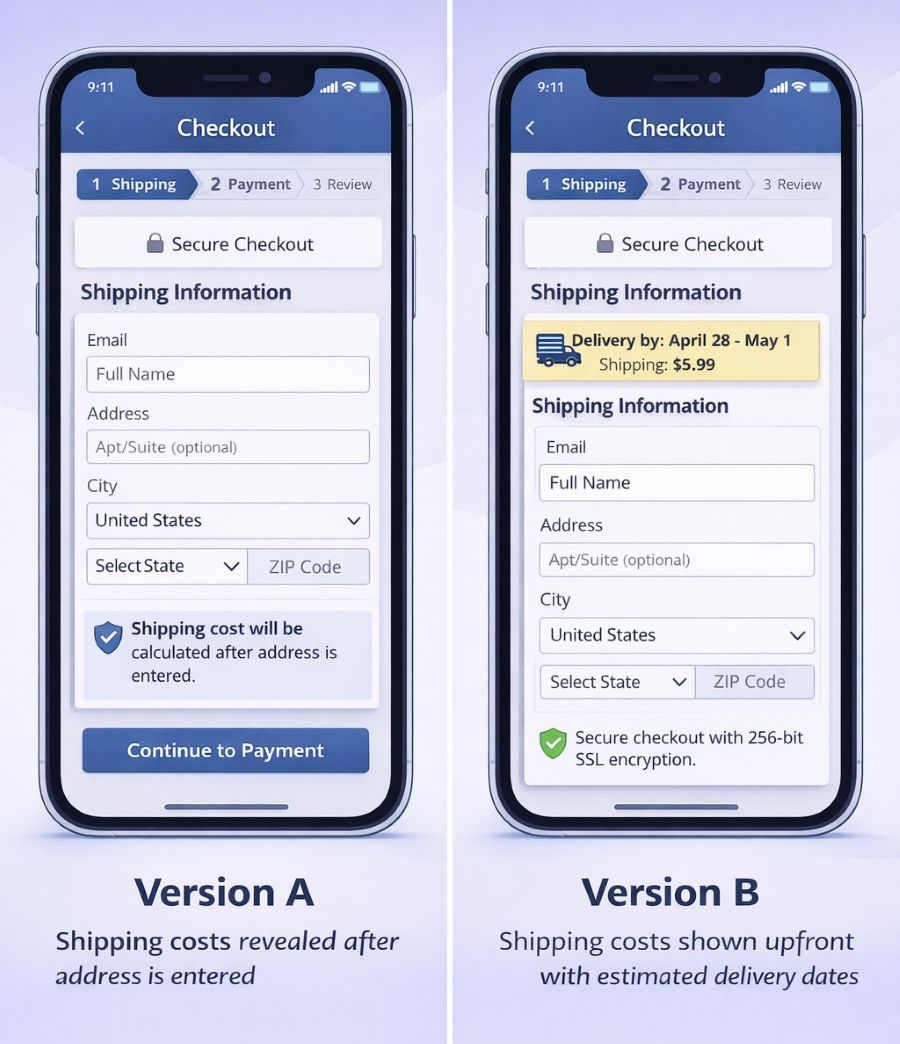
For example:

Version A
Shipping costs revealed after address entry

Version B
Shipping costs shown upfront with estimated delivery dates

Everything else remains identical.

create variation using customfit.ai

Using an A/B Testing Platform like CustomFit.ai helps enforce this discipline. You can visually adjust messaging or layout without altering the underlying checkout logic.

Step 5: Limit Traffic Exposure Initially

Checkout tests do not need full traffic from day one.

Start with a controlled rollout:

  • 10 percent to 20 percent of users

  • Monitor performance closely

  • Watch for unexpected errors

If performance holds steady or improves, you can increase exposure gradually.

This phased approach protects revenue while still allowing learning.

Step 6: Let the Test Run Long Enough

Checkout behavior varies by day and device.

Run your test long enough to capture:

  • Weekday and weekend traffic

  • Mobile and desktop behavior

  • Different traffic sources

Avoid calling winners too early. Stability matters more than speed.

Step 7: Validate Before Scaling

Before rolling out any checkout change globally, double-check:
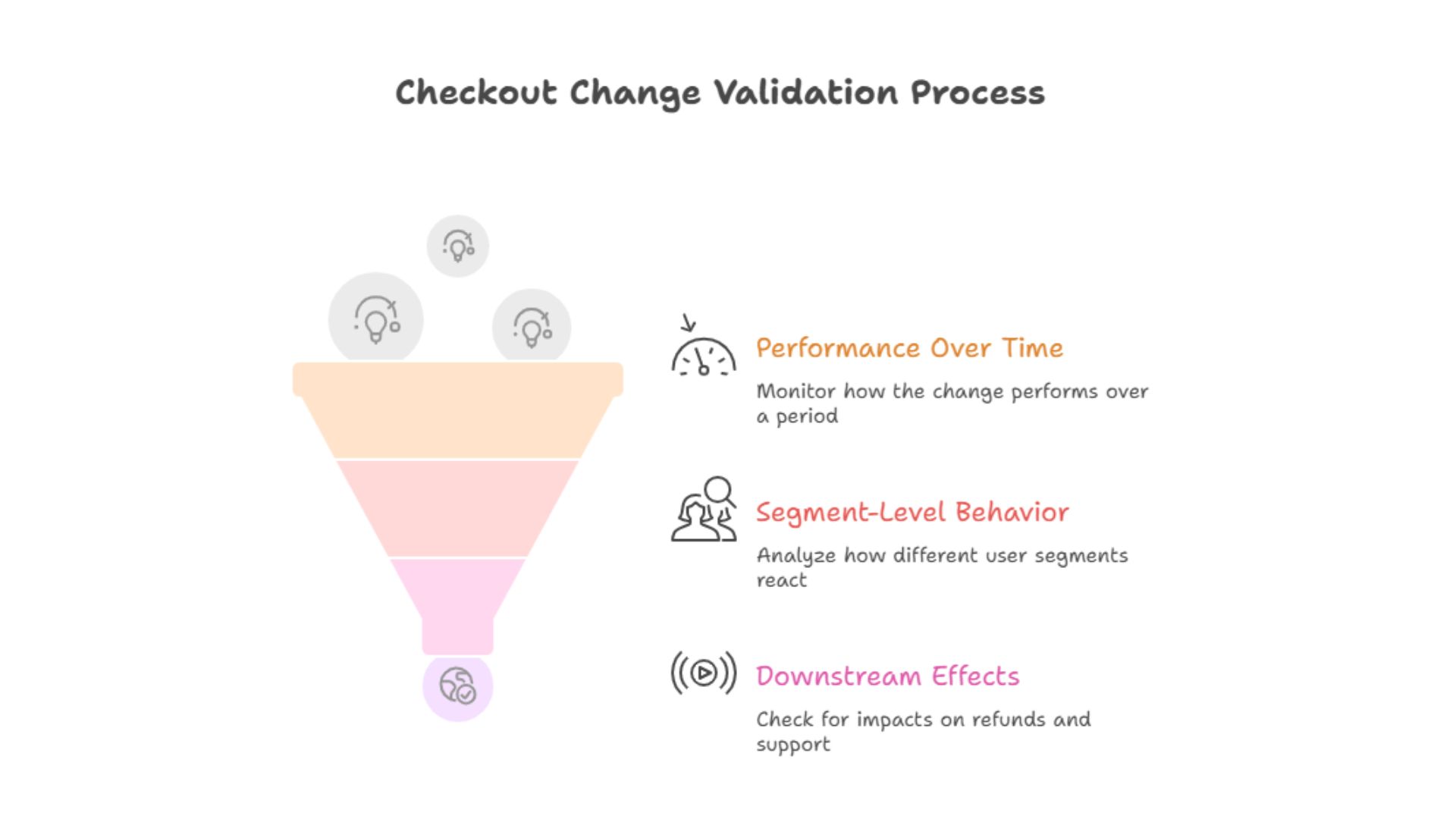
  • Performance over time

  • Segment-level behavior

  • Downstream effects like refunds or support tickets

Checkout Change Validation Process

A checkout winner should hold up under scrutiny.

Best Tools for A/B Testing Checkout Pages for Online Stores

Checkout testing requires tools that prioritize stability and ecommerce context.

The best tools share a few characteristics:

  • Lightweight scripts

  • Flicker-free rendering

  • Support for ecommerce flows

  • Easy rollback

  • Clear reporting

Many generic experimentation tools struggle with checkout pages because they were built for content testing, not transactional flows.

A conversion rate optimization company like CustomFit.ai focuses specifically on ecommerce use cases. This makes it easier to test checkout messaging, layout, and UX safely without interfering with payment processing.

Which Platforms Offer Easy A/B Testing for Checkout Page Optimization?

Different platforms approach checkout testing differently.

Hosted ecommerce platforms like Shopify, WooCommerce, and Magento often limit direct checkout customization. This is intentional, to preserve security and performance.

Because of this, the easiest way to A/B test checkout pages is usually through:
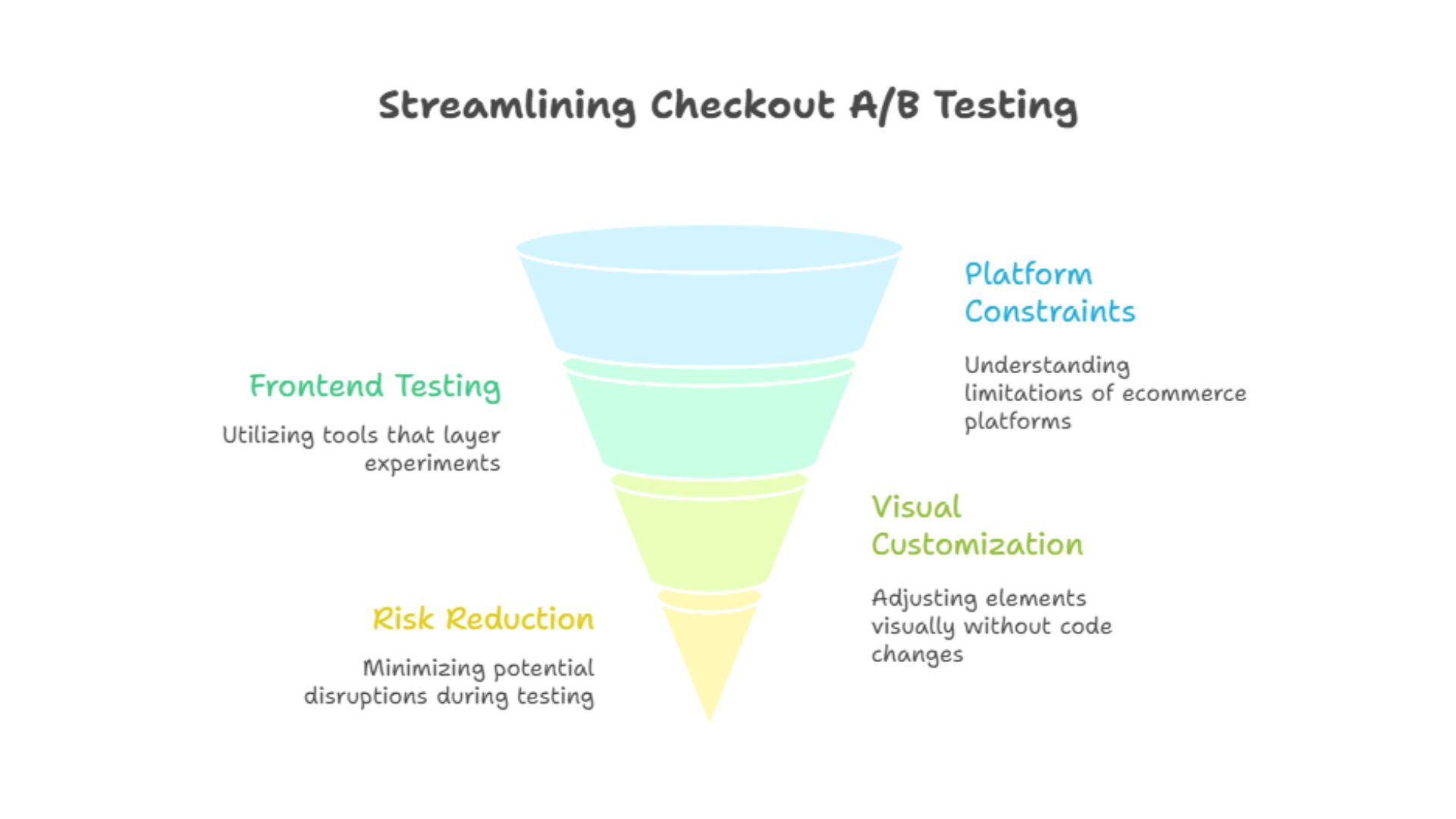
  • Frontend-based A/B Testing Platforms

  • Tools that layer experiments on top of existing checkout flows

  • Solutions that do not require modifying core checkout code

Streamlining Checkout A/B Testing

CustomFit.ai fits into this category by allowing ecommerce teams to test checkout-related elements visually while respecting platform constraints.

This approach reduces risk and speeds up experimentation.

Can I Use Website Builders to Conduct A/B Tests on Checkout Pages?

Website builders and page builders are great for landing pages and content sections, but checkout pages are different.

Most website builders do not fully control checkout flows, especially on ecommerce platforms where checkout is protected.

You can sometimes test:

  • Pre-checkout messaging

  • Cart page elements

  • Checkout entry points

But direct checkout testing usually requires an A/B Testing Platform designed for ecommerce rather than a general-purpose builder.

The safest approach is to combine:

  • Platform-native checkout stability

  • External experimentation tools that modify presentation, not payment logic

This gives you flexibility without compromising security.

Where to Find Templates for Checkout Page A/B Testing

Checkout testing does not require fancy templates. In fact, simpler is better.

Instead of templates, focus on proven checkout test patterns:

  • Single-column layout versus multi-column

  • Early versus late shipping disclosure

  • Short reassurance copy near payment steps

  • Guest checkout prominence

  • Clear error handling

Many conversion rate optimization teams maintain internal test libraries based on what has worked across ecommerce stores.

CustomFit.ai users often build reusable test setups that can be applied across multiple stores or campaigns, reducing setup time while maintaining consistency.

Common Checkout A/B Testing Mistakes to Avoid

Checkout testing magnifies mistakes. Here are a few to avoid.

Testing too many changes at once
You will not know what caused the result.

Optimizing for the wrong metric
Clicks do not equal purchases.

Ignoring mobile users
Mobile checkout behavior is different and often more fragile.

Scaling too fast
A small win can disappear under full traffic.

Not monitoring post-rollout
Checkout changes need ongoing observation.

Avoiding these mistakes keeps experimentation safe and productive.

How A/B Testing Checkout Pages Helps Increase Conversion Rate

When done correctly, checkout A/B Testing delivers some of the highest ROI improvements available to ecommerce brands.

Small changes at checkout affect users who already intend to buy. This means:

  • Higher conversion rate

  • Better revenue per visitor

  • Lower cost per acquisition

  • Improved customer experience

Unlike top-of-funnel experiments, checkout optimization improves efficiency across all traffic sources.

How CustomFit.ai Supports Safe Checkout Testing

CustomFit.ai is a conversion rate optimization company focused on ecommerce experimentation and personalization.

For checkout testing, it helps teams:

  • Test UX and messaging without altering payment logic

  • Run flicker-free experiments

  • Control exposure and rollback easily

  • Analyze segment-level performance

  • Scale responsibly

The goal is not to experiment recklessly. It is to make checkout improvements repeatable and safe.

Turning Checkout Testing Into a Long-Term Advantage

The best ecommerce brands treat checkout as a living system.

They do not redesign it once a year and hope for the best. They continuously test small improvements, validate results, and build confidence over time.

This discipline compounds.

Each successful checkout test removes friction. Over months, this leads to meaningful gains in conversion rate without increasing traffic or discounts.

Conclusion: Checkout A/B Testing Is About Control, Not Courage

You do not need bravery to A/B test your checkout page. You need control.

Control over what changes.
Control over who sees them.
Control over when you scale.

When done responsibly, checkout testing does not hurt conversions. It protects them.

By starting with low-risk changes, using a reliable A/B Testing Platform, and validating results carefully, ecommerce and D2C brands can unlock significant revenue improvements where it matters most.

Checkout optimization is not about pushing harder. It is about making buying easier.

FAQs: How to A/B Test the Checkout Page Without Hurting Conversions

How can I run an A/B test on my e-commerce checkout page?

You can run an A/B test on your checkout page by creating two controlled versions of the checkout experience and showing them to different user groups. Use an A/B Testing Platform that supports ecommerce flows, limit changes to one element at a time, and measure completed purchases as the primary metric.

What are the best tools for A/B testing checkout pages for online stores?

The best tools for checkout testing are platforms built specifically for ecommerce experimentation. These tools prioritize stability, flicker-free rendering, and safe interaction with checkout flows. Conversion rate optimization platforms like CustomFit.ai are designed to support checkout testing without heavy development.

Which platforms offer easy A/B testing for checkout page optimization?

Ecommerce-focused A/B Testing Platforms offer the easiest way to optimize checkout pages. They work alongside platforms like Shopify and WooCommerce, allowing teams to test checkout UX and messaging without modifying payment logic.

Can I use website builders to conduct A/B tests on checkout pages?

Website builders are useful for content pages but usually cannot control checkout flows directly. For checkout testing, it is safer to use an A/B Testing Platform designed for ecommerce rather than a general website builder.

Where can I find templates for checkout page A/B testing?

Instead of templates, focus on proven checkout test patterns such as shipping disclosure timing, trust messaging placement, guest checkout visibility, and error handling. Many ecommerce optimization teams build internal libraries of reusable test setups based on these patterns.

How does checkout A/B testing help increase conversion rate?

Checkout A/B testing improves conversion rate by reducing friction at the final step of the purchase journey. Even small improvements at checkout affect high-intent users, leading to measurable revenue gains.

Is A/B testing checkout pages risky?

Checkout testing can be risky if done carelessly. When done responsibly using controlled exposure, stable tools, and clear metrics, it is one of the safest and most impactful optimization practices.

Does AB testing for SEO apply to checkout pages?

Checkout pages are usually not indexed for SEO, but AB testing still affects overall user experience. Stable, flicker-free testing supports performance metrics that indirectly influence site quality and engagement.

How long should I run a checkout A/B test?

Run checkout tests long enough to capture different traffic patterns, including mobile and desktop users. Avoid ending tests early based on initial results.

How does CustomFit.ai help with checkout page optimization?

CustomFit.ai helps ecommerce teams run safe, controlled checkout A/B tests by enabling visual experimentation, controlled rollouts, and deep performance analysis. This allows teams to improve checkout experience without risking conversions.

Sapna Johar
CRO Engineer at Customfit.ai

The checkout page is the most fragile part of any ecommerce store.

You can experiment freely on homepages, banners, product pages, and even category layouts. But the moment you touch checkout, anxiety sets in. Teams worry about breaking something, slowing things down, or accidentally hurting conversions during peak traffic.

That fear is understandable.

The checkout page sits at the end of the funnel, where intent is highest and tolerance for friction is lowest. One unclear message, one unnecessary field, or one unexpected change can undo all the effort that went into bringing a shopper this far.

At the same time, checkout is where many ecommerce and D2C brands lose the most money. Cart abandonment remains one of the biggest revenue leaks, especially on mobile. Shipping surprises, form fatigue, trust concerns, and unclear payment options quietly push buyers away.

This creates a difficult question for growth teams.

How do you A/B test the checkout page without hurting conversions?

Safe Checkout Optimization via A/B Testing

This guide answers that question in detail. We will cover how to run checkout A/B tests safely, what to test first, which tools and platforms make this easier, and how to validate results before scaling. We will also address common concerns around checkout testing, including performance, SEO, and platform limitations.

Along the way, we will reference how a conversion rate optimization company like CustomFit.ai supports checkout experimentation without forcing risky code changes or heavy development work.

This is not about aggressive experimentation. It is about controlled, responsible optimization that helps your ecommerce store increase conversion rate without breaking trust.

Why Checkout Page A/B Testing Feels Risky but Is Necessary

Most ecommerce brands know their checkout can be better. Fewer steps. Clearer messaging. Less friction. Yet many avoid testing because checkout feels too important to touch.

Ironically, this avoidance often costs more than cautious testing ever would.

Checkout abandonment rarely comes from a single big problem. It comes from small uncertainties that compound. An unexpected shipping fee. A form field that feels unnecessary. A payment option that is missing. A trust badge that appears too late.

Without A/B Testing, teams rely on assumptions. They redesign checkout flows based on what feels right or what competitors are doing. Sometimes that works. Often it does not.

A/B Testing provides a safer alternative. Instead of changing checkout for everyone, you compare versions. You measure behavior. You scale only what proves it can survive real traffic.

The key is knowing how to do this without introducing instability.

How Can I Run an A/B Test on My E-commerce Checkout Page?

Running an A/B test on a checkout page requires a more careful setup than testing other parts of the site, but the principles are the same.

You create two versions of a checkout experience, show them to different groups of users, and compare performance against a clear goal such as completed purchases or revenue per visitor.

The difference lies in how controlled the changes must be.

For checkout testing, best practice looks like this:

  • Test one change at a time

  • Keep the rest of the checkout identical

  • Prioritize stability and speed

  • Use a reliable A/B Testing Platform

  • Monitor results continuously

Most checkout tests focus on experience rather than visual flair. You are not trying to impress. You are trying to remove doubt.

Tools like CustomFit.ai allow ecommerce teams to test checkout messaging, layout, and flow without rebuilding the checkout logic itself. This reduces risk while still unlocking meaningful improvements.

What You Should Test on the Checkout Page First

Not all checkout elements carry the same risk. Some changes are safer and more impactful than others.

If you are testing checkout for the first time, start with areas that influence clarity and trust rather than core payment logic.

High-impact, lower-risk checkout test ideas

Shipping information placement
Showing delivery timelines earlier versus later

Trust and reassurance copy
Adding short security or return messages near payment steps

Form field labels and helper text
Clarifying why certain information is required

Guest checkout visibility
Making guest checkout more prominent

Which checkout elements should be tested first

Error messaging
Testing clearer validation messages versus generic errors

Progress indicators
Showing step count versus no progress indicator

These elements influence confidence without changing how money flows through your system.

A/B Testing Platforms designed for ecommerce understand these nuances and allow teams to isolate changes safely.

Step-by-Step Guide to A/B Test Checkout Page User Experience

Let us walk through a practical, low-risk framework you can apply to almost any ecommerce store.

Step 1: Identify the Checkout Friction Point

Start with data, not opinions.

Look at:

  • Checkout abandonment rate

  • Drop-off by step

  • Error frequency

  • Support tickets related to checkout

  • Session recordings if available

You are not looking for everything that could be better. You are looking for the one thing most likely causing hesitation.

For example:

  • Users abandon when shipping costs appear

  • Users drop off after address entry

  • Users hesitate at payment selection

This becomes your test hypothesis.

Step 2: Define a Clear Hypothesis

A good checkout A/B test starts with a clear statement.

For example:

If we show delivery timelines before payment selection, then more users will complete checkout because uncertainty is reduced.

This keeps your test focused and measurable.

Step 3: Choose the Right Metric

Checkout testing should focus on outcomes, not proxies.

Primary metrics usually include:

  • Completed purchases

  • Conversion rate

  • Revenue per visitor

Secondary metrics may include:

  • Time to complete checkout

  • Error rate

  • Drop-off at specific steps

Avoid optimizing checkout for clicks or engagement alone. What matters here is completion.

Step 4: Create the Variation Carefully

This is where many teams make mistakes.

Your variation should change only one thing.

For example:

Version A
Shipping costs revealed after address entry

Version B
Shipping costs shown upfront with estimated delivery dates

Everything else remains identical.

create variation using customfit.ai

Using an A/B Testing Platform like CustomFit.ai helps enforce this discipline. You can visually adjust messaging or layout without altering the underlying checkout logic.

Step 5: Limit Traffic Exposure Initially

Checkout tests do not need full traffic from day one.

Start with a controlled rollout:

  • 10 percent to 20 percent of users

  • Monitor performance closely

  • Watch for unexpected errors

If performance holds steady or improves, you can increase exposure gradually.

This phased approach protects revenue while still allowing learning.

Step 6: Let the Test Run Long Enough

Checkout behavior varies by day and device.

Run your test long enough to capture:

  • Weekday and weekend traffic

  • Mobile and desktop behavior

  • Different traffic sources

Avoid calling winners too early. Stability matters more than speed.

Step 7: Validate Before Scaling

Before rolling out any checkout change globally, double-check:

  • Performance over time

  • Segment-level behavior

  • Downstream effects like refunds or support tickets

Checkout Change Validation Process

A checkout winner should hold up under scrutiny.

Best Tools for A/B Testing Checkout Pages for Online Stores

Checkout testing requires tools that prioritize stability and ecommerce context.

The best tools share a few characteristics:

  • Lightweight scripts

  • Flicker-free rendering

  • Support for ecommerce flows

  • Easy rollback

  • Clear reporting

Many generic experimentation tools struggle with checkout pages because they were built for content testing, not transactional flows.

A conversion rate optimization company like CustomFit.ai focuses specifically on ecommerce use cases. This makes it easier to test checkout messaging, layout, and UX safely without interfering with payment processing.

Which Platforms Offer Easy A/B Testing for Checkout Page Optimization?

Different platforms approach checkout testing differently.

Hosted ecommerce platforms like Shopify, WooCommerce, and Magento often limit direct checkout customization. This is intentional, to preserve security and performance.

Because of this, the easiest way to A/B test checkout pages is usually through:

  • Frontend-based A/B Testing Platforms

  • Tools that layer experiments on top of existing checkout flows

  • Solutions that do not require modifying core checkout code

Streamlining Checkout A/B Testing

CustomFit.ai fits into this category by allowing ecommerce teams to test checkout-related elements visually while respecting platform constraints.

This approach reduces risk and speeds up experimentation.

Can I Use Website Builders to Conduct A/B Tests on Checkout Pages?

Website builders and page builders are great for landing pages and content sections, but checkout pages are different.

Most website builders do not fully control checkout flows, especially on ecommerce platforms where checkout is protected.

You can sometimes test:

  • Pre-checkout messaging

  • Cart page elements

  • Checkout entry points

But direct checkout testing usually requires an A/B Testing Platform designed for ecommerce rather than a general-purpose builder.

The safest approach is to combine:

  • Platform-native checkout stability

  • External experimentation tools that modify presentation, not payment logic

This gives you flexibility without compromising security.

Where to Find Templates for Checkout Page A/B Testing

Checkout testing does not require fancy templates. In fact, simpler is better.

Instead of templates, focus on proven checkout test patterns:

  • Single-column layout versus multi-column

  • Early versus late shipping disclosure

  • Short reassurance copy near payment steps

  • Guest checkout prominence

  • Clear error handling

Many conversion rate optimization teams maintain internal test libraries based on what has worked across ecommerce stores.

CustomFit.ai users often build reusable test setups that can be applied across multiple stores or campaigns, reducing setup time while maintaining consistency.

Common Checkout A/B Testing Mistakes to Avoid

Checkout testing magnifies mistakes. Here are a few to avoid.

Testing too many changes at once
You will not know what caused the result.

Optimizing for the wrong metric
Clicks do not equal purchases.

Ignoring mobile users
Mobile checkout behavior is different and often more fragile.

Scaling too fast
A small win can disappear under full traffic.

Not monitoring post-rollout
Checkout changes need ongoing observation.

Avoiding these mistakes keeps experimentation safe and productive.

How A/B Testing Checkout Pages Helps Increase Conversion Rate

When done correctly, checkout A/B Testing delivers some of the highest ROI improvements available to ecommerce brands.

Small changes at checkout affect users who already intend to buy. This means:

  • Higher conversion rate

  • Better revenue per visitor

  • Lower cost per acquisition

  • Improved customer experience

Unlike top-of-funnel experiments, checkout optimization improves efficiency across all traffic sources.

How CustomFit.ai Supports Safe Checkout Testing

CustomFit.ai is a conversion rate optimization company focused on ecommerce experimentation and personalization.

For checkout testing, it helps teams:

  • Test UX and messaging without altering payment logic

  • Run flicker-free experiments

  • Control exposure and rollback easily

  • Analyze segment-level performance

  • Scale responsibly

The goal is not to experiment recklessly. It is to make checkout improvements repeatable and safe.

Turning Checkout Testing Into a Long-Term Advantage

The best ecommerce brands treat checkout as a living system.

They do not redesign it once a year and hope for the best. They continuously test small improvements, validate results, and build confidence over time.

This discipline compounds.

Each successful checkout test removes friction. Over months, this leads to meaningful gains in conversion rate without increasing traffic or discounts.

Conclusion: Checkout A/B Testing Is About Control, Not Courage

You do not need bravery to A/B test your checkout page. You need control.

Control over what changes.
Control over who sees them.
Control over when you scale.

When done responsibly, checkout testing does not hurt conversions. It protects them.

By starting with low-risk changes, using a reliable A/B Testing Platform, and validating results carefully, ecommerce and D2C brands can unlock significant revenue improvements where it matters most.

Checkout optimization is not about pushing harder. It is about making buying easier.

FAQs: How to A/B Test the Checkout Page Without Hurting Conversions

How can I run an A/B test on my e-commerce checkout page?

You can run an A/B test on your checkout page by creating two controlled versions of the checkout experience and showing them to different user groups. Use an A/B Testing Platform that supports ecommerce flows, limit changes to one element at a time, and measure completed purchases as the primary metric.

What are the best tools for A/B testing checkout pages for online stores?

The best tools for checkout testing are platforms built specifically for ecommerce experimentation. These tools prioritize stability, flicker-free rendering, and safe interaction with checkout flows. Conversion rate optimization platforms like CustomFit.ai are designed to support checkout testing without heavy development.

Which platforms offer easy A/B testing for checkout page optimization?

Ecommerce-focused A/B Testing Platforms offer the easiest way to optimize checkout pages. They work alongside platforms like Shopify and WooCommerce, allowing teams to test checkout UX and messaging without modifying payment logic.

Can I use website builders to conduct A/B tests on checkout pages?

Website builders are useful for content pages but usually cannot control checkout flows directly. For checkout testing, it is safer to use an A/B Testing Platform designed for ecommerce rather than a general website builder.

Where can I find templates for checkout page A/B testing?

Instead of templates, focus on proven checkout test patterns such as shipping disclosure timing, trust messaging placement, guest checkout visibility, and error handling. Many ecommerce optimization teams build internal libraries of reusable test setups based on these patterns.

How does checkout A/B testing help increase conversion rate?

Checkout A/B testing improves conversion rate by reducing friction at the final step of the purchase journey. Even small improvements at checkout affect high-intent users, leading to measurable revenue gains.

Is A/B testing checkout pages risky?

Checkout testing can be risky if done carelessly. When done responsibly using controlled exposure, stable tools, and clear metrics, it is one of the safest and most impactful optimization practices.

Does AB testing for SEO apply to checkout pages?

Checkout pages are usually not indexed for SEO, but AB testing still affects overall user experience. Stable, flicker-free testing supports performance metrics that indirectly influence site quality and engagement.

How long should I run a checkout A/B test?

Run checkout tests long enough to capture different traffic patterns, including mobile and desktop users. Avoid ending tests early based on initial results.

How does CustomFit.ai help with checkout page optimization?

CustomFit.ai helps ecommerce teams run safe, controlled checkout A/B tests by enabling visual experimentation, controlled rollouts, and deep performance analysis. This allows teams to improve checkout experience without risking conversions.