From the conversion glossary
Concepts referenced in this article, defined.
Concepts referenced in this article, defined.
Run rigorous A/B tests and personalize every visit on Shopify or any storefront — no engineers required.
A/B testing Shopify themes means systematically comparing two versions of a page element — a product page layout, a homepage section, a checkout button — to see which drives more purchases. Done correctly, Shopify theme A/B testing is the fastest way to turn your existing traffic into more revenue without spending more on ads. Done wrong, it generates misleading results and false confidence. This guide shows you how to do it right.
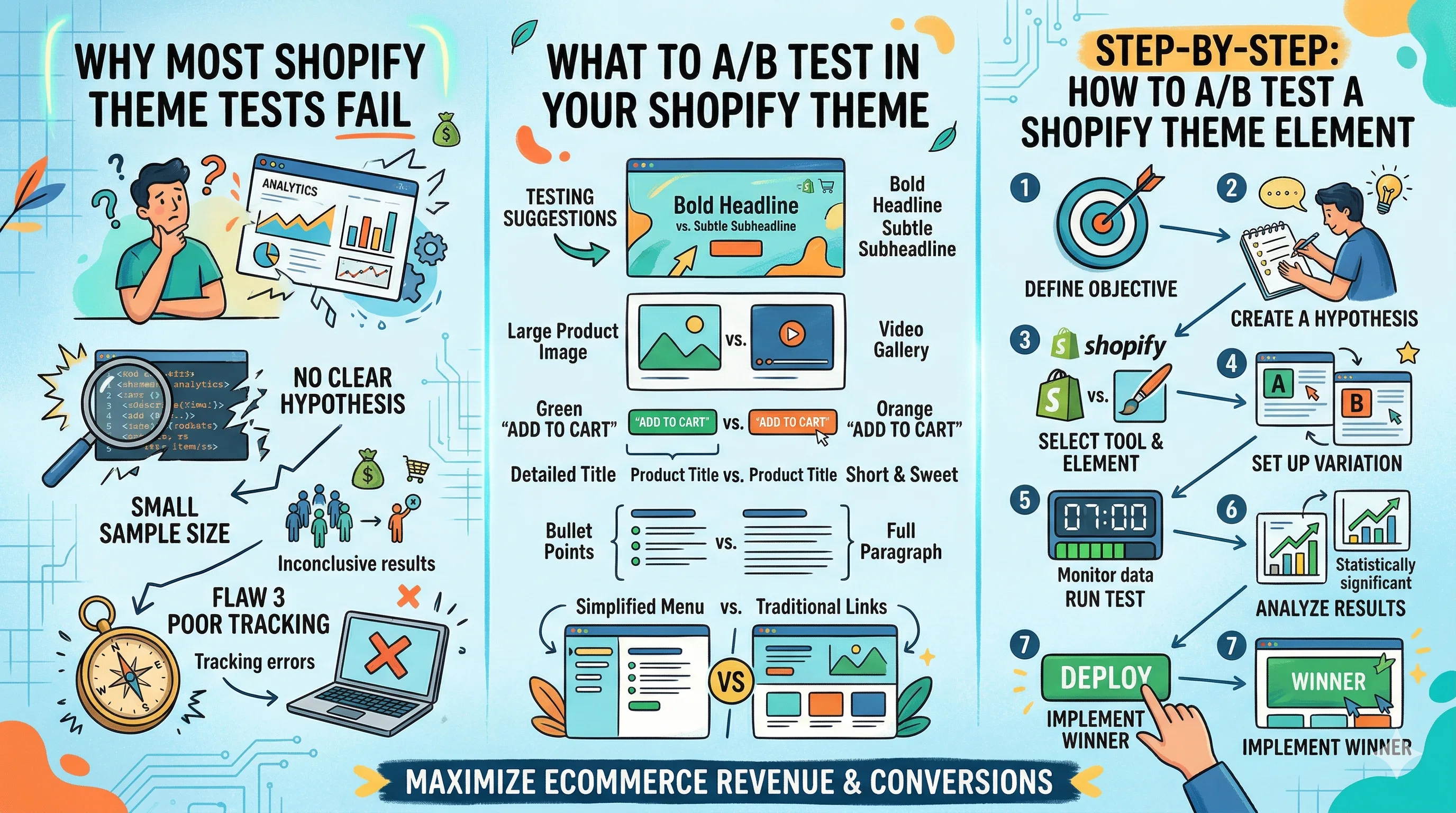
Before the how-to, understand the common failure modes:
Testing the whole theme at once. Brands switch from Dawn to Prestige and call it an A/B test. But the two themes differ in dozens of ways — typography, image layout, section order, CTA design. When conversion changes, you have no idea what caused it.
Ending tests too early. A test that shows a 10% lift after 200 visitors is almost certainly a false positive. Most small-to-mid Shopify stores need 1,000–5,000 visitors per variant to reach statistical significance.
Testing during traffic anomalies. Running a theme test during a Diwali sale, a brand collaboration, or a viral social post means your test traffic is completely different from your normal audience. Results are not generalisable.
Measuring the wrong metric. A theme change that increases time on page but decreases add-to-cart rate is a net negative. Always measure business outcomes, not engagement proxies.
High-impact, easy-to-test elements:
| Element | What to Test | Key Metric |
|---|---|---|
| Product page hero | Image-first vs. description-first layout | Add-to-cart rate |
| Add-to-cart button | Position (fixed vs. scroll), colour, size, text | Add-to-cart rate |
| Product images | Single hero vs. carousel vs. thumbnail grid | Engagement, ATC |
| Social proof block | Above vs. below price, star rating vs. quote | Conversion rate |
| Mobile sticky bar | Sticky ATC bar vs. inline CTA | Mobile CVR |
| Trust badges | Position, style, icons vs. text | Checkout start rate |
| Price display | Original price + discount vs. final price only | ATC rate |
| Upsell block | Product page vs. cart page placement | AOV |
Start with your product page CTA — it is the single most tested element in Shopify CRO and consistently shows significant lift when optimised.
The cardinal rule: one element per test. If you test both the CTA button and the social proof position simultaneously, you cannot attribute the result to either.
Pick the element with the highest expected impact on your primary metric. For most Shopify stores, that's the add-to-cart button on the product page.
Structure your hypothesis clearly: "If we [change], then [metric] will [direction] because [reason]."
Example: "If we add a sticky add-to-cart button that follows the visitor as they scroll on mobile, then mobile add-to-cart rate will increase because the CTA will remain accessible without requiring the visitor to scroll back up."
A hypothesis with a clear "because" is testable — you'll know why it worked or didn't.
Use a sample size calculator before starting. You need to know:
CustomFit.ai calculates this automatically when you set up a test. If you have 10,000 monthly visitors and a 3% product page CVR, you typically need 3–4 weeks to reach significance for a 10% improvement.
In CustomFit.ai's visual editor:
No Liquid template edits. No theme duplication. No risk of breaking your live store.
For most tests, use a 50/50 split between control (original) and variant (new). Launch the test and let it run.
Important: Set a minimum runtime (typically 2 weeks) and don't check results daily. Early peaking and stopping inflates false positives dramatically.
When your test reaches statistical significance:
After every test, document:
Over 12 months, this log becomes a detailed map of what your specific audience responds to — an asset that no competitor can replicate.
When to test sections: Most of the time. Section-level tests are precise, fast to build, and isolate variables cleanly. Start here.
When to test a full theme switch: When you have strong evidence (from heatmaps, session recordings, and multiple section tests) that the overall layout architecture is the problem — not individual elements. At this point, run the full theme as a variant for a large segment over 4–6 weeks, measuring revenue per visitor as the primary metric.
Important: When testing a full theme switch, make sure both themes are loading comparably fast. A theme that loads 2 seconds slower will always lose — you'd be testing load speed, not design.
India is a mobile-first market. 70–80% of your Shopify traffic is likely mobile. Most Shopify themes are designed on desktop first and adapted for mobile — which means mobile visitors are often using a suboptimal experience.
Mobile-specific tests to prioritise:
Run these tests on mobile visitors only using device targeting in CustomFit.ai — don't dilute your results with desktop traffic that experiences the layout differently.
Related reading: Best Shopify A/B Testing Apps in 2026 | Shopify Product Page A/B Testing Ideas | How to Increase Shopify Conversion Rate in 2026