Home /Features /Visual Editor
No-code editing

A no-code visual editor for your live store.

Open any page in the editor, click the thing you want to change, and change it — copy, images, colors, whole sections. Ship it as an A/B test or a personalized experience without editing your theme or filing a single dev ticket. And AI Copilot can build any change for you from a single prompt.

No theme edits Instant rollback Any CMS
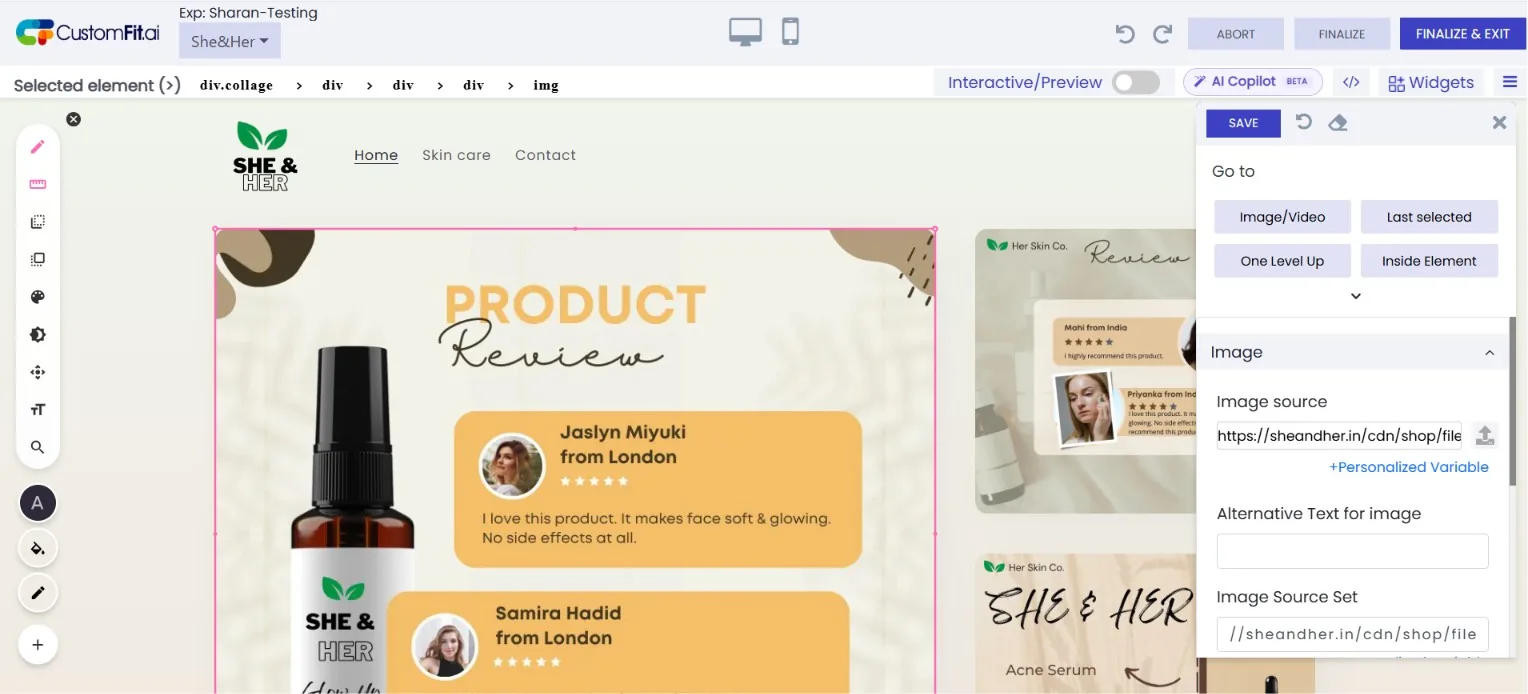
CustomFit no-code visual editor open on a She & Her skincare 'Product Review' storefront page: an image element is selected with pink resize handles and a breadcrumb (div.collage › div › div › div › img), while the right-hand panel shows Image source, alt text, and image source-set fields, plus AI Copilot, Widgets, and device-preview controls.
Click any element
Select it right on the live page
Edit inline
Copy, image, style or hide
AI Copilot
Build it from a prompt
🖱️

Click anything, change anything

Select any element on the page and edit its text, image, color, spacing, or visibility — live, with the real page in front of you.

🧩

Works on any CMS

Shopify, WooCommerce, BigCommerce, Shoplazza, or fully custom — if it renders in a browser, you can edit it.

↩️

Never touches your theme

Edits are layered on at render time. Nothing is written to your theme, so rollback is one click and there's nothing to break.

The element picker

If you can see it, you can edit it.

Hover to highlight, click to select, then use the inline toolbar to rewrite copy, swap an image, restyle a button, move a block, or hide it for a segment. Marketers ship most changes without ever opening code.

  • Edit text, images, links, colors, fonts & spacing
  • Reorder, duplicate, or hide any section
  • Drop in widgets — badges, banners, countdowns
Browse the widget library →
Edit panel · CTA button
Label
Buy now — ships tonight|
Background
#5246E6
Radius
6px
Visibility
ShowHide for segment
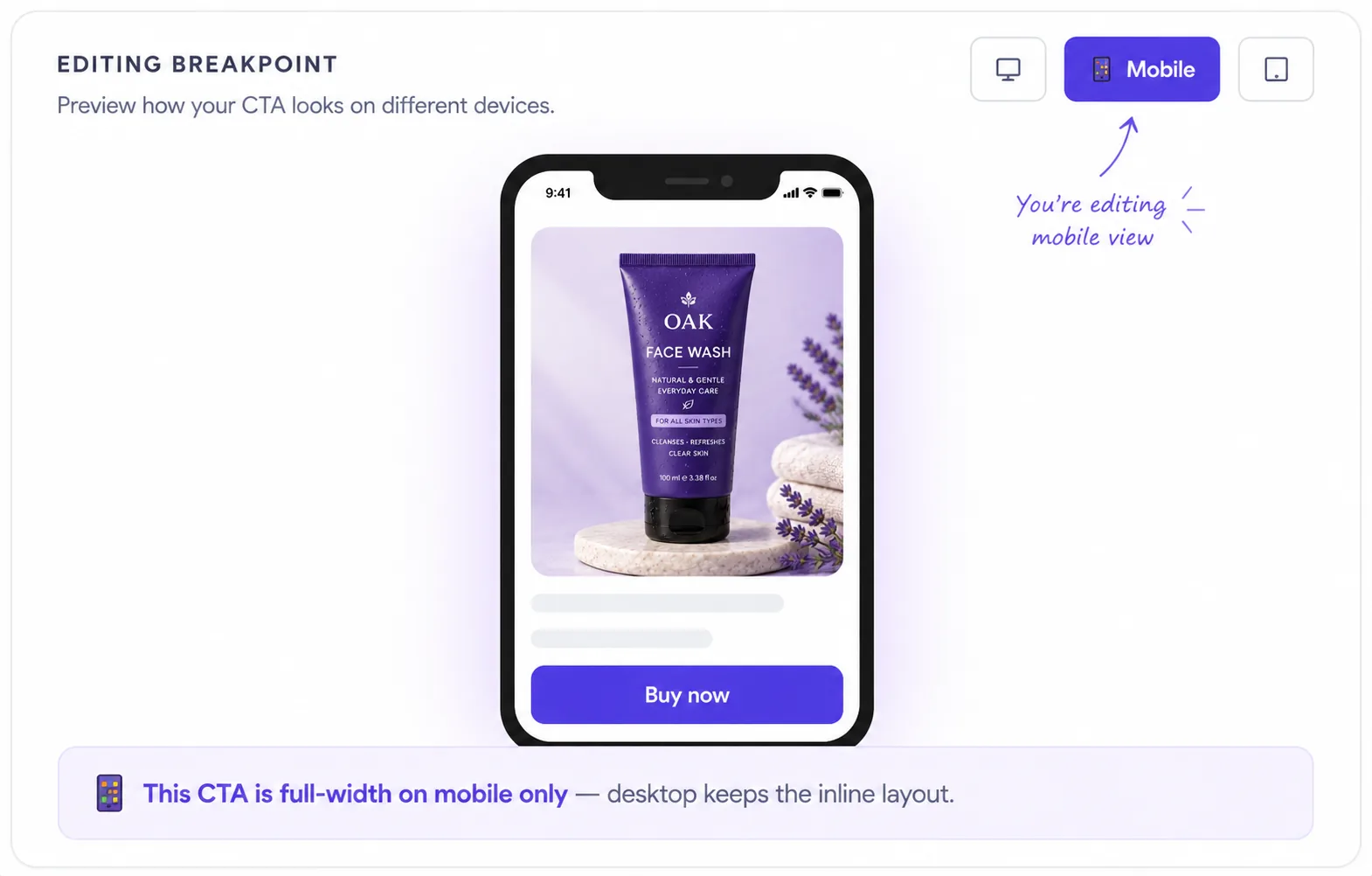
Visual editor breakpoint preview — editing the mobile view of a product page, where the Buy now CTA is full-width on mobile only while desktop keeps the inline layout.
Responsive by breakpoint

Make it perfect on the device that matters.

Most D2C traffic is mobile, so edits shouldn't be one-size-fits-all. Switch to any breakpoint and tweak layout, sizing, and visibility independently — a sticky CTA on mobile, an inline one on desktop, all from the same variation.

  • Desktop, tablet & mobile breakpoints
  • Per-device visibility & layout overrides
  • Live mobile preview as you edit
Safe by design

Experiment fearlessly. Roll back instantly.

Because changes live in a layer above your theme, every edit is reversible and fully versioned. See who changed what, restore any prior version, and resolve variants at the edge so visitors never see a flash of the old page.

  • Full version history with one-click restore
  • Edge rendering — zero flicker, green Core Web Vitals
  • Role-based approvals before anything goes live
Ship edits as A/B tests →
Version history · PDP hero
v4 — live · CTA copy + free-ship badgenow
v3 · resized hero imageRestore
v2 · added trust badgesRestore
v1 · original themeRestore
My team ships PDP and landing-page changes the same afternoon we think of them. The dev backlog used to be where good ideas went to die.
AS
Ankit Shard
Associate VP, E-commerce · Bellavita
0
Dev tickets for routine edits
4 min
From install to first edit
100%
Reversible — nothing touches your theme
The fundamentals

What is a no-code visual editor?

A no-code visual editor lets marketers change a live website — copy, images, styles, layout, whole sections — by clicking elements on the page, with no developer and no theme edits. CustomFit stores changes as a layer applied at render time, so everything is reversible and your theme is never touched.

Quick facts

Point-and-click editing on your real, live store
Changes layer over your theme — nothing is overwritten
Edit per breakpoint: desktop, tablet, mobile
Ship edits as A/B tests or personalized experiences
Why it matters

Why no-code visual editor matters for D2C

🚫

Kill the dev queue

Routine changes shouldn’t wait a sprint. Ship them the same afternoon.

↩️

Zero risk

Layered edits mean one-click rollback and full version history.

Stay fast

Edge rendering keeps Core Web Vitals green — no flicker.

Who it’s for

Built for your whole growth team

✍️

Marketers

Own the page without filing a single ticket.

🎨

Designers

Tweak spacing, color, and layout pixel-by-pixel, live.

🧑‍💻

Developers

Drop into a CSS/JS panel when an edit needs code.

The complete guide

Understanding the no-code visual editor

CustomFit’s no-code visual editor lets marketers change a live store — copy, images, styles, layout, and whole sections — by clicking elements on the page, with no developer and no theme edits. Changes are stored as a layer applied at render time, so everything is reversible and your theme is never touched.

This collapses the dev backlog: routine PDP, landing-page, and campaign changes ship the same afternoon they’re conceived. Edit per breakpoint for desktop, tablet, and mobile, then ship any change as an A/B test or a personalized experience for a specific audience.

Because edits resolve at the edge before first paint, there’s no flash of original content and Core Web Vitals stay green. Full version history means one-click rollback, and role-based approvals let teams draft freely while requiring sign-off before anything goes live.

Does the visual editor change my theme files?

No. Changes are stored as a layer applied at render time, so your theme repository is never touched and every edit is reversible.

Do edits cause flicker?

No. Variants resolve at the edge before first paint, so the correct version renders immediately with no flash of original content.

Do I need a developer?

No. Marketers make most changes — copy, images, colors, spacing, hiding or reordering sections — point-and-click. Developers can drop into a custom CSS/JS panel when an edit needs it.

Can I control who can publish?

Yes. Role-based permissions and an approval step let you draft freely and require sign-off before anything goes live.

Do I need a developer to use CustomFit.ai?

No. Marketers build experiments and personalized experiences in a no-code visual editor; developers can use the API and SDKs when they want deeper control.

Edit your store without the dev queue.

Install the editor and make your first change in under 4 minutes — free to start.

Built for every D2C category

🧴
Skincare
💄
Beauty
🌿
Wellness
F&B
👟
Apparel
💍
Jewelry
🛋️
Home
🍼
Baby
Live · Right now
Mamaearthfree-shipping band +12.4% AOVGIVAfestive collection page +34% revenueBellavitaPDP CTA test +27.4% CVRKapivaQuiz-driven recs +9.48% CTRThe Sleep Colanding personalized 2× capturesPlumReturning shopper swap +18.2% CVRMamaearthfree-shipping band +12.4% AOVGIVAfestive collection page +34% revenueBellavitaPDP CTA test +27.4% CVRKapivaQuiz-driven recs +9.48% CTRThe Sleep Colanding personalized 2× capturesPlumReturning shopper swap +18.2% CVR