Home /A/B Testing /Content
Content A/B testing

Test any element with the visual editor.

Hero copy, trust badges, product imagery, review placement, button wording — the words and pictures decide conversion. CustomFit lets marketers A/B any on-page element with a point-and-click editor, resolves variants at the edge with no flicker, and measures each on revenue.

No-code visual editor Flicker-free at the edge Any element, any page
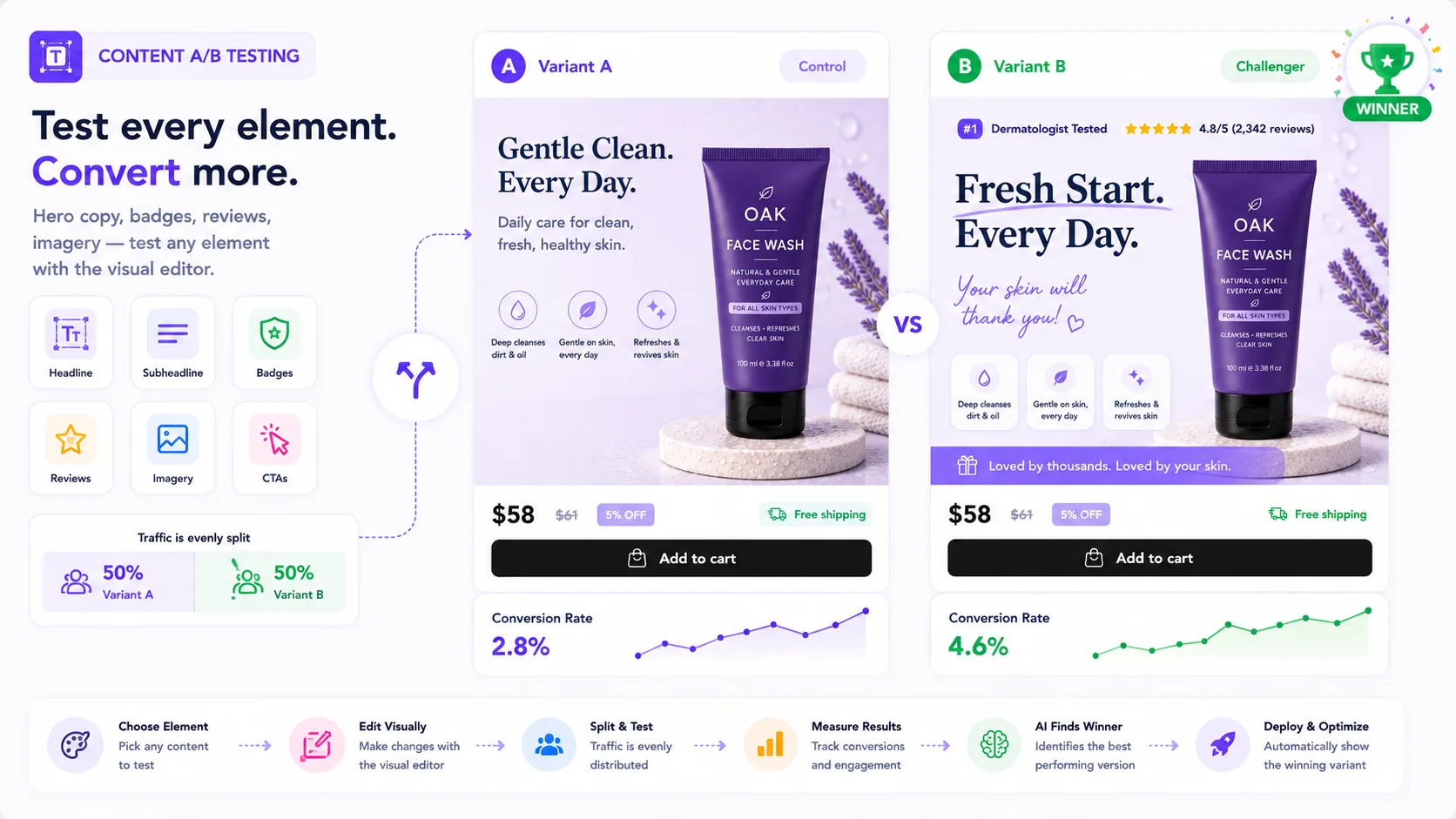
Content A/B testing: Variant A (control) vs Variant B (challenger, winner) of the Oak Face Wash PDP — testing headline, subheadline, badges, reviews, imagery and CTAs with the visual editor; traffic split 50/50, Variant B converts 4.6% vs Variant A's 2.8% and wins. Choose element, edit visually, split & test, measure results, AI finds the winner, then deploy and optimize.
✍️

Edit anything, click to test

Headlines, body copy, badges, images, reviews, CTAs — select an element in the visual editor and create a variant. No code, no ticket.

No flicker, ever

Variants resolve at the edge before first paint, so visitors never see the original flash — protecting both lift and clean data.

📊

Judged on revenue

Every content test reports conversion and revenue per visitor, segment-aware — so you ship words that sell, not words you like.

Words do the selling

Copy and imagery are your highest-frequency test.

You can run a content test on almost any page, almost any week — they’re fast to build and quick to read. A sharper hero, a benefit-led bullet, a better-placed review, or a clearer CTA compounds across every visitor who lands on the page.

  • Hero & value-proposition copy
  • Trust badges, guarantees & reviews
  • Product imagery, order, and CTA wording
See the visual editor →
What you can test
Hero headline & sub-copy
Badges, reviews & proof
Imagery & gallery order
CTA copy & color
With vs without edge rendering
CustomFit: right version, first paint
Client-side tools: original flashes
LCP & CLS stay clean
⚡ Edge rendering is what keeps content tests both fast and trustworthy.
Flicker kills results

A flash of the original ruins the test.

When a tool swaps content after the page loads, visitors glimpse the original first — which both annoys them and biases your data, because the people who saw the flash behaved differently. CustomFit resolves every content variant at the edge before first paint, so the right version renders instantly.

  • Edge-resolved before first paint
  • Clean Core Web Vitals (no CLS spike)
  • Honest data — no flash-skewed cohorts
Draft variants with AI →
Changing the hero from “premium skincare” to “dermatologist-tested” lifted conversion 18% — a two-minute edit in the visual editor, no developer, live the same morning.
AN
Anirudh Shridharan
Growth Marketer · Chargebee
+18%
CVR from one headline change
0ms
Flicker — edge-resolved
2 min
To build the variant
Launch in minutes

A content test in four steps

From an idea to a flicker-free live test — no code.

1

Click the element

Open the visual editor on your live page and select any element.

2

Write the variant

Change the copy, swap the image, restyle the CTA — point and click.

3

Launch the test

CustomFit serves variants at the edge and splits traffic automatically.

4

Ship the winner

Promote the winning content with one click — and archive the rest.

The fundamentals

What is content A/B testing?

Content A/B testing compares variations of on-page content — headlines, body copy, images, trust badges, reviews, and calls-to-action — to see which converts better. Because content is fast to change and high-frequency, it’s the most common kind of A/B test. CustomFit lets marketers build variants in a no-code editor and resolves them at the edge so there’s no flicker to skew results.

Quick facts

Tests copy, images, badges, reviews & CTAs
Built in a no-code visual editor
Edge-resolved — no flicker, clean Core Web Vitals
Measured on conversion and revenue per visitor
Why it matters

Why content testing matters for D2C

✍️

Highest-frequency win

Content is quick to test and quick to read, so it powers a steady cadence of small, compounding gains.

Speed without risk

No-code edits mean marketers ship tests without a developer or a deploy.

🔬

Trustworthy results

Edge rendering removes flicker, so your data reflects the content, not a flash.

Who it’s for

Built for your whole growth team

🎨

Marketers & copywriters

Test messaging on the live page without waiting on engineering.

📈

CRO teams

Run a steady cadence of content experiments with clean data.

🛍️

Merchandisers

Test imagery, badges, and review placement that sell the product.

The complete guide

Understanding content A/B testing

Content A/B testing compares variations of the words and images on a page — hero headlines, body copy, trust badges, product imagery, review placement, and call-to-action wording. Because content is fast to change and applies to almost every page, it is the most common and highest-frequency form of A/B testing a store runs.

The practical advantage is velocity: a marketer can build a content variant in the no-code visual editor in minutes and launch it the same day, with no developer and no deploy. A sharper value proposition, a benefit-led bullet, or a better-placed review compounds across every visitor who sees the page, so even small content wins add up quickly.

The one thing that can quietly ruin a content test is flicker — when a tool swaps content after the page loads, visitors glimpse the original first, which both irritates them and biases the data. CustomFit resolves every variant at the edge before first paint, keeping Core Web Vitals clean and results honest, and reports each test on conversion and revenue per visitor so you only ship content that genuinely sells.

What content can I test?

Hero and value-proposition copy, body text, trust badges and guarantees, product imagery and gallery order, review placement, and CTA wording or color — essentially any on-page element.

Do I need a developer to run a content test?

No. Content variants are built in a no-code visual editor by clicking the element you want to change. Developers can use a custom CSS/JS panel for edge cases.

What is flicker and why does it matter?

Flicker is the flash of the original content before a variant loads. It annoys visitors and biases data because the people who saw the flash behave differently. CustomFit resolves variants at the edge to prevent it.

How are content tests measured?

On conversion and revenue per visitor, segment-aware — so you ship the content that actually sells rather than the version the team prefers.

Do I need a developer to use CustomFit.ai?

No. Marketers build experiments and personalized experiences in a no-code visual editor; developers can use the API and SDKs when they want deeper control.

Ship words that sell.

Test your hero, badges, and CTAs this week — no code, no flicker, free to start.

Built for every D2C category

🧴
Skincare
💄
Beauty
🌿
Wellness
F&B
👟
Apparel
💍
Jewelry
🛋️
Home
🍼
Baby
Live · Right now
Mamaearthfree-shipping band +12.4% AOVGIVAfestive collection page +34% revenueBellavitaPDP CTA test +27.4% CVRKapivaQuiz-driven recs +9.48% CTRThe Sleep Colanding personalized 2× capturesPlumReturning shopper swap +18.2% CVRMamaearthfree-shipping band +12.4% AOVGIVAfestive collection page +34% revenueBellavitaPDP CTA test +27.4% CVRKapivaQuiz-driven recs +9.48% CTRThe Sleep Colanding personalized 2× capturesPlumReturning shopper swap +18.2% CVR