Home / Integrations / Salesforce
S
CRM Integration

Salesforce Integration — personalize by CRM state.

A customer relationship management solution that brings companies and customers together. Personalize by live Salesforce CRM state and write conversions back to the contact timeline automatically.

2-way data sync 5-min setup SOC 2 + GDPR
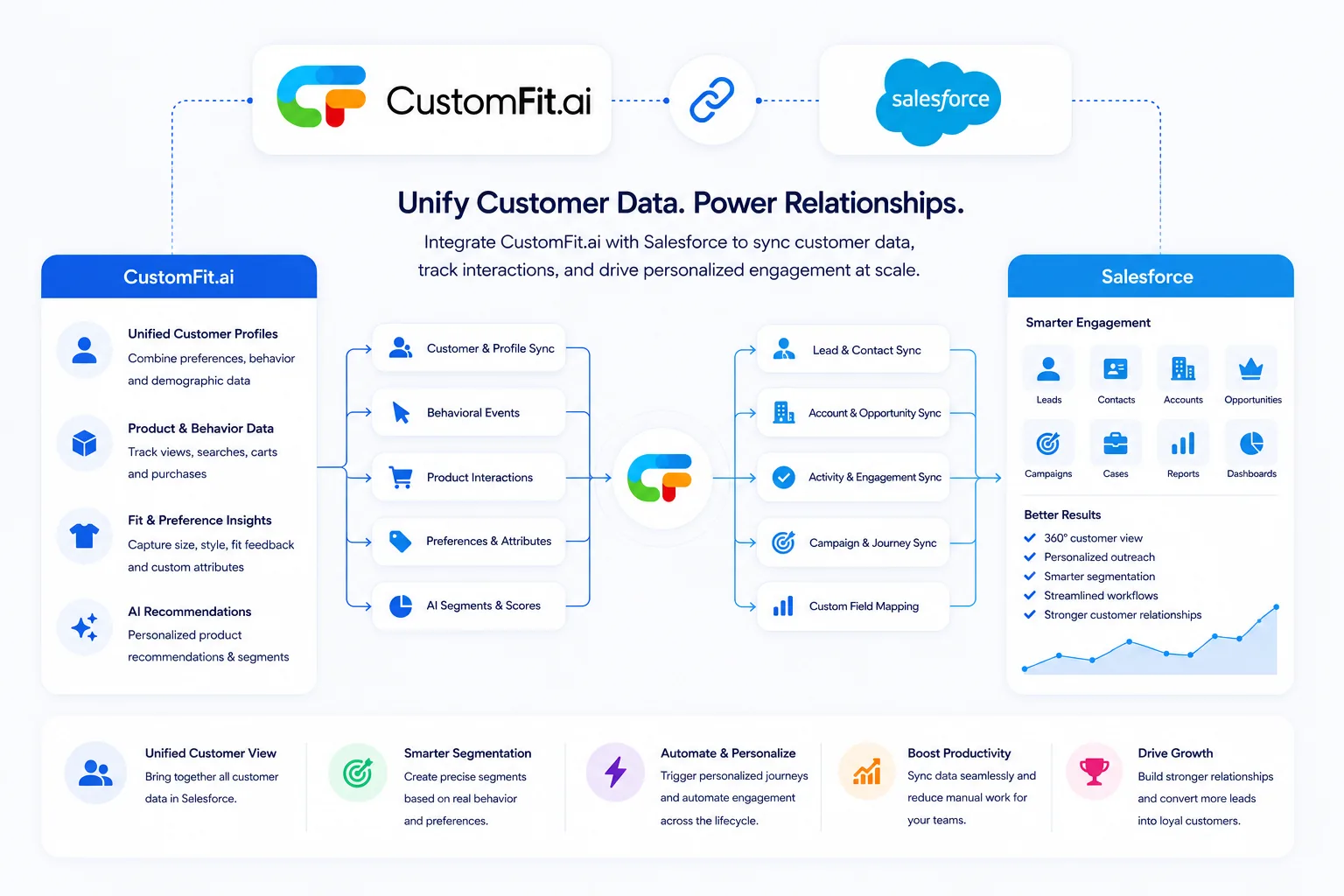
How CustomFit.ai integrates with Salesforce: CustomFit syncs customer and profile data, behavioral events, product interactions, preferences and AI segments into Salesforce for lead and contact sync, account and opportunity sync, activity and engagement sync, campaign and journey sync and custom field mapping — delivering a 360-degree customer view, personalized outreach, smarter segmentation, streamlined workflows and stronger customer relationships.
🤝

CRM record targeting

Sync Salesforce contacts, leads, and lifecycle stage to personalize by CRM data; write conversions back.

🏢

Enterprise sync

Bidirectional sync with Sales & Service Cloud, governed by field-level permissions.

🎯

Account-aware

Surface high-value or at-risk accounts a different experience, driven by live CRM state.

Why Salesforce + CustomFit.ai

The fastest path from Salesforce data to a shipped experiment.

Salesforce captures what's happening on your site. CustomFit.ai is where you act on it — building cohorts, running A/B tests, and personalizing experiences without engineering tickets. Together, they close the loop from observe → hypothesize → test → ship → measure in days, not quarters.

  • 2-way sync of contacts and accounts
  • Use Salesforce attributes in personalization rules
  • Push experiment outcomes back to opportunity records
  • Enrich anonymous visitors with Salesforce account data
5-step setup
1Connect Salesforce via OAuth or API key
2Map fields & events
3Enable 2-way sync
4Build your first cohort & experiment
Live in 5 minutes
Inbound · Salesforce → CustomFit
  • Account & contact records
  • Custom Salesforce fields
Outbound · CustomFit → Salesforce
  • Variant assignments as Salesforce events
  • Experiment outcomes on opportunity records
Data flow

Exactly what flows between Salesforce and CustomFit.ai

Total transparency on the data we read and write. Every field is configurable, every event is logged, and you control retention.

In practice

Popular ways D2C teams use Salesforce + CustomFit.ai — + CustomFit.ai

Real plays that growth and CRO teams run the week they connect Salesforce + CustomFit.ai —.

1

Build high-intent audiences

Pull Salesforce + CustomFit.ai — cohorts and signals into CustomFit targeting, then personalize the storefront for each segment in real time.

2

Measure every experiment in Salesforce + CustomFit.ai —

Variant assignment and conversions flow back automatically, so you can slice any Salesforce + CustomFit.ai — report by experiment cohort.

3

Close the CRO loop

Observe in Salesforce + CustomFit.ai —, hypothesize and test in CustomFit, ship the winner, and feed results right back — no spreadsheets in between.

+27%
Median revenue lift
5 min
To connect Salesforce + CustomFit.ai —
0 ms
Added latency
2-way
Data sync

Other integrations you might like

Clearbit
Enrichment
Google Analytics 4
Analytics
Slack
Notifications
Geo Fit
CustomFit Service
HubSpot
CRM & Marketing
Shopify
Ecommerce Platform
Browse all integrations →
Straight answer

What is the Salesforce + CustomFit.ai integration?

Salesforce, which runs CRM and customer data, connects natively to CustomFit.ai. Once linked, Salesforce data flows into CustomFit to build audiences and target experiences, while experiment exposure and conversions flow back to Salesforce — no spreadsheets and no glue code, just one connected loop between your CRM and your storefront.

At a glance

Syncs CRM segments & lifecycle
Personalizes by customer record
Sends conversions back
Unifies sales & site data
Setup

Connect Salesforce in four steps

1

Add the connector

Find Salesforce in the CustomFit integrations catalog.

2

Authorize

Connect via OAuth or an API key in minutes.

3

Map data

Choose what syncs in and what flows back.

4

Activate

Target experiences and tests on the synced data.

Who it’s for

Teams that get the most from Salesforce + CustomFit

🤝

RevOps teams

Align site with CRM data.

🎯

Marketers

Personalize by lifecycle stage.

📊

Sales teams

Surface intent signals.

The complete guide

Understanding Salesforce integration

The Salesforce integration connects your Salesforce data to CustomFit.ai so growth and CRO teams can run A/B tests, personalize experiences, and measure revenue impact without engineering work. Instead of exporting CSVs or maintaining brittle scripts, Salesforce and CustomFit stay in continuous two-way sync — audiences and events flow into CustomFit, and experiment exposures and conversions flow back to Salesforce.

For D2C and ecommerce brands, pairing Salesforce with CustomFit closes the optimization loop: you observe behavior, form a hypothesis, build a test or personalized experience in a no-code editor, ship it, and measure the lift against real outcomes. Because evaluation happens at the edge before first paint, the Salesforce integration adds no visible latency and keeps Core Web Vitals healthy.

Setting up the Salesforce integration takes minutes, not sprints. Connect via OAuth or an API key, map the fields and events you care about, and turn on sync — every field is configurable, every API call is audit-logged, and you stay in control of data retention. Security is enterprise-grade: SOC 2 Type II, ISO 27001, GDPR and CCPA alignment, with encryption in transit and at rest.

How do I connect Salesforce to CustomFit.ai?

Add the Salesforce connector from the CustomFit integrations catalog, authorize via OAuth or an API key, map your fields and events, and enable sync. Most teams are live in minutes with no engineering ticket.

Is the Salesforce integration secure?

Yes. Data is encrypted in transit (TLS 1.3) and at rest (AES-256), secrets are vaulted, every API call is audit-logged, and the integration is SOC 2 Type II, ISO 27001, GDPR and CCPA aligned.

Will the Salesforce integration slow my site?

No. CustomFit evaluates experiences at the edge before first paint, so the Salesforce integration adds negligible latency and your Core Web Vitals stay green.

Does this support Salesforce Marketing Cloud?

Yes, plus Sales Cloud, Service Cloud, and Commerce Cloud.

How are field mappings configured?

Through the visual integration setup — no code required.

How long does it take to set up the Salesforce integration?

Most teams connect Salesforce in minutes — authorize via OAuth or an API key, map your fields, and turn on sync. No engineering ticket required.

Does the Salesforce integration cost extra?

No. Every integration is included on all CustomFit plans; you only pay on matched monthly visitors, never per connector.

Is my data secure with the Salesforce integration?

Yes. Data is encrypted in transit (TLS 1.3) and at rest (AES-256), secrets are vaulted, and every API call is audit-logged — SOC 2 Type II, ISO 27001, GDPR and CCPA aligned.

Plays you can run

What Salesforce + CustomFit unlocks

CRM-driven plays for revenue teams.

🤝

Lifecycle targeting

Personalize by Salesforce lifecycle stage and lead score in real time.

🎯

Account-aware UX

Show high-value or at-risk accounts a tailored experience driven by live CRM state.

🔁

Conversion write-back

Write experiment conversions back to the Salesforce contact timeline.

Ready to connect Salesforce?

Free trial includes every integration. Live in 5 minutes.

Built for every D2C category

🧴
Skincare
💄
Beauty
🌿
Wellness
F&B
👟
Apparel
💍
Jewelry
🛋️
Home
🍼
Baby
Live · Right now
Mamaearthfree-shipping band +12.4% AOVGIVAfestive collection page +34% revenueBellavitaPDP CTA test +27.4% CVRKapivaQuiz-driven recs +9.48% CTRThe Sleep Colanding personalized 2× capturesPlumReturning shopper swap +18.2% CVRMamaearthfree-shipping band +12.4% AOVGIVAfestive collection page +34% revenueBellavitaPDP CTA test +27.4% CVRKapivaQuiz-driven recs +9.48% CTRThe Sleep Colanding personalized 2× capturesPlumReturning shopper swap +18.2% CVR