CustomFit.ai — Website personalization, A/B testing and CRO for Shopify and D2C
Product
Features
✱
Website Personalization
Adapt to each visitor's behavior & intent
⧖
A/B & Multivariate Testing
Rigorous experimentation
✨
AI CopilotNEW
Personalize with a prompt
🤖
AI WingmanNEW
Auto-optimize toward winners
🎯
AI Conversion OptimizerNEW
GPT-grade test ideas
✎
No-Code Visual Editor
Drag-and-drop edit any element
▦
Product Recommendations
Personalized recs that lift AOV
⚑
Feature Flags
Ship safely with kill-switches
◧
Chrome Extension
Edit your store in the browser
⧉
Shopify, WooCommerce & more
All platform integrations
View all features →
Use Cases
$
Price A/B Testing
Test price points to maximize revenue
▦
Theme A/B Testing
Compare whole layouts & designs
🗂
Template A/B Testing
Test whole PDP/PLP templates
🏷
Discount A/B Testing
Find the offer that converts
🚚
Shipping A/B Testing
Thresholds, speed & copy
✍
Content A/B Testing
Copy, images & reviews
💳
Checkout Gateway A/B
Payments & one-click
⌖
Geo-Based Personalization
Per-location content & offers
⚡
Buyer-Intent Nudges
Exit-intent & retargeting
↔
Split-URL / Redirection
Full-page redirect tests
View all use cases →
Solutions & Guides
⤢
Conversion Rate Optimization
The complete CRO guide
⧖
A/B Testing Software
Buyer's guide for D2C
🛒
Cart Abandonment Recovery
Win back lost carts
📰
Landing Page Optimization
Convert more paid traffic
S
Shopify A/B Testing
Test your store, no code
S
Shopify Personalization
Tailor the store per shopper
◔
First-Time Visitor Offers
Convert new shoppers with trust & offers
★
Repeat-Customer Experiences
Reward and re-engage loyal buyers
◎
Campaign-Matched Pages
Match the landing page to the ad
⌖
Location-Based Experiences
Currency, language & regional offers
Explore CRO →
Customer stories
GIVA
+32%
conversion via personalized recs
GIVA
Mamaearth
+18%
revenue lift from PDP A/B tests
ME
The Sleep Company
+24%
AOV from product recommendations
TSC
Read customer stories →
Integrations
SWsfGA+15
✦
Not sure where to start?
Let AI Copilot pick your first tests

“We wake up to evidence-backed tests ready to deploy — not a backlog of maybe ideas.”

AN
Anirudh S.
Growth · Chargebee
★★★★★4.8on G2 · 2,400+ brands
Talk to our team →
Widgets
Integrations
Ecommerce & Checkout
Shopify
Shopline
Shoplazza
GoKwik
ShopFlo
Razorpay Magic Checkout
Breeze
Shiprocket
View all integrations →
Analytics & Behavior
Google Analytics 4
Microsoft Clarity
Hotjar
Mixpanel
Amplitude
Heap
Adobe Analytics
Segment (CDP)
View all integrations →
Engagement, CRM & More
Klaviyo
MoEngage
CleverTap
WebEngage
HubSpot
Salesforce
Slack
Meta Ads
View all integrations →
CustomersPricing
Resources
CRO
▤
Playbooks
Proven strategies to boost conversions
🎙
Interviews
D2C leaders & marketing experts
▶
Webinars
Live deep dives & product sessions
Learn
✎
Blog
Tips, experiments & best practices
📕
Free E-Books
Mastering personalization
📖
Conversion Glossary
Every CRO term, defined
✦AI CopilotNEWLog inBook a demo
Start free trial
Select your platform — Install in 2 minsWe'll tailor the setup
⚡ Risk-free 14-day trial · No credit card · Cancel anytime
S
Shopify
Install from Shopify App Store
›
W
WooCommerce
Install the WooCommerce plugin
›
B
BigCommerce
Install from BigCommerce App Marketplace
›
SL
Shopline
Install from Shopline App Store
›
M
Salesforce / Magento
Install from the marketplace
›
SZ
Shoplazza
Install from Shoplazza App Store
›
WP
WordPress / Webflow
Install plugin or paste the script
›
◧
Others
Custom-built on React, Next.js, etc.
›
Tip: pick your platform — we handle the restBook a demo →
Product
Website PersonalizationA/B & Multivariate TestingAI CopilotAI WingmanAI Conversion OptimizerNo-Code Visual EditorProduct RecommendationsFeature FlagsView all features →
Use Cases
Price A/B TestingTheme A/B TestingTemplate A/B TestingDiscount A/B TestingShipping A/B TestingContent A/B TestingCheckout Gateway A/BGeo-Based PersonalizationBuyer-Intent NudgesSplit-URL / Redirection
Solutions & Guides
Conversion Rate OptimizationA/B Testing SoftwareCart Abandonment RecoveryLanding Page OptimizationShopify A/B TestingShopify Personalization
Explore
WidgetsIntegrationsCustomersPricing
Resources
BlogPlaybooksWebinarsInterviewsE-BooksConversion Glossary
Platforms
ShopifyShoplineShoplazzaChrome ExtensionAll integrations
Start free trialBook a demo
Home›Blog›checkout pricing›Checkout Form Fields: What to Include and Remove

Checkout Form Fields: What to Include and Remove

SJSapna JoharHead of Growth & CRO, CustomFit.aiJanuary 15, 20256 min read
On this page
  1. The Checkout Abandonment Cost of Excess Fields
  2. Essential Fields: Keep These
  3. Fields to Remove or Make Optional
  4. Optimizing the Fields You Keep
  5. Single-Page vs. Multi-Step Checkout
  6. Tips / Best Practices
  7. Key Takeaways
0%
Checkout Form Fields: What to Include and Remove

From the conversion glossary

Concepts referenced in this article, defined.

Definition
What Is Friction? Definition & Guide
Definition
What Is Checkout Completion Rate? Definition & Guide
← Back to Checkout Pricing guide
Try CustomFit.ai

Run A/B tests and personalize your store without code. 14-day free trial, no credit card.

Start free trial →
Share
XLinkedInEmail

Related articles

checkout pricing

Volume Discount Strategy for Ecommerce

Sapna Johar· 5 min read
checkout pricing

UPI & COD Optimization for Indian Ecommerce

Sapna Johar· 9 min read
checkout pricing

Tiered Pricing for D2C Products

Sapna Johar· 5 min read

Start lifting conversions today.

Run rigorous A/B tests and personalize every visit on Shopify or any storefront — no engineers required.

Start free trialBook a demo

Built for every D2C category

🧴
Skincare
💄
Beauty
🌿
Wellness
☕
F&B
👟
Apparel
💍
Jewelry
🛋️
Home
🍼
Baby
Live · Right now
Mamaearth — free-shipping band +12.4% AOVGIVA — festive collection page +34% revenueBellavita — PDP CTA test +27.4% CVRKapiva — Quiz-driven recs +9.48% CTRThe Sleep Co — landing personalized 2× capturesPlum — Returning shopper swap +18.2% CVRMamaearth — free-shipping band +12.4% AOVGIVA — festive collection page +34% revenueBellavita — PDP CTA test +27.4% CVRKapiva — Quiz-driven recs +9.48% CTRThe Sleep Co — landing personalized 2× capturesPlum — Returning shopper swap +18.2% CVR
Get in touch

Tell us about your store.

We reply within an hour during business hours. No sales pitch, no spam — just answers from someone who's seen 2,400+ D2C stores.

✓ Reply within 1 hour✓ No spam, ever✓ Free demo & setup help
✓ Thanks! We'll be in touch shortly.
CustomFit.ai

The all-in-one website personalization, A/B testing & CRO platform for high-growth D2C brands. Made by marketers, fueled by coffee.

in𝕏◎▶f
Product
  • Features
  • A/B Testing
  • Personalization
  • AI Copilot
  • AI Wingman
  • AI Conversion Optimizer
  • Feature Flags
  • Widgets
  • Integrations
  • ROI Calculator
Platforms
  • Shopify
  • Shopline
  • Shoplazza
  • Salesforce
  • Chrome Extension
  • All Integrations
Resources
  • Blog
  • Playbooks
  • Webinars
  • GrowthFit Interviews
  • Free E-Books
  • Conversion Glossary
  • Case Studies
Compare
  • vs VWO
  • vs Optimizely
  • vs Google Optimize
  • vs Mutiny
  • vs Intelligems
  • vs Shoplift
  • vs AB Tasty
  • vs Convert
  • vs Kameleoon
Company
  • About Us
  • Partners
  • CustomFit Awards
  • Recognition
  • Contact
  • Privacy Policy
  • Terms & Conditions
© 2026 CustomFit.ai · Valley Monks Pvt Ltd · Made by marketers, fueled by coffee, and obsessed with conversions.
SOC 2 Type II · GDPR · CCPA · ISO 27001

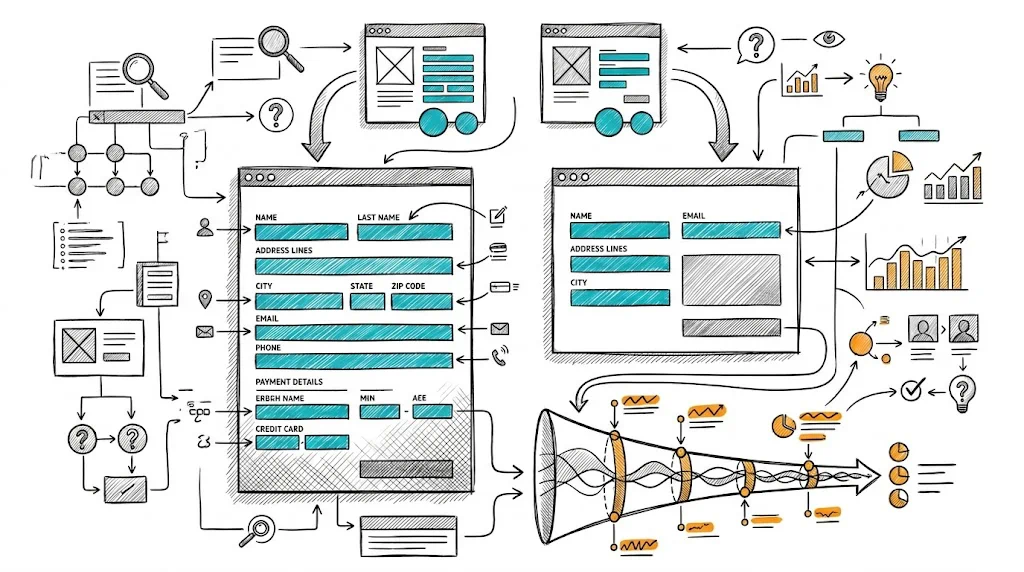
Every form field in your checkout is a question you are asking your customer to answer before they can give you money. Some questions are necessary. Many are not. Each unnecessary question costs you a percentage of the shoppers who started checkout and never finished. The research is unambiguous: fewer fields, higher completion. The discipline is in deciding which fields are truly necessary and having the conviction to remove the rest.

The Checkout Abandonment Cost of Excess Fields

Industry data on checkout abandonment consistently points to form complexity as a top-three cause. For Indian D2C brands, where a significant portion of buyers are first-time online shoppers or are transacting on mobile, form friction is particularly damaging.

The approximate conversion cost per added field varies by study, but a conservative estimate is 3–7% checkout completion rate per unnecessary field. A checkout asking 14 fields vs. one asking 8 fields could be 30–40% lower in completion rate for the same quality of traffic.

On 1,000 checkout initiations at ₹800 AOV, that gap represents ₹2.4–₹3.2 lakh in lost revenue monthly—from form fields alone.

Essential Fields: Keep These

Contact Information:

  • Name: First name at minimum; last name can be optional for most D2C categories
  • Mobile number: Primary contact for Indian brands; essential for delivery coordination and WhatsApp order updates
  • Email address: For order confirmation, return links, and long-term marketing

Shipping Address:

  • Address line 1: Street, building, area
  • Address line 2: Apartment/flat/floor — keep optional
  • City: Required
  • State: Dropdown is faster than free text
  • PIN code: Required for Indian logistics; auto-fill city and state from PIN to reduce total fields

Payment:

  • Payment method selection and relevant payment fields

This is 7–9 fields—the target for most D2C checkouts.

Fields to Remove or Make Optional

Company name: Unless your business has significant B2B volume, remove this field entirely. It creates cognitive dissonance for consumer shoppers ("is this a form for companies?") and is never used for consumer deliveries.

Address line 2 (required): Make optional. Many Indian addresses fit on one line. A required "Address line 2" field either gets filled with a period (".") or causes genuine frustration.

Landmark field (required): Useful for Indian addresses but not universally needed. Make optional. Most modern logistics partners use GPS and PIN codes for delivery—the landmark field is a legacy requirement. If you include it, label it "Landmark (optional, helps delivery)."

Date of birth: Unless required for your category (age-restricted products, personalized gifts), do not ask at checkout. It belongs in account preferences, not checkout.

Gender: Unless it affects the order (personalized products), remove it. Generic D2C brands asking gender at checkout create unnecessary friction and privacy concern.

Order notes (long text field): A full text area for "special instructions" invites lengthy inputs that create customer service complexity. Replace with a dropdown of common instructions ("Leave at door," "Call before delivery") or remove entirely.

Newsletter opt-in checkbox (required or default-checked): Opt-in should be optional and default-unchecked. A required or pre-checked newsletter opt-in is a dark pattern that may also violate consent standards.

Optimizing the Fields You Keep

Auto-fill from PIN code: The moment a shopper enters a valid PIN code, auto-populate city and state. This eliminates two data entry steps and reduces errors. Most Shopify checkout apps support this with Indian PIN code databases.

Address auto-complete: Google Places API integration suggests addresses as the shopper types. This is especially valuable for Tier 2/3 city addresses where standard street naming is inconsistent. See our full guide on address auto-complete for checkout.

Mobile number as login: For returning customers, pre-fill checkout details based on mobile number. A returning customer who enters their phone number sees their saved address and preferred payment method—dramatically reducing friction on the second and subsequent orders.

Inline validation: Validate fields as the shopper fills them (not only on submit). A green checkmark on a correctly formatted email and an immediate "invalid PIN code" warning prevents the frustrating experience of submitting and getting a list of errors.

Sensible field order: The psychological flow matters: contact details (name, email, mobile) → shipping address → payment. Do not interleave contact and address fields. The standard mental model for checkout follows this sequence.

Single-Page vs. Multi-Step Checkout

Shopify's native checkout is multi-step (contact → shipping → payment). Alternative approaches:

Single-page checkout: All fields visible simultaneously with sections. Some brands see higher completion because shoppers can see how much is left. Others see lower completion because the full form looks intimidating.

One-click checkout (Shop Pay, Razorpay One-Click): For returning customers with saved details, one-click checkout eliminates all form fields. This is the ultimate form field reduction. Push hard for Shop Pay adoption among returning customers.

A/B test your checkout format with CustomFit.ai to determine which structure works best for your audience.

Tips / Best Practices

  • Audit your checkout fields quarterly. Over time, custom form fields added for specific campaigns accumulate. Review and remove those no longer needed.
  • Test removing one field at a time to isolate the impact of each removal. Removing multiple fields simultaneously makes it impossible to know which change drove the improvement.
  • Do not remove necessary fields to hit a number. The goal is to have only necessary fields—not to minimize fields for its own sake. An incomplete address due to missing required info creates logistics failures.
  • Make the 'optional' label visually clear. If optional fields look identical to required fields, shoppers either fill them all (unnecessarily) or skip required ones (incorrectly).
  • Track checkout field abandonment. Some analytics tools (Hotjar, Microsoft Clarity) show exactly where in the checkout form shoppers drop off—a precise guide to which fields are creating friction.

Key Takeaways

  • Each unnecessary form field costs 3–7% checkout completion rate; a 14-field checkout versus an 8-field checkout can be 30–40% lower in completion.
  • Essential fields: name, mobile, email, address line 1, city, state, PIN code, payment. Everything else should be justified or removed.
  • Auto-fill from PIN code, address auto-complete, and inline validation reduce friction without removing fields.
  • Returning customer pre-fill (from saved profile or Shop Pay) is the ultimate form field reduction for repeat buyers.
  • Audit and remove accumulated custom fields regularly to prevent checkout complexity from creeping back up.

Related reading: Conversion Rate Optimization | Cart Abandonment | Checkout Flow | Address Auto-Complete | Checkout Progress Indicators

See also: Checkout & Pricing Pillar | Checkout Pillar