CustomFit.ai — Website personalization, A/B testing and CRO for Shopify and D2C
Product
Features
✱
Website Personalization
Adapt to each visitor's behavior & intent
⧖
A/B & Multivariate Testing
Rigorous experimentation
✨
AI CopilotNEW
Personalize with a prompt
🤖
AI WingmanNEW
Auto-optimize toward winners
🎯
AI Conversion OptimizerNEW
GPT-grade test ideas
✎
No-Code Visual Editor
Drag-and-drop edit any element
▦
Product Recommendations
Personalized recs that lift AOV
⚑
Feature Flags
Ship safely with kill-switches
◧
Chrome Extension
Edit your store in the browser
⧉
Shopify, WooCommerce & more
All platform integrations
View all features →
Use Cases
$
Price A/B Testing
Test price points to maximize revenue
▦
Theme A/B Testing
Compare whole layouts & designs
🗂
Template A/B Testing
Test whole PDP/PLP templates
🏷
Discount A/B Testing
Find the offer that converts
🚚
Shipping A/B Testing
Thresholds, speed & copy
✍
Content A/B Testing
Copy, images & reviews
💳
Checkout Gateway A/B
Payments & one-click
⌖
Geo-Based Personalization
Per-location content & offers
⚡
Buyer-Intent Nudges
Exit-intent & retargeting
↔
Split-URL / Redirection
Full-page redirect tests
View all use cases →
Solutions & Guides
⤢
Conversion Rate Optimization
The complete CRO guide
⧖
A/B Testing Software
Buyer's guide for D2C
🛒
Cart Abandonment Recovery
Win back lost carts
📰
Landing Page Optimization
Convert more paid traffic
S
Shopify A/B Testing
Test your store, no code
S
Shopify Personalization
Tailor the store per shopper
◔
First-Time Visitor Offers
Convert new shoppers with trust & offers
★
Repeat-Customer Experiences
Reward and re-engage loyal buyers
◎
Campaign-Matched Pages
Match the landing page to the ad
⌖
Location-Based Experiences
Currency, language & regional offers
Explore CRO →
Customer stories
GIVA
+32%
conversion via personalized recs
GIVA
Mamaearth
+18%
revenue lift from PDP A/B tests
ME
The Sleep Company
+24%
AOV from product recommendations
TSC
Read customer stories →
Integrations
SWsfGA+15
✦
Not sure where to start?
Let AI Copilot pick your first tests

“We wake up to evidence-backed tests ready to deploy — not a backlog of maybe ideas.”

AN
Anirudh S.
Growth · Chargebee
★★★★★4.8on G2 · 2,400+ brands
Talk to our team →
Widgets
Integrations
Ecommerce & Checkout
Shopify
Shopline
Shoplazza
GoKwik
ShopFlo
Razorpay Magic Checkout
Breeze
Shiprocket
View all integrations →
Analytics & Behavior
Google Analytics 4
Microsoft Clarity
Hotjar
Mixpanel
Amplitude
Heap
Adobe Analytics
Segment (CDP)
View all integrations →
Engagement, CRM & More
Klaviyo
MoEngage
CleverTap
WebEngage
HubSpot
Salesforce
Slack
Meta Ads
View all integrations →
CustomersPricing
Resources
CRO
▤
Playbooks
Proven strategies to boost conversions
🎙
Interviews
D2C leaders & marketing experts
▶
Webinars
Live deep dives & product sessions
Learn
✎
Blog
Tips, experiments & best practices
📕
Free E-Books
Mastering personalization
📖
Conversion Glossary
Every CRO term, defined
✦AI CopilotNEWLog inBook a demo
Start free trial
Select your platform — Install in 2 minsWe'll tailor the setup
⚡ Risk-free 14-day trial · No credit card · Cancel anytime
S
Shopify
Install from Shopify App Store
›
W
WooCommerce
Install the WooCommerce plugin
›
B
BigCommerce
Install from BigCommerce App Marketplace
›
SL
Shopline
Install from Shopline App Store
›
M
Salesforce / Magento
Install from the marketplace
›
SZ
Shoplazza
Install from Shoplazza App Store
›
WP
WordPress / Webflow
Install plugin or paste the script
›
◧
Others
Custom-built on React, Next.js, etc.
›
Tip: pick your platform — we handle the restBook a demo →
Product
Website PersonalizationA/B & Multivariate TestingAI CopilotAI WingmanAI Conversion OptimizerNo-Code Visual EditorProduct RecommendationsFeature FlagsView all features →
Use Cases
Price A/B TestingTheme A/B TestingTemplate A/B TestingDiscount A/B TestingShipping A/B TestingContent A/B TestingCheckout Gateway A/BGeo-Based PersonalizationBuyer-Intent NudgesSplit-URL / Redirection
Solutions & Guides
Conversion Rate OptimizationA/B Testing SoftwareCart Abandonment RecoveryLanding Page OptimizationShopify A/B TestingShopify Personalization
Explore
WidgetsIntegrationsCustomersPricing
Resources
BlogPlaybooksWebinarsInterviewsE-BooksConversion Glossary
Platforms
ShopifyShoplineShoplazzaChrome ExtensionAll integrations
Start free trialBook a demo
Home›Blog›d2c ecommerce›Ecommerce Quick View vs Full Page: What Converts Better?

Ecommerce Quick View vs Full Page: What Converts Better?

SJSapna JoharHead of Growth & CRO, CustomFit.aiJanuary 15, 20257 min read
On this page
  1. What Quick View Is and How It Works
  2. When Quick View Wins
  3. Low-Consideration, Repeat-Purchase Products
  4. Browsing-Mode Shopping
  5. Mobile Grid Browsing
  6. When Full Page Product Views Convert Better
  7. High-Consideration Purchases
  8. Products with Complex Variant Selection
  9. SEO and Analytics Clarity
  10. Implementation If You Choose Quick View
  11. A/B Testing the Decision
  12. Tips / Best Practices
  13. Key Takeaways
0%
Ecommerce Quick View vs Full Page: What Converts Better?

From the conversion glossary

Concepts referenced in this article, defined.

Definition
What Is Quick View? Definition & Guide
Definition
What Is Variant? Definition, Formula & Guide
Definition
What Is Collection Page? Definition & Guide
Definition
What Is Friction? Definition & Guide
Definition
What Is Checkout Completion Rate? Definition & Guide
← Back to D2c Ecommerce guide
Try CustomFit.ai

Run A/B tests and personalize your store without code. 14-day free trial, no credit card.

Start free trial →
Share
XLinkedInEmail

Related articles

d2c ecommerce

Wishlist Feature: Impact on Conversions & Retargeting

Sapna Johar· 7 min read
d2c ecommerce

User-Generated Content Strategy for D2C

Sapna Johar· 9 min read
d2c ecommerce

Seasonal Demand Planning for Ecommerce

Sapna Johar· 6 min read

Start lifting conversions today.

Run rigorous A/B tests and personalize every visit on Shopify or any storefront — no engineers required.

Start free trialBook a demo

Built for every D2C category

🧴
Skincare
💄
Beauty
🌿
Wellness
☕
F&B
👟
Apparel
💍
Jewelry
🛋️
Home
🍼
Baby
Live · Right now
Mamaearth — free-shipping band +12.4% AOVGIVA — festive collection page +34% revenueBellavita — PDP CTA test +27.4% CVRKapiva — Quiz-driven recs +9.48% CTRThe Sleep Co — landing personalized 2× capturesPlum — Returning shopper swap +18.2% CVRMamaearth — free-shipping band +12.4% AOVGIVA — festive collection page +34% revenueBellavita — PDP CTA test +27.4% CVRKapiva — Quiz-driven recs +9.48% CTRThe Sleep Co — landing personalized 2× capturesPlum — Returning shopper swap +18.2% CVR
Get in touch

Tell us about your store.

We reply within an hour during business hours. No sales pitch, no spam — just answers from someone who's seen 2,400+ D2C stores.

✓ Reply within 1 hour✓ No spam, ever✓ Free demo & setup help
✓ Thanks! We'll be in touch shortly.
CustomFit.ai

The all-in-one website personalization, A/B testing & CRO platform for high-growth D2C brands. Made by marketers, fueled by coffee.

in𝕏◎▶f
Product
  • Features
  • A/B Testing
  • Personalization
  • AI Copilot
  • AI Wingman
  • AI Conversion Optimizer
  • Feature Flags
  • Widgets
  • Integrations
  • ROI Calculator
Platforms
  • Shopify
  • Shopline
  • Shoplazza
  • Salesforce
  • Chrome Extension
  • All Integrations
Resources
  • Blog
  • Playbooks
  • Webinars
  • GrowthFit Interviews
  • Free E-Books
  • Conversion Glossary
  • Case Studies
Compare
  • vs VWO
  • vs Optimizely
  • vs Google Optimize
  • vs Mutiny
  • vs Intelligems
  • vs Shoplift
  • vs AB Tasty
  • vs Convert
  • vs Kameleoon
Company
  • About Us
  • Partners
  • CustomFit Awards
  • Recognition
  • Contact
  • Privacy Policy
  • Terms & Conditions
© 2026 CustomFit.ai · Valley Monks Pvt Ltd · Made by marketers, fueled by coffee, and obsessed with conversions.
SOC 2 Type II · GDPR · CCPA · ISO 27001

The quick view debate has no universal answer—and that is the right starting point for this guide. Quick view (a product modal overlaying the collection page) has genuine value for some products and shoppers; for others, it is a conversion barrier dressed up as a convenience feature. Understanding when each approach wins helps you make the right decision for your catalog rather than copying what larger stores do.

What Quick View Is and How It Works

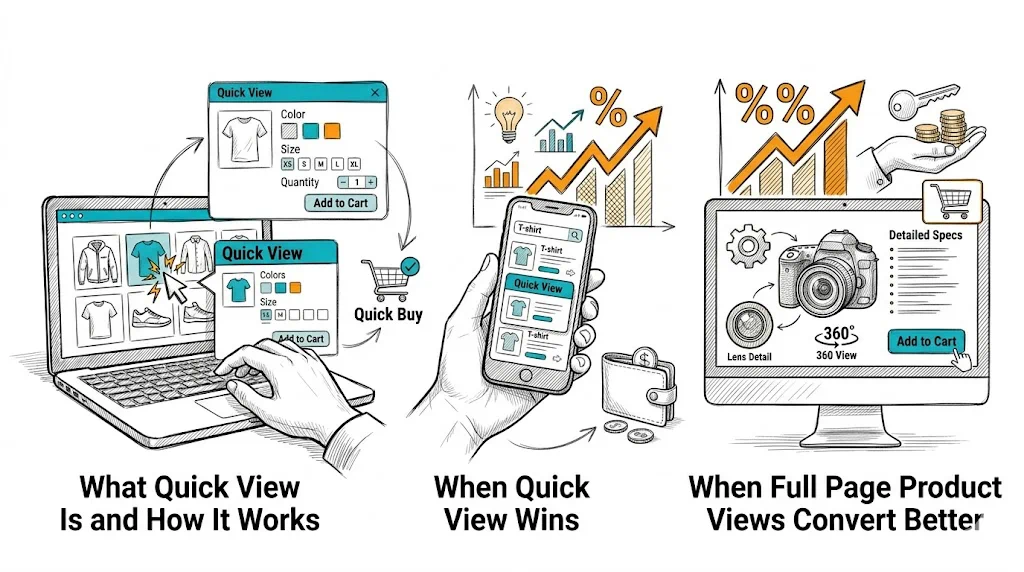
Quick view is a UI pattern on collection pages where clicking a product (or a "Quick View" button on hover) opens an overlay modal with:

  • Product images (often a subset of the full product page images)
  • Product name and price
  • Variant selectors (size, color, quantity)
  • Add-to-cart button
  • Sometimes: a brief description and rating summary

The shopper can add the product to cart without navigating to the full product page. When they close the modal, they are back where they were on the collection page—browse flow uninterrupted.

The proposed benefit: faster browsing, less friction for decisive shoppers, higher add-to-cart rate on collection pages.

The risk: quick view provides less information than the full product page. For shoppers who need reviews, detailed descriptions, size guides, or ingredient lists to purchase with confidence, quick view truncates the information they need—and produces lower-quality adds-to-cart that abandon at checkout or result in returns.

When Quick View Wins

Low-Consideration, Repeat-Purchase Products

For a shopper reordering their regular face wash or vitamin supplement, the full product page adds friction, not value. They already know the product. A quick view that shows the variant they want and an add-to-cart button is all they need.

Categories where quick view tends to perform well:

  • Consumables (supplements, skincare basics, food products)
  • Accessories with limited variants (hair ties, phone cases)
  • Gift add-ons (small impulse products added to a cart already built)
  • Clearly photographed items where image is the primary decision factor

Browsing-Mode Shopping

Shoppers in browse mode—not looking for a specific product but exploring a sale or curated collection—use quick view as a triage tool: "Is this interesting enough to explore further?" If the quick view is compelling, they click "View Full Product" to go deeper. If it is not, they close and continue browsing.

In this mode, quick view acts as a progressive disclosure mechanism—a first filter before the full product page.

Mobile Grid Browsing

On mobile, product grids with small thumbnails make it hard to evaluate products without tapping into each one. A quick view triggered by tapping a product image (with "View Full Details" as a secondary link) can reduce the tap-load cycle for decisive shoppers. However, mobile modal UX is tricky—see the implementation section below.

When Full Page Product Views Convert Better

High-Consideration Purchases

For fashion, furniture, electronics, and premium beauty or health products, the purchase decision involves:

  • Reading detailed descriptions and ingredient/material lists
  • Reviewing customer reviews and photos
  • Checking size guides or fit recommendations
  • Watching product videos
  • Understanding return and warranty policies

A quick view modal cannot contain all of this effectively. Truncated information leads to lower-quality purchase decisions—customers add to cart with uncertainty and abandon at checkout or initiate returns after delivery.

For any product where the full product page is doing real conversion work (reviews, videos, detailed specs), sending shoppers to the full page is the right call.

Products with Complex Variant Selection

A kurta with 5 sizes, 8 colors, and 3 length options in a quick view modal creates a cramped, stressful variant selection experience. The full product page has space to show color swatches clearly, display size guides inline, and show variant-specific stock indicators. Quick view compresses this into a small modal—a poor experience for complex variant products.

SEO and Analytics Clarity

Full product page visits generate clean analytics data: which products are viewed, how long shoppers engage, where they drop off. Quick view bypasses product page visits, making it harder to track individual product performance. It also means search engines may not see the product page visited as part of the session journey—though this does not directly affect crawling.

Implementation If You Choose Quick View

If your analysis suggests quick view is right for your catalog:

Image quality must match the full product page. A quick view with low-resolution or poorly cropped images creates a worse impression than the full page. Use the same hero image and at least 2–3 gallery images in the modal.

Variant selection must be clear. Size, color, and quantity selectors need sufficient space and clear current-selection states. If variant options exceed what fits cleanly in the modal, the quick view is failing.

Always include a "View Full Details" link. The quick view should not be a dead end—shoppers who want more information should have a one-click path to the full product page. Position this link near the add-to-cart button, not buried at the bottom.

Mobile quick view is often a worse experience. On small screens, modals are cramped and the "tap outside to close" behavior is inconsistent. Consider showing quick view on desktop only and using a standard collection-to-product navigation on mobile.

Loading speed matters. A quick view modal that takes 2+ seconds to load is worse than just navigating to the product page. If your product images are large and your quick view app loads slowly, skip it.

A/B Testing the Decision

The only reliable way to know whether quick view improves your store's performance is to test it. Run a clean A/B test:

  • Control: Standard collection page with no quick view; click goes to full product page
  • Variant: Collection page with quick view modal enabled

Measure:

  • Add-to-cart rate (both from collection and product pages combined)
  • Checkout initiation rate
  • Checkout completion rate
  • Return rate (a lagging indicator of low-confidence purchases)

Use CustomFit.ai to set up this test without developer involvement. Run it for at least 2 weeks with enough traffic to reach statistical significance before deciding.

Important: do not measure only add-to-cart rate. Quick view often increases collection page adds to cart while decreasing the quality of those adds—resulting in no improvement or worse performance at checkout.

Tips / Best Practices

  • Test by product category, not globally. Quick view may work well for your supplement line and poorly for your apparel line. Enable it selectively.
  • Track "view full page" click rate within the quick view. If more than 40% of quick view users click "View Full Details," the quick view is not substituting the full page for these shoppers—it is just adding a step.
  • Never remove the full product page. Quick view should always be an overlay on top of a functional full product page, not a replacement.
  • Audit quick view performance quarterly. Customer behavior and catalog composition change; a quick view that helped 18 months ago may now be hurting.
  • Consider a hybrid: Quick view for in-stock simple products, direct product page link for complex or out-of-stock products.

Key Takeaways

  • Quick view increases convenience for low-consideration, repeat-purchase products but reduces conversion for high-consideration products where the full page is doing real persuasion work.
  • Measure the full checkout funnel (not just add-to-cart rate) when evaluating quick view impact—collection-page adds often do not translate to higher checkout completions.
  • Mobile quick view UX is often worse than standard navigation; consider desktop-only implementation.
  • A/B testing is the only reliable way to determine whether quick view helps your specific catalog and audience.
  • Always include a "View Full Details" link in the quick view modal as an escape path to the full product page.

Related reading: Conversion Rate Optimization | Product Page | Cart Abandonment | A/B Testing | Ecommerce Filter & Sort

See also: D2C & Ecommerce Growth Pillar