CustomFit.ai — Website personalization, A/B testing and CRO for Shopify and D2C
Product
Features
✱
Website Personalization
Adapt to each visitor's behavior & intent
⧖
A/B & Multivariate Testing
Rigorous experimentation
✨
AI CopilotNEW
Personalize with a prompt
🤖
AI WingmanNEW
Auto-optimize toward winners
🎯
AI Conversion OptimizerNEW
GPT-grade test ideas
✎
No-Code Visual Editor
Drag-and-drop edit any element
▦
Product Recommendations
Personalized recs that lift AOV
⚑
Feature Flags
Ship safely with kill-switches
◧
Chrome Extension
Edit your store in the browser
⧉
Shopify, WooCommerce & more
All platform integrations
View all features →
Use Cases
$
Price A/B Testing
Test price points to maximize revenue
▦
Theme A/B Testing
Compare whole layouts & designs
🗂
Template A/B Testing
Test whole PDP/PLP templates
🏷
Discount A/B Testing
Find the offer that converts
🚚
Shipping A/B Testing
Thresholds, speed & copy
✍
Content A/B Testing
Copy, images & reviews
💳
Checkout Gateway A/B
Payments & one-click
⌖
Geo-Based Personalization
Per-location content & offers
⚡
Buyer-Intent Nudges
Exit-intent & retargeting
↔
Split-URL / Redirection
Full-page redirect tests
View all use cases →
Solutions & Guides
⤢
Conversion Rate Optimization
The complete CRO guide
⧖
A/B Testing Software
Buyer's guide for D2C
🛒
Cart Abandonment Recovery
Win back lost carts
📰
Landing Page Optimization
Convert more paid traffic
S
Shopify A/B Testing
Test your store, no code
S
Shopify Personalization
Tailor the store per shopper
◔
First-Time Visitor Offers
Convert new shoppers with trust & offers
★
Repeat-Customer Experiences
Reward and re-engage loyal buyers
◎
Campaign-Matched Pages
Match the landing page to the ad
⌖
Location-Based Experiences
Currency, language & regional offers
Explore CRO →
Customer stories
GIVA
+32%
conversion via personalized recs
GIVA
Mamaearth
+18%
revenue lift from PDP A/B tests
ME
The Sleep Company
+24%
AOV from product recommendations
TSC
Read customer stories →
Integrations
SWsfGA+15
✦
Not sure where to start?
Let AI Copilot pick your first tests

“We wake up to evidence-backed tests ready to deploy — not a backlog of maybe ideas.”

AN
Anirudh S.
Growth · Chargebee
★★★★★4.8on G2 · 2,400+ brands
Talk to our team →
Widgets
Integrations
Ecommerce & Checkout
Shopify
Shopline
Shoplazza
GoKwik
ShopFlo
Razorpay Magic Checkout
Breeze
Shiprocket
View all integrations →
Analytics & Behavior
Google Analytics 4
Microsoft Clarity
Hotjar
Mixpanel
Amplitude
Heap
Adobe Analytics
Segment (CDP)
View all integrations →
Engagement, CRM & More
Klaviyo
MoEngage
CleverTap
WebEngage
HubSpot
Salesforce
Slack
Meta Ads
View all integrations →
CustomersPricing
Resources
CRO
▤
Playbooks
Proven strategies to boost conversions
🎙
Interviews
D2C leaders & marketing experts
▶
Webinars
Live deep dives & product sessions
Learn
✎
Blog
Tips, experiments & best practices
📕
Free E-Books
Mastering personalization
📖
Conversion Glossary
Every CRO term, defined
✦AI CopilotNEWLog inBook a demo
Start free trial
Select your platform — Install in 2 minsWe'll tailor the setup
⚡ Risk-free 14-day trial · No credit card · Cancel anytime
S
Shopify
Install from Shopify App Store
›
W
WooCommerce
Install the WooCommerce plugin
›
B
BigCommerce
Install from BigCommerce App Marketplace
›
SL
Shopline
Install from Shopline App Store
›
M
Salesforce / Magento
Install from the marketplace
›
SZ
Shoplazza
Install from Shoplazza App Store
›
WP
WordPress / Webflow
Install plugin or paste the script
›
◧
Others
Custom-built on React, Next.js, etc.
›
Tip: pick your platform — we handle the restBook a demo →
Product
Website PersonalizationA/B & Multivariate TestingAI CopilotAI WingmanAI Conversion OptimizerNo-Code Visual EditorProduct RecommendationsFeature FlagsView all features →
Use Cases
Price A/B TestingTheme A/B TestingTemplate A/B TestingDiscount A/B TestingShipping A/B TestingContent A/B TestingCheckout Gateway A/BGeo-Based PersonalizationBuyer-Intent NudgesSplit-URL / Redirection
Solutions & Guides
Conversion Rate OptimizationA/B Testing SoftwareCart Abandonment RecoveryLanding Page OptimizationShopify A/B TestingShopify Personalization
Explore
WidgetsIntegrationsCustomersPricing
Resources
BlogPlaybooksWebinarsInterviewsE-BooksConversion Glossary
Platforms
ShopifyShoplineShoplazzaChrome ExtensionAll integrations
Start free trialBook a demo
Home›Blog›d2c ecommerce›Ecommerce Site Search Optimization

Ecommerce Site Search Optimization

SJSapna JoharHead of Growth & CRO, CustomFit.aiJanuary 15, 20257 min read
On this page
  1. The Site Search Conversion Opportunity
  2. Step 1: Audit Your Current Search Performance
  3. Step 2: Implement Typo Tolerance and Fuzzy Matching
  4. Step 3: Build Your Synonym Dictionary
  5. Step 4: Optimize Zero-Result Pages
  6. Step 5: Improve Search Result Ranking and Merchandising
  7. Step 6: Optimize the Search UI
  8. Using Search Data for Business Intelligence
  9. Tips / Best Practices
  10. Key Takeaways
0%
Ecommerce Site Search Optimization

From the conversion glossary

Concepts referenced in this article, defined.

Definition
What Is Breadcrumb Navigation? Definition & Guide
Definition
What Is Category Page? Definition & Guide
Definition
What Is Lift? Definition, Formula & Guide
← Back to D2c Ecommerce guide
Try CustomFit.ai

Run A/B tests and personalize your store without code. 14-day free trial, no credit card.

Start free trial →
Share
XLinkedInEmail

Related articles

d2c ecommerce

Wishlist Feature: Impact on Conversions & Retargeting

Sapna Johar· 7 min read
d2c ecommerce

User-Generated Content Strategy for D2C

Sapna Johar· 9 min read
d2c ecommerce

Seasonal Demand Planning for Ecommerce

Sapna Johar· 6 min read

Start lifting conversions today.

Run rigorous A/B tests and personalize every visit on Shopify or any storefront — no engineers required.

Start free trialBook a demo

Built for every D2C category

🧴
Skincare
💄
Beauty
🌿
Wellness
☕
F&B
👟
Apparel
💍
Jewelry
🛋️
Home
🍼
Baby
Live · Right now
Mamaearth — free-shipping band +12.4% AOVGIVA — festive collection page +34% revenueBellavita — PDP CTA test +27.4% CVRKapiva — Quiz-driven recs +9.48% CTRThe Sleep Co — landing personalized 2× capturesPlum — Returning shopper swap +18.2% CVRMamaearth — free-shipping band +12.4% AOVGIVA — festive collection page +34% revenueBellavita — PDP CTA test +27.4% CVRKapiva — Quiz-driven recs +9.48% CTRThe Sleep Co — landing personalized 2× capturesPlum — Returning shopper swap +18.2% CVR
Get in touch

Tell us about your store.

We reply within an hour during business hours. No sales pitch, no spam — just answers from someone who's seen 2,400+ D2C stores.

✓ Reply within 1 hour✓ No spam, ever✓ Free demo & setup help
✓ Thanks! We'll be in touch shortly.
CustomFit.ai

The all-in-one website personalization, A/B testing & CRO platform for high-growth D2C brands. Made by marketers, fueled by coffee.

in𝕏◎▶f
Product
  • Features
  • A/B Testing
  • Personalization
  • AI Copilot
  • AI Wingman
  • AI Conversion Optimizer
  • Feature Flags
  • Widgets
  • Integrations
  • ROI Calculator
Platforms
  • Shopify
  • Shopline
  • Shoplazza
  • Salesforce
  • Chrome Extension
  • All Integrations
Resources
  • Blog
  • Playbooks
  • Webinars
  • GrowthFit Interviews
  • Free E-Books
  • Conversion Glossary
  • Case Studies
Compare
  • vs VWO
  • vs Optimizely
  • vs Google Optimize
  • vs Mutiny
  • vs Intelligems
  • vs Shoplift
  • vs AB Tasty
  • vs Convert
  • vs Kameleoon
Company
  • About Us
  • Partners
  • CustomFit Awards
  • Recognition
  • Contact
  • Privacy Policy
  • Terms & Conditions
© 2026 CustomFit.ai · Valley Monks Pvt Ltd · Made by marketers, fueled by coffee, and obsessed with conversions.
SOC 2 Type II · GDPR · CCPA · ISO 27001

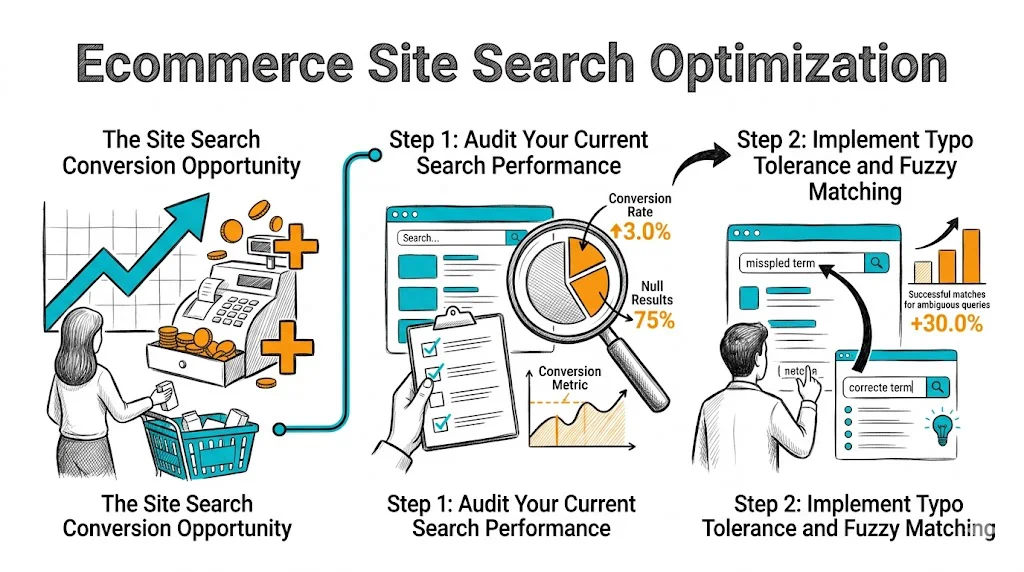
Site search is one of the most undervalued conversion opportunities in ecommerce. Shoppers who use search are actively trying to find and buy a specific product—they are your highest-intent visitors. Yet the majority of ecommerce stores have site search implementations that fail these buyers: typos return zero results, synonyms are not recognized, and the search bar is buried in the navigation. Fixing site search can improve overall store conversion rate by 15–30% by serving your most purchase-ready visitors better.

The Site Search Conversion Opportunity

Data consistently shows that search users convert at 3–5x the rate of non-search users. They are not browsing—they know what they want and are trying to get there fast.

Consider the math: if 15% of your visitors use site search, and search users convert at 4% while non-searchers convert at 1.5%, site search users are responsible for roughly one-third of your total conversions despite being a minority of visitors. Improving search experience for this group has outsized impact on total revenue.

Step 1: Audit Your Current Search Performance

Before optimizing, understand where you are failing:

Enable search analytics. Shopify's analytics shows top search terms but not zero-result searches. Use a dedicated search app or Google Analytics to capture the full picture including failed searches.

Key metrics to track:

  • Top 50 search terms (your most in-demand products and categories)
  • Zero-result searches (catalog gaps or synonym misses)
  • Searches with low click-through rate (search is returning results, but they are irrelevant)
  • Searches with high abandonment after results (found results but they were wrong)
  • Mobile search performance vs. desktop

Run manual tests: Search for your top products using:

  • Common alternate names ("vitamin c" vs. "ascorbic acid," "kajal" vs. "kohl eyeliner")
  • Misspellings ("moisturizer" vs. "moisturiser" vs. "moisterizer")
  • Brand names you carry vs. generic terms
  • Ingredient or material terms ("niacinamide serum," "cotton kurta")

Document every failure. This is your search optimization backlog.

Step 2: Implement Typo Tolerance and Fuzzy Matching

Shopify's native search is exact-match—"moisturizer" and "moisturiser" are different queries, and a typo returns zero results. This is a fundamental failure for a highly mobile Indian shopper base where typing on a touchscreen introduces frequent errors.

Dedicated search apps (Searchie, Searchanise, Boost Commerce, Klevu) add:

  • Fuzzy matching: "moisturizer" matches "moisturiser," "mosturizer," "moisturizr"
  • Partial word matching: "vitam" returns vitamin products
  • Accent-insensitive matching (important for multilingual catalog names)

Most of these apps are ₹2,000–₹8,000/month—easily justified by the conversion lift on search users.

Step 3: Build Your Synonym Dictionary

Synonyms are where most site search fails for Indian D2C brands. Category-specific examples:

Beauty/personal care:

  • kajal = kohl = eyeliner
  • serum = facial oil = face oil (for some queries)
  • face wash = cleanser = face cleanser
  • SPF = sunscreen = sunblock = sun cream

Apparel:

  • kurta = kurti = tunic
  • salwar = churidar = palazzo
  • denim = jeans

Health/supplements:

  • ashwagandha = withania somnifera
  • vitamin C = ascorbic acid = L-ascorbic acid
  • protein powder = whey protein = protein supplement

Build a comprehensive synonym list for your catalog and configure it in your search app. This is a one-time investment that permanently improves search relevance for these common mismatches.

Step 4: Optimize Zero-Result Pages

Zero-result pages are where search abandonment happens. A blank page with "No results for 'xyz'" is a conversion dead end. Best practices:

Immediate suggestions: "Did you mean [closest matching term]?" with a clickable suggestion.

Popular products fallback: When no results exist, show your top-selling products or best sellers in your most searched categories.

Category-level redirect: If the search term matches a category name (e.g., "skincare"), redirect to that category page rather than showing a search results page.

Feedback mechanism: A "Can't find what you're looking for? Tell us." input captures demand signals and helps you identify catalog gaps. Even a 5% response rate on zero-result searches gives you valuable product development data.

Step 5: Improve Search Result Ranking and Merchandising

Even when results are returned, their ranking affects conversion. The default ranking by relevance score is often suboptimal:

Boost high-converting products: Products that historically convert well when found via search should rank higher in results for relevant queries.

Boost in-stock products: Never rank OOS products highly in search results—it creates a frustrating click-to-disappointment experience.

Boost new arrivals for trend-driven categories: Fashion and beauty searchers often want new products; boost recent additions for these categories.

Pinned results: For your top 20–30 search terms, manually pin the exact right product to position 1. A search for your hero product name should always return that product first.

Step 6: Optimize the Search UI

Search mechanics matter, but so does the search experience:

Search bar visibility: Put the search bar prominently in the header—center-aligned or with a magnifying glass icon that expands on click. On mobile, a sticky search bar or prominent search icon in the header prevents lost searches.

Search suggestions (autocomplete): As users type, show real-time product and category suggestions. Autocomplete reduces search query length (fewer typos) and navigates high-intent users to products faster.

Mobile keyboard trigger: On mobile, ensure the search bar triggers the appropriate keyboard (text vs. number) and that the keyboard does not obscure results below the fold.

Search results page layout: On mobile, 2-column product grid with clear product names, prices, and ratings. On desktop, 3–4 column grid with filter/sort controls. Ensure images load fast on the results page.

Using Search Data for Business Intelligence

Your search analytics is a goldmine of product and content insights:

  • High-volume zero-result searches = potential catalog additions or partnership opportunities
  • High-volume searches for products you carry = SEO keyword opportunities
  • Seasonal search trends = demand planning signals (searches for "Holi color powder" spike in February)
  • Searches for competitor products = customer intent to compare; opportunity to show comparison content

Review your top 100 search terms monthly. It is one of the most actionable pieces of customer intelligence you can access.

Tips / Best Practices

  • Prioritize search app investment over most other tech spending. A ₹4,000/month search app pays for itself in days if your search traffic has any meaningful volume.
  • Do not just add synonyms—add them based on your actual zero-result data, not assumptions. Check what people are actually searching for that fails.
  • Test search UI changes with A/B experiments (bar placement, autocomplete triggers) to measure real impact on search usage and conversion.
  • Review your pinned results after every inventory change. A pinned product that goes OOS will frustrate exactly your most ready-to-buy visitors.
  • Track the percentage of sessions that include a search as a KPI. Low search usage can mean your search bar is hard to find, not that customers do not want to search.

Key Takeaways

  • Search users convert at 3–5x non-searchers—optimizing site search has outsized impact on overall store CVR.
  • Typo tolerance, synonym support, and zero-result handling are the highest-priority fixes for most ecommerce stores.
  • A synonym dictionary built from your actual zero-result search data is more valuable than a generic synonym list.
  • Search result ranking should prioritize high-converting, in-stock products with manually pinned results for your top queries.
  • Search analytics data is a rich source of product demand, catalog gap, and SEO insights—review monthly.

Related reading: Conversion Rate Optimization | Product Page | Cart Abandonment | Ecommerce Filter & Sort | Ecommerce Breadcrumb Navigation

See also: D2C & Ecommerce Growth Pillar