CustomFit.ai โ€” Website personalization, A/B testing and CRO for Shopify and D2C
Product
Features
โœฑ
Website Personalization
Adapt to each visitor's behavior & intent
โง–
A/B & Multivariate Testing
Rigorous experimentation
โœจ
AI CopilotNEW
Personalize with a prompt
๐Ÿค–
AI WingmanNEW
Auto-optimize toward winners
๐ŸŽฏ
AI Conversion OptimizerNEW
GPT-grade test ideas
โœŽ
No-Code Visual Editor
Drag-and-drop edit any element
โ–ฆ
Product Recommendations
Personalized recs that lift AOV
โš‘
Feature Flags
Ship safely with kill-switches
โ—ง
Chrome Extension
Edit your store in the browser
โง‰
Shopify, WooCommerce & more
All platform integrations
View all features โ†’
Use Cases
$
Price A/B Testing
Test price points to maximize revenue
โ–ฆ
Theme A/B Testing
Compare whole layouts & designs
๐Ÿ—‚
Template A/B Testing
Test whole PDP/PLP templates
๐Ÿท
Discount A/B Testing
Find the offer that converts
๐Ÿšš
Shipping A/B Testing
Thresholds, speed & copy
โœ
Content A/B Testing
Copy, images & reviews
๐Ÿ’ณ
Checkout Gateway A/B
Payments & one-click
โŒ–
Geo-Based Personalization
Per-location content & offers
โšก
Buyer-Intent Nudges
Exit-intent & retargeting
โ†”
Split-URL / Redirection
Full-page redirect tests
View all use cases โ†’
Solutions & Guides
โคข
Conversion Rate Optimization
The complete CRO guide
โง–
A/B Testing Software
Buyer's guide for D2C
๐Ÿ›’
Cart Abandonment Recovery
Win back lost carts
๐Ÿ“ฐ
Landing Page Optimization
Convert more paid traffic
S
Shopify A/B Testing
Test your store, no code
S
Shopify Personalization
Tailor the store per shopper
โ—”
First-Time Visitor Offers
Convert new shoppers with trust & offers
โ˜…
Repeat-Customer Experiences
Reward and re-engage loyal buyers
โ—Ž
Campaign-Matched Pages
Match the landing page to the ad
โŒ–
Location-Based Experiences
Currency, language & regional offers
Explore CRO โ†’
Customer stories
GIVA
+32%
conversion via personalized recs
GIVA
Mamaearth
+18%
revenue lift from PDP A/B tests
ME
The Sleep Company
+24%
AOV from product recommendations
TSC
Read customer stories โ†’
Integrations
SWsfGA+15
โœฆ
Not sure where to start?
Let AI Copilot pick your first tests

โ€œWe wake up to evidence-backed tests ready to deploy โ€” not a backlog of maybe ideas.โ€

AN
Anirudh S.
Growth ยท Chargebee
โ˜…โ˜…โ˜…โ˜…โ˜…4.8on G2 ยท 2,400+ brands
Talk to our team โ†’
Widgets
Integrations
Ecommerce & Checkout
Shopify
Shopline
Shoplazza
GoKwik
ShopFlo
Razorpay Magic Checkout
Breeze
Shiprocket
View all integrations โ†’
Analytics & Behavior
Google Analytics 4
Microsoft Clarity
Hotjar
Mixpanel
Amplitude
Heap
Adobe Analytics
Segment (CDP)
View all integrations โ†’
Engagement, CRM & More
Klaviyo
MoEngage
CleverTap
WebEngage
HubSpot
Salesforce
Slack
Meta Ads
View all integrations โ†’
CustomersPricing
Resources
CRO
โ–ค
Playbooks
Proven strategies to boost conversions
๐ŸŽ™
Interviews
D2C leaders & marketing experts
โ–ถ
Webinars
Live deep dives & product sessions
Learn
โœŽ
Blog
Tips, experiments & best practices
๐Ÿ“•
Free E-Books
Mastering personalization
๐Ÿ“–
Conversion Glossary
Every CRO term, defined
โœฆAI CopilotNEWLog inBook a demo
Start free trial
Select your platform โ€” Install in 2 minsWe'll tailor the setup
โšก Risk-free 14-day trial ยท No credit card ยท Cancel anytime
S
Shopify
Install from Shopify App Store
โ€บ
W
WooCommerce
Install the WooCommerce plugin
โ€บ
B
BigCommerce
Install from BigCommerce App Marketplace
โ€บ
SL
Shopline
Install from Shopline App Store
โ€บ
M
Salesforce / Magento
Install from the marketplace
โ€บ
SZ
Shoplazza
Install from Shoplazza App Store
โ€บ
WP
WordPress / Webflow
Install plugin or paste the script
โ€บ
โ—ง
Others
Custom-built on React, Next.js, etc.
โ€บ
Tip: pick your platform โ€” we handle the restBook a demo โ†’
Product
Website PersonalizationA/B & Multivariate TestingAI CopilotAI WingmanAI Conversion OptimizerNo-Code Visual EditorProduct RecommendationsFeature FlagsView all features โ†’
Use Cases
Price A/B TestingTheme A/B TestingTemplate A/B TestingDiscount A/B TestingShipping A/B TestingContent A/B TestingCheckout Gateway A/BGeo-Based PersonalizationBuyer-Intent NudgesSplit-URL / Redirection
Solutions & Guides
Conversion Rate OptimizationA/B Testing SoftwareCart Abandonment RecoveryLanding Page OptimizationShopify A/B TestingShopify Personalization
Explore
WidgetsIntegrationsCustomersPricing
Resources
BlogPlaybooksWebinarsInterviewsE-BooksConversion Glossary
Platforms
ShopifyShoplineShoplazzaChrome ExtensionAll integrations
Start free trialBook a demo
Homeโ€บBlogโ€บab testingโ€บA/B Testing Reporting Dashboard Setup

A/B Testing Reporting Dashboard Setup

SJSapna JoharHead of Growth & CRO, CustomFit.aiJanuary 15, 20258 min read
On this page
  1. Why Reporting Matters as Much as Running Tests
  2. The Four Levels of A/B Testing Reporting
  3. Level 1: Live Test Status (Daily)
  4. Level 2: Test Results Report (Weekly)
  5. Level 3: Monthly Program Dashboard
  6. Level 4: Executive/Investor Summary (Quarterly)
  7. Metrics to Track in Your Dashboard
  8. Test-Level Metrics
  9. Program-Level Metrics
  10. Building Your Dashboard: Tool Recommendations
  11. Option 1: CustomFit.ai Native Dashboard (Recommended Starting Point)
  12. Option 2: CustomFit.ai + Notion (For Documentation + Reporting Combined)
  13. Option 3: Looker Studio (Google Data Studio) Custom Dashboard
  14. Option 4: Airtable Dashboard (For Team Collaboration)
  15. Reporting A/B Test Results to Stakeholders
  16. Tips and Best Practices
  17. Key Takeaways
0%
A/B Testing Reporting Dashboard Setup

From the conversion glossary

Concepts referenced in this article, defined.
Definition
What Is Variant? Definition, Formula & Guide
Definition
What Is Control? Definition, Formula & Guide
Definition
What Is Significance? Definition, Formula & Guide
Definition
What Is Effect Size? Definition, Formula & Guide
Definition
What Is Lift? Definition, Formula & Guide
โ† Back to Ab Testing guide
Try CustomFit.ai

Run A/B tests and personalize your store without code. 14-day free trial, no credit card.

Start free trial โ†’
Share
XLinkedInEmail

Related articles

ab testing

Statistical Significance in A/B Testing: A Plain-English Guide

Statistical significance in A/B testing means there's less than a 5% chance your result is random. Here's what p-values, confidence levels, and sample size mean for your tests.

Sapna Joharยท 12 min read
ab testing

How A/B Testing Works: Step-by-Step Explained

A/B testing works by splitting traffic between two versions of a page, measuring which performs better on a conversion metric, and declaring a winner at statistical significance.

Sapna Joharยท 10 min read
ab testing

A/B Testing vs Split Testing: What's the Difference?

A/B testing and split testing are the same thing โ€” two names for the same experiment. Here's why the terms are used interchangeably and what actually matters.

Sapna Joharยท 7 min read

Start lifting conversions today.

Run rigorous A/B tests and personalize every visit on Shopify or any storefront โ€” no engineers required.

Start free trialBook a demo

Built for every D2C category

๐Ÿงด
Skincare
๐Ÿ’„
Beauty
๐ŸŒฟ
Wellness
โ˜•
F&B
๐Ÿ‘Ÿ
Apparel
๐Ÿ’
Jewelry
๐Ÿ›‹๏ธ
Home
๐Ÿผ
Baby
Live ยท Right now
Mamaearth โ€” free-shipping band +12.4% AOVGIVA โ€” festive collection page +34% revenueBellavita โ€” PDP CTA test +27.4% CVRKapiva โ€” Quiz-driven recs +9.48% CTRThe Sleep Co โ€” landing personalized 2ร— capturesPlum โ€” Returning shopper swap +18.2% CVRMamaearth โ€” free-shipping band +12.4% AOVGIVA โ€” festive collection page +34% revenueBellavita โ€” PDP CTA test +27.4% CVRKapiva โ€” Quiz-driven recs +9.48% CTRThe Sleep Co โ€” landing personalized 2ร— capturesPlum โ€” Returning shopper swap +18.2% CVR
Get in touch

Tell us about your store.

We reply within an hour during business hours. No sales pitch, no spam โ€” just answers from someone who's seen 2,400+ D2C stores.

โœ“ Reply within 1 hourโœ“ No spam, everโœ“ Free demo & setup help
โœ“ Thanks! We'll be in touch shortly.
CustomFit.ai

The all-in-one website personalization, A/B testing & CRO platform for high-growth D2C brands. Made by marketers, fueled by coffee.

in๐•โ—Žโ–ถf
Product
  • Features
  • A/B Testing
  • Personalization
  • AI Copilot
  • AI Wingman
  • AI Conversion Optimizer
  • Feature Flags
  • Widgets
  • Integrations
  • ROI Calculator
Platforms
  • Shopify
  • Shopline
  • Shoplazza
  • Salesforce
  • Chrome Extension
  • All Integrations
Resources
  • Blog
  • Playbooks
  • Webinars
  • GrowthFit Interviews
  • Free E-Books
  • Conversion Glossary
  • Case Studies
Compare
  • vs VWO
  • vs Optimizely
  • vs Google Optimize
  • vs Mutiny
  • vs Intelligems
  • vs Shoplift
  • vs AB Tasty
  • vs Convert
  • vs Kameleoon
Company
  • About Us
  • Partners
  • CustomFit Awards
  • Recognition
  • Contact
  • Privacy Policy
  • Terms & Conditions
ยฉ 2026 CustomFit.ai ยท Valley Monks Pvt Ltd ยท Made by marketers, fueled by coffee, and obsessed with conversions.
SOC 2 Type II ยท GDPR ยท CCPA ยท ISO 27001

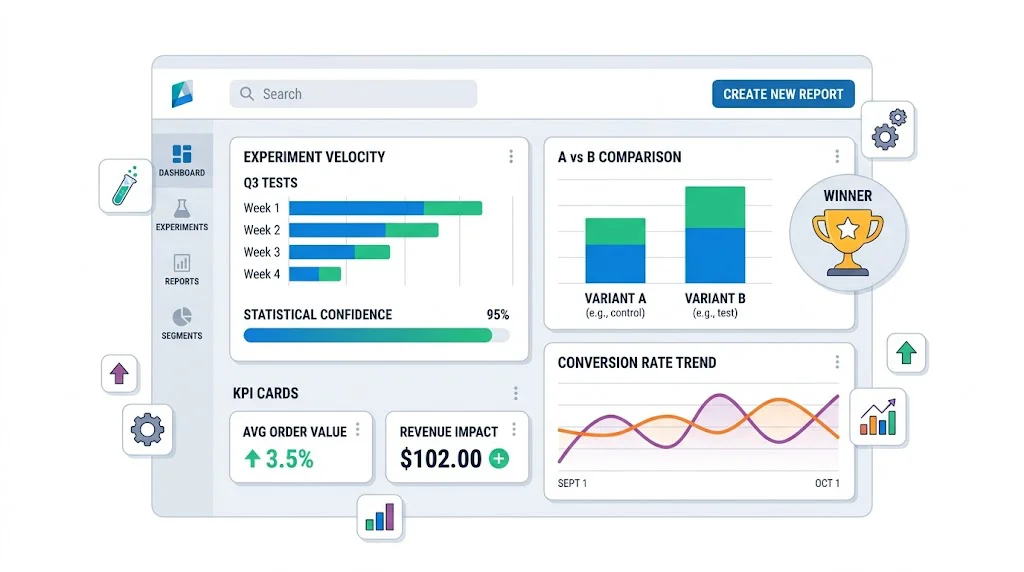
An A/B testing reporting dashboard makes your experimentation program legible โ€” to your team, your management, and any investors who ask about your growth process. The right dashboard shows active test status, completed results, revenue impact from winners, and program-level metrics like testing velocity. This guide covers what to track, how to structure the dashboard, and the tools to build it with โ€” starting with CustomFit.ai's built-in reporting and extending to custom setups for more advanced programs.

Why Reporting Matters as Much as Running Tests

Most D2C teams spend their reporting effort on acquisition metrics โ€” CAC, ROAS, email open rates. A/B test results get documented (if at all) in a spreadsheet that no one reviews.

The problem: without visible, accessible reporting:

  • Leadership doesn't know whether the testing program is generating ROI
  • Teams make rollout decisions without reviewing segment data
  • New team members don't have context on what's been tested
  • Investors see a "we A/B test everything" claim with no evidence

Good reporting transforms your testing program from a cost center into a provably ROI-positive initiative.
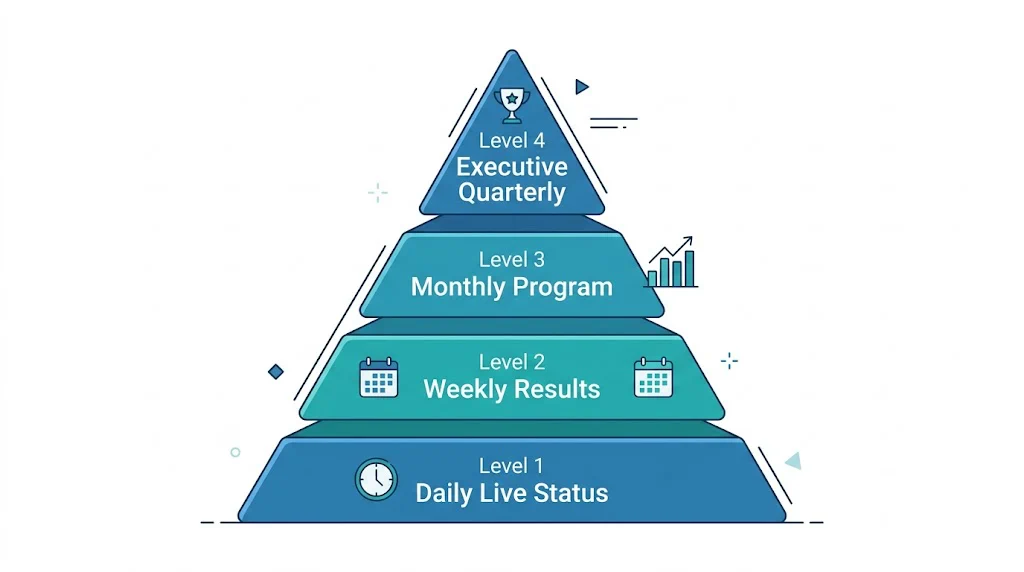
The Four Levels of A/B Testing Reporting

Metrics levels

Level 1: Live Test Status (Daily)

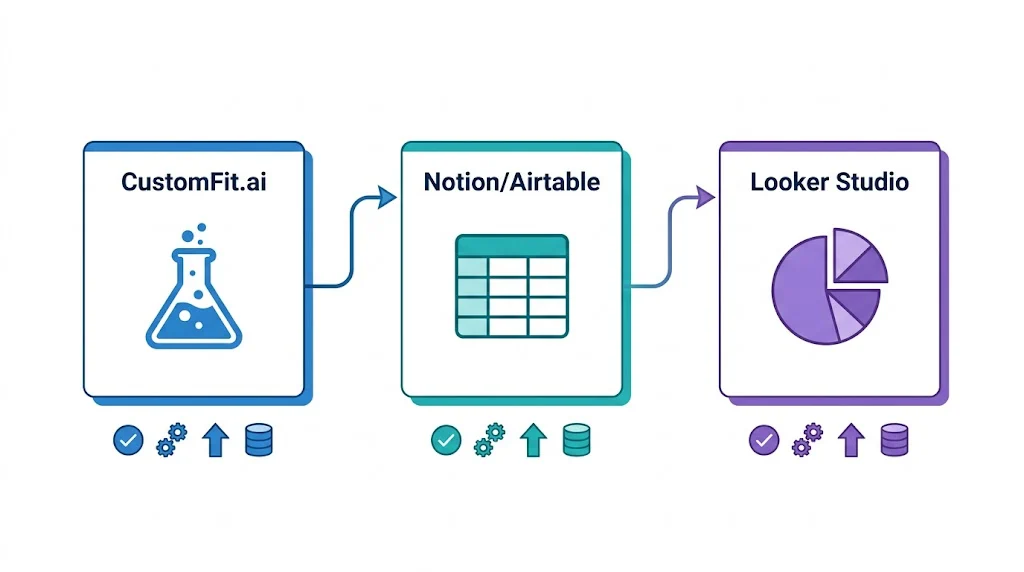
Tools setup

A view of all currently running tests with key status indicators. Your team checks this daily to confirm tests are functioning correctly.

Key fields:

  • Test name and ID
  • Start date and planned end date
  • Traffic per variant (today and cumulative)
  • Current significance level
  • Primary metric: current value per variant
  • Status flag: On Track / At Risk / Needs Attention

Where to build it: CustomFit.ai's experiments dashboard provides this view natively. For teams wanting a consolidated view across multiple stores or tools, Looker Studio (free) with CustomFit.ai's data export works well.

Level 2: Test Results Report (Weekly)

A summary of tests that concluded this week with their results and decisions.

Key fields:

  • Test name
  • Duration and sample size
  • Primary metric: control vs variant, absolute and relative difference
  • Statistical significance
  • Result: Winner / Loser / Inconclusive
  • Decision: Implement / Hold / Follow-up test
  • Estimated revenue impact (for winners)

Report format: A simple weekly email to the team with 3โ€“5 bullet points covering new results is often more useful than a formal dashboard. "Test T-014 (product page CTA button) concluded: variant lifts CVR from 1.9% to 2.4% (+26%), 97% confidence. Implementing. Estimated impact: โ‚น1.8 lakh/month."

Level 3: Monthly Program Dashboard

A comprehensive view of the full testing program's performance over the past 30 days. Typically reviewed in a monthly team meeting.

Sections:

Program Velocity

  • Tests launched this month: [N]
  • Tests completed this month: [N]
  • Tests abandoned: [N]
  • Average test duration: [X days]

Results Summary

  • Tests with winning variants: [N] (X%)
  • Tests with control winning: [N] (X%)
  • Inconclusive tests: [N] (X%)

Revenue Impact

  • New winners implemented this month: [N]
  • Incremental revenue from new winners (estimated): [โ‚นX/month]
  • Cumulative incremental revenue from all implemented winners (YTD): [โ‚นX/month]

Active Pipeline

  • Tests currently running: [N]
  • Tests in backlog: [N]
  • Next planned test launch: [Test name, date]

Level 4: Executive/Investor Summary (Quarterly)

A high-level summary for leadership, investors, or board review.

One-page format:

Q[X] 2026 A/B Testing Program Summary

Tests Completed: [N] (vs [N] last quarter)
Win Rate: [X%] of tests produced a winning variant
Revenue Impact: โ‚น[X] lakhs/month in incremental revenue from Q[X] winners
Top Win: [Test name] โ€” [X%] CVR improvement on [page]

Testing Velocity: [Avg tests/month this quarter]
Program Efficiency: โ‚น[X] incremental monthly revenue per test completed

Q[X+1] Testing Focus: [2โ€“3 bullet points on planned test areas]

This one-page view gives leadership all the information they need in 60 seconds.

Metrics to Track in Your Dashboard

Test-Level Metrics

Conversion rate per variant: The core metric. Show control and variant side by side.

Absolute improvement: Variant CVR minus control CVR, in percentage points. Easier for non-technical stakeholders to interpret than relative lift.

Relative improvement: (Variant CVR - Control CVR) / Control CVR ร— 100. The "X% improvement" number used in case studies.

Statistical confidence: Expressed as a percentage (95%, 97%, 99%). Confidence below 95% should be flagged as preliminary.

Revenue per session: Combines CVR and AOV. Often more meaningful than pure CVR for high-AOV D2C brands.

Program-Level Metrics

Testing velocity: Tests completed per month. Target: 2โ€“4 for most D2C brands.

Win rate: Percentage of tests where a variant outperformed control. Industry average is 20โ€“30% โ€” most tests don't produce winners. A win rate above 40% may indicate tests are too safe (changes are too obvious) or statistical thresholds are too low.

Time to significance: Average days from test launch to a conclusive result. Long times indicate either insufficient traffic or overly conservative significance thresholds.

Revenue per test: Total incremental revenue from implemented winners divided by total tests run. This is the headline ROI metric of your testing program.

Building Your Dashboard: Tool Recommendations

Option 1: CustomFit.ai Native Dashboard (Recommended Starting Point)

CustomFit.ai's experiments dashboard shows all active and completed tests, traffic allocation, real-time significance levels, and revenue impact estimates โ€” all within the platform. For most Shopify D2C brands, this is sufficient without any additional dashboard tooling.

Access path: CustomFit.ai dashboard โ†’ Experiments โ†’ [Select test]

Option 2: CustomFit.ai + Notion (For Documentation + Reporting Combined)

Connect CustomFit.ai results to a Notion database using Zapier. When a test completes, automatically create a Notion record with results pre-populated. The Notion database serves as both your test documentation archive and your program-level reporting roll-up.

Option 3: Looker Studio (Google Data Studio) Custom Dashboard

Looker Studio (free) connects to Google Analytics 4, Google Sheets, and many testing tools via connectors. Build a custom dashboard that combines:

  • Test results from CustomFit.ai (exported to Google Sheets via Zapier)
  • Funnel data from GA4
  • Revenue data from Shopify analytics

This gives you a unified view across all data sources โ€” useful when you want to correlate test results with upstream traffic quality.

Option 4: Airtable Dashboard (For Team Collaboration)

Airtable's dashboard view works well as a combined roadmap + reporting tool. Create a base with all tests, configure views for "Active Tests," "Completed Tests," and "Backlog," and add summary metrics at the top. Share with the full team as a live program dashboard.

Reporting A/B Test Results to Stakeholders

Different stakeholders need different information from the same test result:

For your CRO/growth team: Full statistical detail โ€” confidence levels, segment breakdown, sample sizes, guardrail metric performance. They need everything.

For leadership (CMO, CEO): Revenue impact and strategic implication. "We found that showing COD as the default payment option lifts checkout completion by 11% โ€” we're implementing this today. Estimated impact: โ‚น3.2 lakh/month in additional revenue."

For investors: Program-level ROI narrative. "Our A/B testing program generated โ‚น18 lakh/month in incremental conversion revenue in Q3, representing a 340% ROI on testing tool costs. Average CVR improvement from 11% across brands like Bellavita demonstrates the model."

Tips and Best Practices

Automate result documentation. Set up Zapier triggers that automatically log test results to your master spreadsheet or Airtable base when tests conclude in CustomFit.ai. Manual documentation doesn't happen reliably.

Show the program impact in revenue, not just statistics. Leadership and investors understand rupees better than p-values. Always translate test results into estimated monthly revenue impact before presenting.

Flag inconclusive tests clearly. A test that ran for 30 days without reaching significance is not a "neutral" result โ€” it's a signal that either the traffic is too low, the effect size is too small to detect, or the test was designed incorrectly. Flag these explicitly and determine which explanation applies.

Include segment highlights in every report. Even when reporting to non-technical audiences, a one-line segment finding ("mobile users responded 2x stronger than desktop users") adds depth and demonstrates analytical rigor.

Update the dashboard when tests are implemented. The most common reporting gap: a test wins, gets implemented, but the dashboard still shows it as "completed" rather than "implemented." Add an implementation column and update it within 24 hours of implementing winners.

Key Takeaways

  • An A/B testing dashboard has four levels: daily live status, weekly results, monthly program, and quarterly executive summary.
  • Track both test-level metrics (CVR per variant, significance, revenue impact) and program-level metrics (velocity, win rate, revenue per test).
  • CustomFit.ai's native dashboard is the right starting point for most Shopify D2C brands โ€” extend with Looker Studio or Airtable when you need cross-tool data integration.
  • Always translate results into rupee revenue impact before presenting to leadership โ€” the ROI of your testing program should be visible and compelling.
  • Automate result documentation using Zapier to eliminate the gap between test conclusion and reporting.