CustomFit.ai โ€” Website personalization, A/B testing and CRO for Shopify and D2C
Product
Features
โœฑ
Website Personalization
Adapt to each visitor's behavior & intent
โง–
A/B & Multivariate Testing
Rigorous experimentation
โœจ
AI CopilotNEW
Personalize with a prompt
๐Ÿค–
AI WingmanNEW
Auto-optimize toward winners
๐ŸŽฏ
AI Conversion OptimizerNEW
GPT-grade test ideas
โœŽ
No-Code Visual Editor
Drag-and-drop edit any element
โ–ฆ
Product Recommendations
Personalized recs that lift AOV
โš‘
Feature Flags
Ship safely with kill-switches
โ—ง
Chrome Extension
Edit your store in the browser
โง‰
Shopify, WooCommerce & more
All platform integrations
View all features โ†’
Use Cases
$
Price A/B Testing
Test price points to maximize revenue
โ–ฆ
Theme A/B Testing
Compare whole layouts & designs
๐Ÿ—‚
Template A/B Testing
Test whole PDP/PLP templates
๐Ÿท
Discount A/B Testing
Find the offer that converts
๐Ÿšš
Shipping A/B Testing
Thresholds, speed & copy
โœ
Content A/B Testing
Copy, images & reviews
๐Ÿ’ณ
Checkout Gateway A/B
Payments & one-click
โŒ–
Geo-Based Personalization
Per-location content & offers
โšก
Buyer-Intent Nudges
Exit-intent & retargeting
โ†”
Split-URL / Redirection
Full-page redirect tests
View all use cases โ†’
Solutions & Guides
โคข
Conversion Rate Optimization
The complete CRO guide
โง–
A/B Testing Software
Buyer's guide for D2C
๐Ÿ›’
Cart Abandonment Recovery
Win back lost carts
๐Ÿ“ฐ
Landing Page Optimization
Convert more paid traffic
S
Shopify A/B Testing
Test your store, no code
S
Shopify Personalization
Tailor the store per shopper
โ—”
First-Time Visitor Offers
Convert new shoppers with trust & offers
โ˜…
Repeat-Customer Experiences
Reward and re-engage loyal buyers
โ—Ž
Campaign-Matched Pages
Match the landing page to the ad
โŒ–
Location-Based Experiences
Currency, language & regional offers
Explore CRO โ†’
Customer stories
GIVA
+32%
conversion via personalized recs
GIVA
Mamaearth
+18%
revenue lift from PDP A/B tests
ME
The Sleep Company
+24%
AOV from product recommendations
TSC
Read customer stories โ†’
Integrations
SWsfGA+15
โœฆ
Not sure where to start?
Let AI Copilot pick your first tests

โ€œWe wake up to evidence-backed tests ready to deploy โ€” not a backlog of maybe ideas.โ€

AN
Anirudh S.
Growth ยท Chargebee
โ˜…โ˜…โ˜…โ˜…โ˜…4.8on G2 ยท 2,400+ brands
Talk to our team โ†’
Widgets
Integrations
Ecommerce & Checkout
Shopify
Shopline
Shoplazza
GoKwik
ShopFlo
Razorpay Magic Checkout
Breeze
Shiprocket
View all integrations โ†’
Analytics & Behavior
Google Analytics 4
Microsoft Clarity
Hotjar
Mixpanel
Amplitude
Heap
Adobe Analytics
Segment (CDP)
View all integrations โ†’
Engagement, CRM & More
Klaviyo
MoEngage
CleverTap
WebEngage
HubSpot
Salesforce
Slack
Meta Ads
View all integrations โ†’
CustomersPricing
Resources
CRO
โ–ค
Playbooks
Proven strategies to boost conversions
๐ŸŽ™
Interviews
D2C leaders & marketing experts
โ–ถ
Webinars
Live deep dives & product sessions
Learn
โœŽ
Blog
Tips, experiments & best practices
๐Ÿ“•
Free E-Books
Mastering personalization
๐Ÿ“–
Conversion Glossary
Every CRO term, defined
โœฆAI CopilotNEWLog inBook a demo
Start free trial
Select your platform โ€” Install in 2 minsWe'll tailor the setup
โšก Risk-free 14-day trial ยท No credit card ยท Cancel anytime
S
Shopify
Install from Shopify App Store
โ€บ
W
WooCommerce
Install the WooCommerce plugin
โ€บ
B
BigCommerce
Install from BigCommerce App Marketplace
โ€บ
SL
Shopline
Install from Shopline App Store
โ€บ
M
Salesforce / Magento
Install from the marketplace
โ€บ
SZ
Shoplazza
Install from Shoplazza App Store
โ€บ
WP
WordPress / Webflow
Install plugin or paste the script
โ€บ
โ—ง
Others
Custom-built on React, Next.js, etc.
โ€บ
Tip: pick your platform โ€” we handle the restBook a demo โ†’
Product
Website PersonalizationA/B & Multivariate TestingAI CopilotAI WingmanAI Conversion OptimizerNo-Code Visual EditorProduct RecommendationsFeature FlagsView all features โ†’
Use Cases
Price A/B TestingTheme A/B TestingTemplate A/B TestingDiscount A/B TestingShipping A/B TestingContent A/B TestingCheckout Gateway A/BGeo-Based PersonalizationBuyer-Intent NudgesSplit-URL / Redirection
Solutions & Guides
Conversion Rate OptimizationA/B Testing SoftwareCart Abandonment RecoveryLanding Page OptimizationShopify A/B TestingShopify Personalization
Explore
WidgetsIntegrationsCustomersPricing
Resources
BlogPlaybooksWebinarsInterviewsE-BooksConversion Glossary
Platforms
ShopifyShoplineShoplazzaChrome ExtensionAll integrations
Start free trialBook a demo
Homeโ€บBlogโ€บab testingโ€บHow A/B Testing Works: Step-by-Step Explained
a-b-testingcroecommerce

How A/B Testing Works: Step-by-Step Explained

A/B testing works by splitting traffic between two versions of a page, measuring which performs better on a conversion metric, and declaring a winner at statistical significance.

SJSapna JoharHead of Growth & CRO, CustomFit.aiMarch 26, 202610 min read
On this page
  1. The Basic Mechanics of A/B Testing
  2. Step 1 โ€” Traffic Splitting (How Random Assignment Works Technically)
  3. Step 2 โ€” Variant Serving (Cookies and Consistent Experience)
  4. Step 3 โ€” Data Collection (What Gets Tracked)
  5. Step 4 โ€” Statistical Analysis (P-Values and Confidence Intervals Explained Simply)
  6. Step 5 โ€” Winner Declaration
  7. What Happens Under the Hood: Client-Side vs Server-Side Testing
  8. How AI-Powered Testing Works Differently
  9. A/B Testing on Shopify: How It Works in Practice
  10. Common Questions About How A/B Testing Works
0%
How A/B Testing Works: Step-by-Step Explained

From the conversion glossary

Concepts referenced in this article, defined.
Definition
What Is Variant? Definition, Formula & Guide
Definition
What Is Significance? Definition, Formula & Guide
Definition
What Is Control? Definition, Formula & Guide
Definition
What Is Lift? Definition, Formula & Guide
Definition
What Is Cookie? Definition & Guide
โ† Back to Ab Testing guide
Try CustomFit.ai

Run A/B tests and personalize your store without code. 14-day free trial, no credit card.

Start free trial โ†’
Share
XLinkedInEmail

Related articles

ab testing

Statistical Significance in A/B Testing: A Plain-English Guide

Statistical significance in A/B testing means there's less than a 5% chance your result is random. Here's what p-values, confidence levels, and sample size mean for your tests.

Sapna Joharยท 12 min read
ab testing

A/B Testing vs Split Testing: What's the Difference?

A/B testing and split testing are the same thing โ€” two names for the same experiment. Here's why the terms are used interchangeably and what actually matters.

Sapna Joharยท 7 min read
ab testing

A/B Testing vs Multivariate Testing: Which Should You Use?

A/B testing compares two page versions; multivariate testing tests multiple elements simultaneously. Learn when to use each for your ecommerce store.

Sapna Joharยท 9 min read

Start lifting conversions today.

Run rigorous A/B tests and personalize every visit on Shopify or any storefront โ€” no engineers required.

Start free trialBook a demo

Built for every D2C category

๐Ÿงด
Skincare
๐Ÿ’„
Beauty
๐ŸŒฟ
Wellness
โ˜•
F&B
๐Ÿ‘Ÿ
Apparel
๐Ÿ’
Jewelry
๐Ÿ›‹๏ธ
Home
๐Ÿผ
Baby
Live ยท Right now
Mamaearth โ€” free-shipping band +12.4% AOVGIVA โ€” festive collection page +34% revenueBellavita โ€” PDP CTA test +27.4% CVRKapiva โ€” Quiz-driven recs +9.48% CTRThe Sleep Co โ€” landing personalized 2ร— capturesPlum โ€” Returning shopper swap +18.2% CVRMamaearth โ€” free-shipping band +12.4% AOVGIVA โ€” festive collection page +34% revenueBellavita โ€” PDP CTA test +27.4% CVRKapiva โ€” Quiz-driven recs +9.48% CTRThe Sleep Co โ€” landing personalized 2ร— capturesPlum โ€” Returning shopper swap +18.2% CVR
Get in touch

Tell us about your store.

We reply within an hour during business hours. No sales pitch, no spam โ€” just answers from someone who's seen 2,400+ D2C stores.

โœ“ Reply within 1 hourโœ“ No spam, everโœ“ Free demo & setup help
โœ“ Thanks! We'll be in touch shortly.
CustomFit.ai

The all-in-one website personalization, A/B testing & CRO platform for high-growth D2C brands. Made by marketers, fueled by coffee.

in๐•โ—Žโ–ถf
Product
  • Features
  • A/B Testing
  • Personalization
  • AI Copilot
  • AI Wingman
  • AI Conversion Optimizer
  • Feature Flags
  • Widgets
  • Integrations
  • ROI Calculator
Platforms
  • Shopify
  • Shopline
  • Shoplazza
  • Salesforce
  • Chrome Extension
  • All Integrations
Resources
  • Blog
  • Playbooks
  • Webinars
  • GrowthFit Interviews
  • Free E-Books
  • Conversion Glossary
  • Case Studies
Compare
  • vs VWO
  • vs Optimizely
  • vs Google Optimize
  • vs Mutiny
  • vs Intelligems
  • vs Shoplift
  • vs AB Tasty
  • vs Convert
  • vs Kameleoon
Company
  • About Us
  • Partners
  • CustomFit Awards
  • Recognition
  • Contact
  • Privacy Policy
  • Terms & Conditions
ยฉ 2026 CustomFit.ai ยท Valley Monks Pvt Ltd ยท Made by marketers, fueled by coffee, and obsessed with conversions.
SOC 2 Type II ยท GDPR ยท CCPA ยท ISO 27001

A/B testing works by randomly splitting your website visitors into two groups โ€” one sees the original version of a page (the control), the other sees a changed version (the variant) โ€” then measuring which group converts better on a specific metric. The assignment happens instantly when a visitor lands on the page, is locked via a cookie so the experience stays consistent, and results accumulate until the difference between the two versions is statistically significant. When significance is reached and the test period is complete, you ship the winner and move to the next test.

If you're building a D2C brand and want to understand exactly what's happening inside an A/B test โ€” technically, not just conceptually โ€” this guide walks through every step.

The Basic Mechanics of A/B Testing

Every A/B test โ€” whether you're running it on a Shopify product page or a landing page for a fashion brand โ€” follows the same five-step sequence. Understanding each step helps you run tests correctly and avoid the errors that invalidate results.

Step 1 โ€” Traffic Splitting (How Random Assignment Works Technically)

When a visitor hits your page, the A/B testing system needs to decide instantly: control or variant? This decision uses a deterministic hashing algorithm.

Here's how it works: the system takes a unique identifier โ€” usually a cookie ID generated on first visit, or a logged-in user ID โ€” and runs it through a hash function. The output is a number. That number maps to a bucket (say, 0โ€“49 = control, 50โ€“99 = variant for a 50/50 split). The same input always produces the same output, which means the same visitor always lands in the same bucket.

This is important for two reasons:

  1. Randomness at the population level โ€” across thousands of visitors, you get a clean 50/50 split with comparable demographics, traffic sources, and intent levels in each group.
  2. Consistency at the individual level โ€” the same person always sees the same version, so their experience isn't jarring and their data isn't contaminated.

For a 50/50 split, both groups are as equal as possible. You can also run unequal splits (80/20) if you want to limit exposure to a riskier variant.

Step 2 โ€” Variant Serving (Cookies and Consistent Experience)

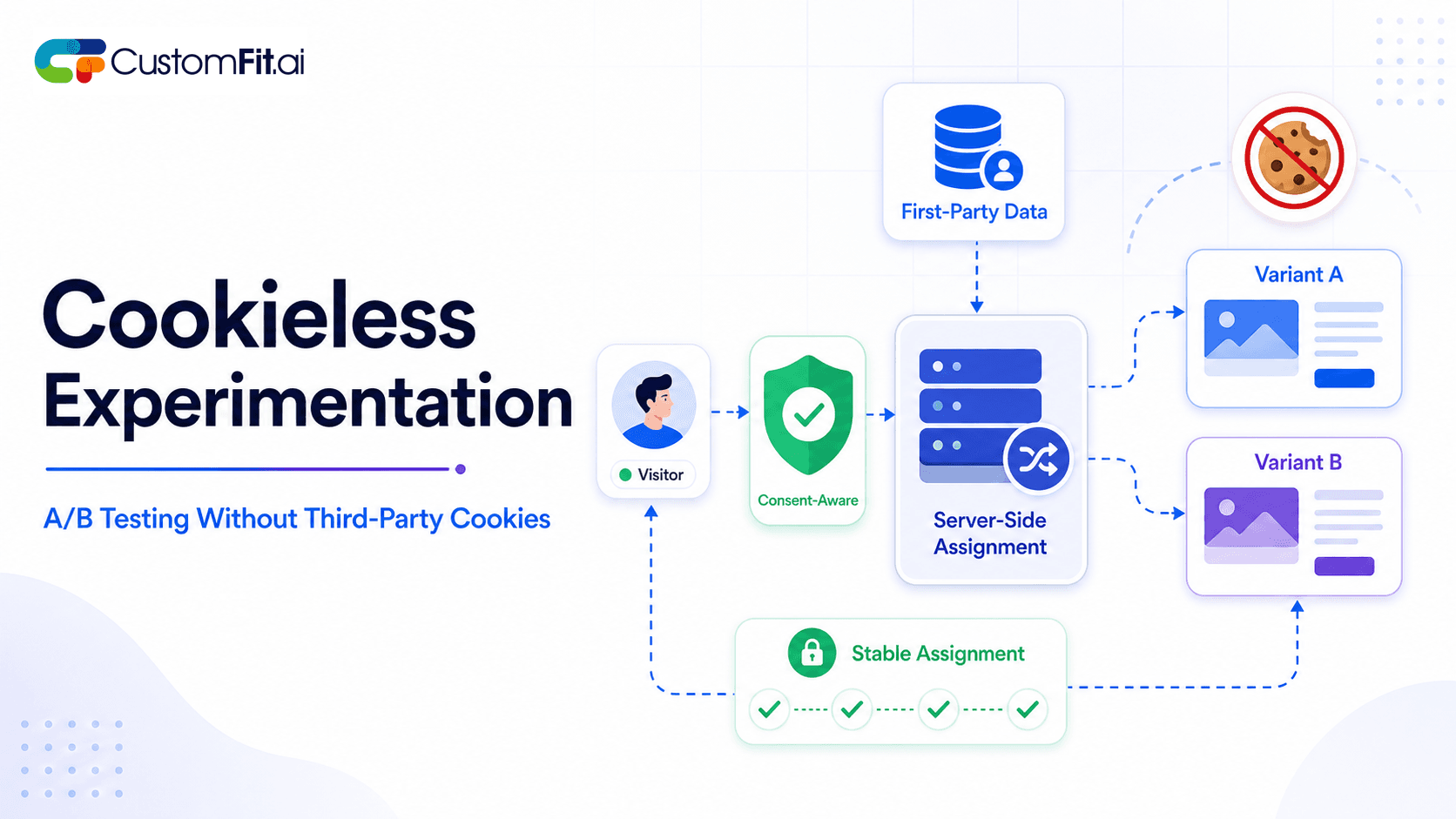
Once the assignment is made, it's stored in a first-party cookie in the visitor's browser. This cookie typically has a lifespan of 30โ€“90 days, long enough to cover the test duration.

Every time that visitor returns to the page, the testing system reads the cookie and serves the same experience. No flickering. No switching between versions. This consistency matters because:

  • Switching experiences mid-test corrupts behavioral data
  • Visitors who return across multiple sessions contribute data consistently to one group
  • The cookie also powers cross-session attribution โ€” if a visitor adds to cart on day 1 and purchases on day 5, both events count for the same variant

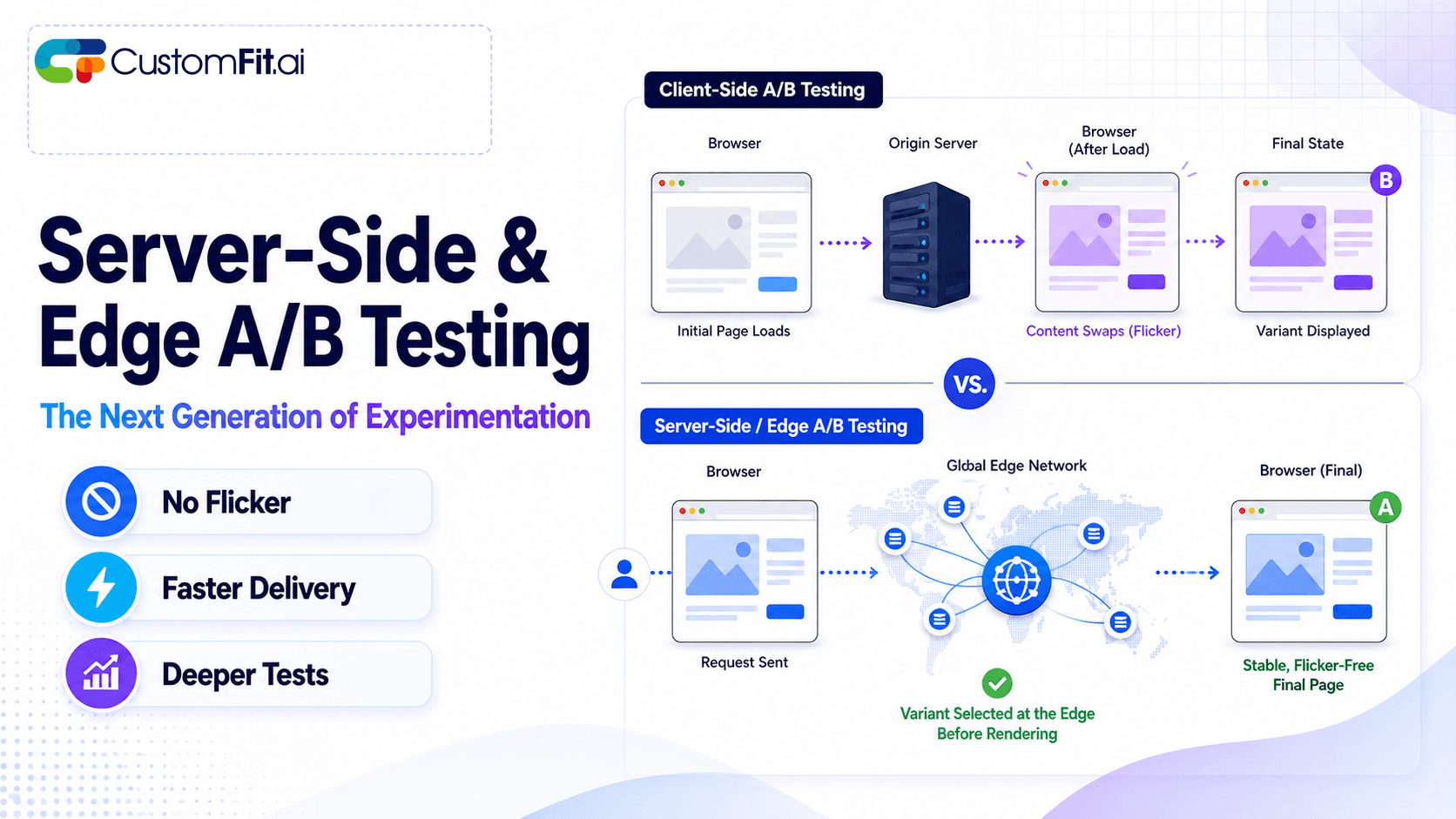
Client-side tests inject the variant via JavaScript after the page loads, which can sometimes cause a brief flash of original content (FOOC) before the variant appears. Server-side tests serve the correct version from the origin server, with no flash โ€” we'll cover this distinction more below.

Step 3 โ€” Data Collection (What Gets Tracked)

With visitors consistently bucketed into control and variant, the testing tool begins collecting data. For each group, it tracks:

  • Conversion events โ€” the primary metric (add-to-cart, purchase, form submit, whatever you defined)
  • Secondary metrics โ€” bounce rate, time on page, revenue per visitor, pages per session
  • Visitor counts โ€” how many unique visitors have been exposed to each variant
  • Session data โ€” new vs. returning visitors, device type, traffic source

The data flows into the testing platform in near real-time. Each conversion event is tagged with the variant that visitor belongs to, creating two parallel streams of data that will be compared at analysis time.

One nuance: you want to track unique visitors, not sessions. If a visitor visits three times before converting, that's one convert in one bucket โ€” not three sessions contributing to the numerator.

Step 4 โ€” Statistical Analysis (P-Values and Confidence Intervals Explained Simply)

This is where most marketers get lost. Here's the plain-language version.

When you observe that the variant has a 4.2% conversion rate and the control has a 3.8% conversion rate, you have a 10.5% relative lift. But is that difference real, or could it be random noise?

P-value tells you the probability that the observed difference happened by chance, assuming there was no real difference (the null hypothesis). A p-value of 0.05 means there's a 5% probability the result is random noise. When p < 0.05, you've reached 95% statistical significance โ€” the industry standard.

Confidence interval shows the range of likely true values for the lift. A 95% confidence interval of [+2% to +18%] means you're 95% confident the true lift is somewhere in that range. Wider intervals mean more uncertainty; narrow intervals mean you have enough data to be precise.

Sample size is the other side of this equation. The smaller the true effect you're trying to detect, the larger the sample you need. A tool like a sample size calculator will ask you for:

  • Current conversion rate (baseline)
  • Minimum detectable effect (smallest lift worth acting on, often 10-15% relative)
  • Statistical significance threshold (95%)
  • Statistical power (80% standard โ€” meaning 80% chance of detecting a real effect if one exists)

Running this calculation before you start is non-negotiable. It tells you how many visitors each variant needs before results are valid.

Step 5 โ€” Winner Declaration

A test is ready to call when both conditions are true:

  1. Statistical significance โ‰ฅ 95% (p-value < 0.05)
  2. Minimum test duration reached (usually 14โ€“30 days, to capture weekly traffic cycles)

Never call a winner based on significance alone. A test that reaches 95% significance on day 3 with 400 visitors is almost certainly a false positive โ€” you need both the statistical threshold and the time threshold.

When both are met:

  • Variant wins: Ship it permanently. Remove the test code. Document the result.
  • No significant difference: Control stays. The variant didn't beat it โ€” which is useful information. Document the hypothesis and why it didn't work.
  • Variant loses significantly: Control wins. Document what the data revealed about your users.

What Happens Under the Hood: Client-Side vs Server-Side Testing

There are two fundamentally different ways to deliver A/B test variants, and each has meaningful trade-offs for D2C brands.

Client-side testing works via a JavaScript snippet that loads in the browser after the page HTML is delivered. The snippet reads the visitor's bucket assignment and modifies the DOM (Document Object Model) to render the variant โ€” changing headline text, button colors, image swaps, etc. Tools like Google Optimize (deprecated), VWO, and many others use this approach.

The downside: because the modification happens after page load, there's a window where the visitor sees the original before the JavaScript executes. This "flicker" is usually milliseconds, but it's a real issue on slower connections and can contaminate behavioral data if users see both versions.

Server-side testing makes the branching decision at the server or CDN level, before any HTML is delivered to the browser. The visitor gets the correct version immediately, with zero flicker. This approach also handles complex experiments โ€” different pricing, different product recommendations, different page layouts โ€” that would be difficult to implement purely in JavaScript.

Server-side testing is harder to set up but produces cleaner data. For D2C brands doing serious CRO, it's worth the investment.

How AI-Powered Testing Works Differently

Traditional A/B testing is binary and static: 50% to control, 50% to variant, hold it until significance. AI-powered testing introduces dynamic traffic allocation that improves both speed and accuracy.

Multi-armed bandit algorithms treat each variant as an "arm" of a slot machine. Early in the test, the algorithm explores โ€” spreading traffic relatively evenly to gather data. As data accumulates, it begins exploiting โ€” shifting more traffic toward the variant that's currently winning. By the end of the test, the majority of traffic may be going to the better-performing version.

The benefit: you capture the lift sooner, and you lose less revenue to the underperforming variant during the test. The trade-off: pure bandit results are harder to interpret with classical statistics, so some platforms use a hybrid approach.

Predictive intent scoring goes further. Instead of assigning all visitors to the same test, the system segments by predicted intent โ€” high-intent purchasers, browsers, price-sensitive shoppers โ€” and learns which variant performs best for each segment. A variant that lifts conversions for high-intent shoppers might have no effect on casual browsers, and showing the result as a single aggregate number would mask both findings.

Automatic winner detection uses sequential testing methods that continuously monitor significance and flag when results are conclusive, rather than waiting for a fixed endpoint.

A/B Testing on Shopify: How It Works in Practice

For Indian D2C brands on Shopify, the testing workflow is concrete. Here's how it runs on CustomFit.ai:

  1. Define the hypothesis โ€” "We believe adding a size guide popup on the product page will increase add-to-cart rate because users are dropping off due to size uncertainty."
  2. Set up the test in CustomFit.ai โ€” Select the page, define the variant (add the popup), set the traffic split (50/50), and configure the primary metric (add-to-cart clicks).
  3. Calculate sample size โ€” CustomFit.ai's built-in calculator estimates you need 2,400 visitors per variant to detect a 15% relative lift at 95% significance with 80% power.
  4. Launch and monitor โ€” The test runs. CustomFit.ai tracks both variants in real time, shows a live significance meter, and alerts you when the test is ready to call.
  5. Call the winner โ€” At day 21 with 5,100 visitors per variant, the variant shows a 17.3% lift at 97% significance. Ship it.
  6. Document and repeat โ€” Results logged, hypothesis confirmed, next test queued.

No developer tickets. No waiting for sprint cycles. Tests that used to take weeks to set up now launch in an afternoon.

Common Questions About How A/B Testing Works

Can I test more than two versions at once? Yes โ€” testing three or more variants simultaneously is called A/B/n testing or multivariate testing. It requires proportionally more traffic (if you have three variants at 33% each, each group is smaller) and takes longer to reach significance. Keep variants to 2โ€“3 unless you have very high traffic.

What if my traffic is seasonal? Always run tests across at least one full weekly cycle to account for weekday/weekend behavior differences. For seasonal categories (festive wear, wedding lehengas), avoid launching tests during major sale periods โ€” the behavioral data from sale traffic doesn't represent normal shoppers.

Does A/B testing work on mobile apps? Yes, with server-side testing or mobile SDKs. The mechanics are identical: users are assigned to buckets via a unique identifier, variants are served consistently, and conversions are tracked. Mobile introduces session complexity (apps don't use cookies the same way), so use a user ID as the assignment key.

What's the difference between A/B testing and multivariate testing? A/B testing changes one element and compares two complete versions. Multivariate testing (MVT) tests multiple elements simultaneously โ€” headline + image + button โ€” to find the best combination. MVT requires significantly more traffic and is generally more useful for optimization teams with established testing programs.

Understanding what A/B testing is is the foundation. Knowing how to run A/B tests correctly is what turns that knowledge into revenue.

1,000+ D2C brands use CustomFit.ai to run A/B tests โ€” without code, without developer tickets. 14-day free trial ยท No credit card required.

Start Your Free Trial ยท Book a Demo