CustomFit.ai โ€” Website personalization, A/B testing and CRO for Shopify and D2C
Product
Features
โœฑ
Website Personalization
Adapt to each visitor's behavior & intent
โง–
A/B & Multivariate Testing
Rigorous experimentation
โœจ
AI CopilotNEW
Personalize with a prompt
๐Ÿค–
AI WingmanNEW
Auto-optimize toward winners
๐ŸŽฏ
AI Conversion OptimizerNEW
GPT-grade test ideas
โœŽ
No-Code Visual Editor
Drag-and-drop edit any element
โ–ฆ
Product Recommendations
Personalized recs that lift AOV
โš‘
Feature Flags
Ship safely with kill-switches
โ—ง
Chrome Extension
Edit your store in the browser
โง‰
Shopify, WooCommerce & more
All platform integrations
View all features โ†’
Use Cases
$
Price A/B Testing
Test price points to maximize revenue
โ–ฆ
Theme A/B Testing
Compare whole layouts & designs
๐Ÿ—‚
Template A/B Testing
Test whole PDP/PLP templates
๐Ÿท
Discount A/B Testing
Find the offer that converts
๐Ÿšš
Shipping A/B Testing
Thresholds, speed & copy
โœ
Content A/B Testing
Copy, images & reviews
๐Ÿ’ณ
Checkout Gateway A/B
Payments & one-click
โŒ–
Geo-Based Personalization
Per-location content & offers
โšก
Buyer-Intent Nudges
Exit-intent & retargeting
โ†”
Split-URL / Redirection
Full-page redirect tests
View all use cases โ†’
Solutions & Guides
โคข
Conversion Rate Optimization
The complete CRO guide
โง–
A/B Testing Software
Buyer's guide for D2C
๐Ÿ›’
Cart Abandonment Recovery
Win back lost carts
๐Ÿ“ฐ
Landing Page Optimization
Convert more paid traffic
S
Shopify A/B Testing
Test your store, no code
S
Shopify Personalization
Tailor the store per shopper
โ—”
First-Time Visitor Offers
Convert new shoppers with trust & offers
โ˜…
Repeat-Customer Experiences
Reward and re-engage loyal buyers
โ—Ž
Campaign-Matched Pages
Match the landing page to the ad
โŒ–
Location-Based Experiences
Currency, language & regional offers
Explore CRO โ†’
Customer stories
GIVA
+32%
conversion via personalized recs
GIVA
Mamaearth
+18%
revenue lift from PDP A/B tests
ME
The Sleep Company
+24%
AOV from product recommendations
TSC
Read customer stories โ†’
Integrations
SWsfGA+15
โœฆ
Not sure where to start?
Let AI Copilot pick your first tests

โ€œWe wake up to evidence-backed tests ready to deploy โ€” not a backlog of maybe ideas.โ€

AN
Anirudh S.
Growth ยท Chargebee
โ˜…โ˜…โ˜…โ˜…โ˜…4.8on G2 ยท 2,400+ brands
Talk to our team โ†’
Widgets
Integrations
Ecommerce & Checkout
Shopify
Shopline
Shoplazza
GoKwik
ShopFlo
Razorpay Magic Checkout
Breeze
Shiprocket
View all integrations โ†’
Analytics & Behavior
Google Analytics 4
Microsoft Clarity
Hotjar
Mixpanel
Amplitude
Heap
Adobe Analytics
Segment (CDP)
View all integrations โ†’
Engagement, CRM & More
Klaviyo
MoEngage
CleverTap
WebEngage
HubSpot
Salesforce
Slack
Meta Ads
View all integrations โ†’
CustomersPricing
Resources
CRO
โ–ค
Playbooks
Proven strategies to boost conversions
๐ŸŽ™
Interviews
D2C leaders & marketing experts
โ–ถ
Webinars
Live deep dives & product sessions
Learn
โœŽ
Blog
Tips, experiments & best practices
๐Ÿ“•
Free E-Books
Mastering personalization
๐Ÿ“–
Conversion Glossary
Every CRO term, defined
โœฆAI CopilotNEWLog inBook a demo
Start free trial
Select your platform โ€” Install in 2 minsWe'll tailor the setup
โšก Risk-free 14-day trial ยท No credit card ยท Cancel anytime
S
Shopify
Install from Shopify App Store
โ€บ
W
WooCommerce
Install the WooCommerce plugin
โ€บ
B
BigCommerce
Install from BigCommerce App Marketplace
โ€บ
SL
Shopline
Install from Shopline App Store
โ€บ
M
Salesforce / Magento
Install from the marketplace
โ€บ
SZ
Shoplazza
Install from Shoplazza App Store
โ€บ
WP
WordPress / Webflow
Install plugin or paste the script
โ€บ
โ—ง
Others
Custom-built on React, Next.js, etc.
โ€บ
Tip: pick your platform โ€” we handle the restBook a demo โ†’
Product
Website PersonalizationA/B & Multivariate TestingAI CopilotAI WingmanAI Conversion OptimizerNo-Code Visual EditorProduct RecommendationsFeature FlagsView all features โ†’
Use Cases
Price A/B TestingTheme A/B TestingTemplate A/B TestingDiscount A/B TestingShipping A/B TestingContent A/B TestingCheckout Gateway A/BGeo-Based PersonalizationBuyer-Intent NudgesSplit-URL / Redirection
Solutions & Guides
Conversion Rate OptimizationA/B Testing SoftwareCart Abandonment RecoveryLanding Page OptimizationShopify A/B TestingShopify Personalization
Explore
WidgetsIntegrationsCustomersPricing
Resources
BlogPlaybooksWebinarsInterviewsE-BooksConversion Glossary
Platforms
ShopifyShoplineShoplazzaChrome ExtensionAll integrations
Start free trialBook a demo
Homeโ€บBlogโ€บanalyticsโ€บGoogle Analytics 4 for Ecommerce: Setup Guide

Google Analytics 4 for Ecommerce: Setup Guide

SKSharan KumarCo-Founder & CTO, CustomFit.aiJanuary 15, 202510 min read
On this page
  1. Understanding GA4's Event-Based Model
  2. Step 1: GA4 Property Setup
  3. Creating Your GA4 Property
  4. Data Retention Settings
  5. Internal Traffic Filtering
  6. Step 2: Shopify GA4 Integration
  7. Option 1: Shopify Native Google Channel (Basic)
  8. Option 2: Third-Party Tracking Apps (Recommended)
  9. Option 3: Google Tag Manager (GTM) + Custom Implementation
  10. Step 3: Ecommerce Event Setup
  11. Essential Ecommerce Events
  12. Verifying Event Tracking
  13. Step 4: Setting Up GA4 Ecommerce Reports
  14. The Reports That Matter for D2C
  15. Step 5: Custom Reports and Explorations for D2C
  16. Must-Build Explorations for D2C
  17. Step 6: GA4 Audiences for Remarketing
  18. Step 7: Connecting GA4 to CustomFit.ai for A/B Test Analysis
  19. Common GA4 Ecommerce Setup Mistakes
  20. Tips and Best Practices
  21. Key Takeaways
0%
Google Analytics 4 for Ecommerce: Setup Guide

From the conversion glossary

Concepts referenced in this article, defined.

Definition
What Is Variant? Definition, Formula & Guide
Definition
What Is Experiment? Definition, Formula & Guide
Definition
What Is New Users? Definition, Formula & Guide
Definition
What Is Cohort Analysis? Definition & Guide
Definition
What Is Control? Definition, Formula & Guide
โ† Back to Analytics guide
Try CustomFit.ai

Run A/B tests and personalize your store without code. 14-day free trial, no credit card.

Start free trial โ†’
Share
XLinkedInEmail

Related articles

analytics

Tracking Setup for A/B Testing: Events & Goals

Sharan Kumarยท 8 min read
analytics

RFM Segmentation for D2C Brands

Sharan Kumarยท 9 min read
analytics

Ecommerce Dashboard: KPIs to Track Daily

Sharan Kumarยท 8 min read

Start lifting conversions today.

Run rigorous A/B tests and personalize every visit on Shopify or any storefront โ€” no engineers required.

Start free trialBook a demo

Built for every D2C category

๐Ÿงด
Skincare
๐Ÿ’„
Beauty
๐ŸŒฟ
Wellness
โ˜•
F&B
๐Ÿ‘Ÿ
Apparel
๐Ÿ’
Jewelry
๐Ÿ›‹๏ธ
Home
๐Ÿผ
Baby
Live ยท Right now
Mamaearth โ€” free-shipping band +12.4% AOVGIVA โ€” festive collection page +34% revenueBellavita โ€” PDP CTA test +27.4% CVRKapiva โ€” Quiz-driven recs +9.48% CTRThe Sleep Co โ€” landing personalized 2ร— capturesPlum โ€” Returning shopper swap +18.2% CVRMamaearth โ€” free-shipping band +12.4% AOVGIVA โ€” festive collection page +34% revenueBellavita โ€” PDP CTA test +27.4% CVRKapiva โ€” Quiz-driven recs +9.48% CTRThe Sleep Co โ€” landing personalized 2ร— capturesPlum โ€” Returning shopper swap +18.2% CVR
Get in touch

Tell us about your store.

We reply within an hour during business hours. No sales pitch, no spam โ€” just answers from someone who's seen 2,400+ D2C stores.

โœ“ Reply within 1 hourโœ“ No spam, everโœ“ Free demo & setup help
โœ“ Thanks! We'll be in touch shortly.
CustomFit.ai

The all-in-one website personalization, A/B testing & CRO platform for high-growth D2C brands. Made by marketers, fueled by coffee.

in๐•โ—Žโ–ถf
Product
  • Features
  • A/B Testing
  • Personalization
  • AI Copilot
  • AI Wingman
  • AI Conversion Optimizer
  • Feature Flags
  • Widgets
  • Integrations
  • ROI Calculator
Platforms
  • Shopify
  • Shopline
  • Shoplazza
  • Salesforce
  • Chrome Extension
  • All Integrations
Resources
  • Blog
  • Playbooks
  • Webinars
  • GrowthFit Interviews
  • Free E-Books
  • Conversion Glossary
  • Case Studies
Compare
  • vs VWO
  • vs Optimizely
  • vs Google Optimize
  • vs Mutiny
  • vs Intelligems
  • vs Shoplift
  • vs AB Tasty
  • vs Convert
  • vs Kameleoon
Company
  • About Us
  • Partners
  • CustomFit Awards
  • Recognition
  • Contact
  • Privacy Policy
  • Terms & Conditions
ยฉ 2026 CustomFit.ai ยท Valley Monks Pvt Ltd ยท Made by marketers, fueled by coffee, and obsessed with conversions.
SOC 2 Type II ยท GDPR ยท CCPA ยท ISO 27001

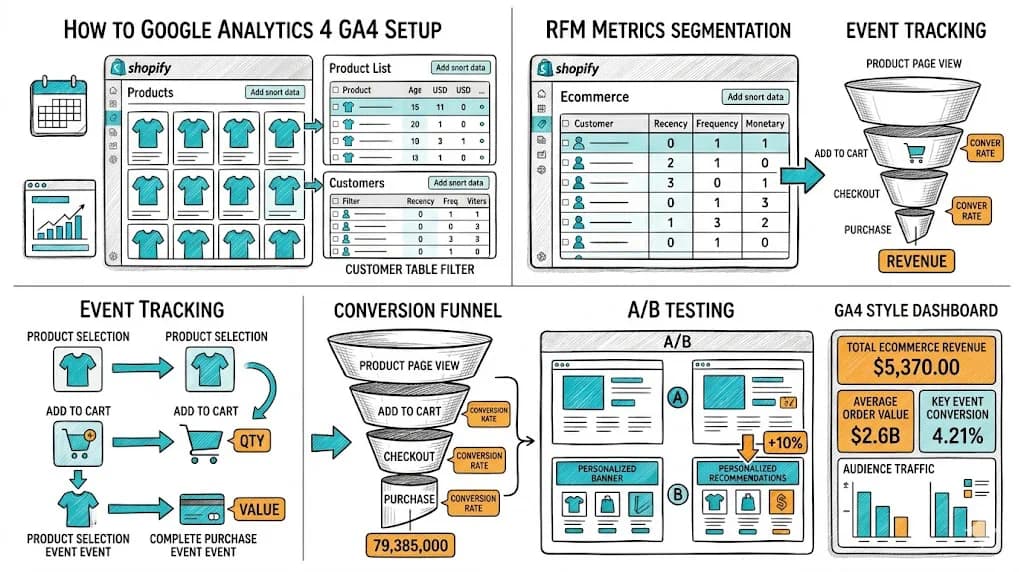
Google Analytics 4 replaced Universal Analytics in 2023, and many ecommerce brands are still running suboptimal setups that miss critical data. A properly configured GA4 installation for ecommerce tracks the complete purchase journey โ€” from first visit through product view, add to cart, checkout, and purchase โ€” and connects that journey to marketing channels, customer segments, and retention cohorts. This guide walks through the complete GA4 ecommerce setup and the reports that actually matter for Indian D2C brands.

Understanding GA4's Event-Based Model

The biggest conceptual shift from Universal Analytics to GA4 is the move from sessions and pageviews to events and parameters.

In GA4, everything is an event:

  • A page view is an event (page_view)
  • A product view is an event (view_item)
  • Adding to cart is an event (add_to_cart)
  • A purchase is an event (purchase)

Each event can have parameters โ€” additional data points that give context:

  • item_id: The product SKU
  • item_name: The product name
  • price: The product price
  • currency: INR (for Indian stores)
  • value: The transaction value

This model is more flexible than UA's session model and gives you much more granular data for funnel analysis and cohort analysis.

Step 1: GA4 Property Setup

Creating Your GA4 Property

  1. Log into Google Analytics (analytics.google.com)
  2. Admin โ†’ Create Property โ†’ GA4
  3. Property name: "[Your Brand] GA4"
  4. Reporting time zone: India Standard Time (IST)
  5. Currency: Indian Rupee (INR)

Setting currency to INR is critical for accurate revenue reporting. Revenue reported in USD when your orders are INR will create confusing data.

Data Retention Settings

GA4 defaults to 2-month data retention for user-level data. Change this to 14 months: Admin โ†’ Data Settings โ†’ Data Retention โ†’ 14 months

Without this change, cohort analysis reports will have limited historical data.

Internal Traffic Filtering

Exclude your own team's visits from GA4 data: Admin โ†’ Data Streams โ†’ [Your stream] โ†’ Configure Tag Settings โ†’ Define Internal Traffic โ†’ Add your office/home IP addresses

This prevents your own product testing and browsing from inflating traffic metrics.

Step 2: Shopify GA4 Integration

There are three approaches to connecting GA4 to Shopify:

Option 1: Shopify Native Google Channel (Basic)

The Shopify Google & YouTube sales channel app provides basic GA4 tracking. It covers:

  • Page views
  • Purchase events (with revenue)
  • Basic session data

What it misses: Product detail views, add to cart events, checkout step events, and refund events. Without these, you cannot build a complete purchase funnel in GA4.

Best for: Brands just starting out who want basic data quickly.

Option 2: Third-Party Tracking Apps (Recommended)

Apps like Elevar, TrueROAS, Littledata, or Analyzify implement full GA4 ecommerce tracking on Shopify without requiring custom development:

  • All 9 standard ecommerce events
  • Checkout funnel events
  • Refund events
  • Cross-device tracking via server-side events

These apps cost โ‚น3,000โ€“10,000/month but provide reliable, complete data that justifies the investment. Data gaps in GA4 lead to bad optimization decisions.

Option 3: Google Tag Manager (GTM) + Custom Implementation

For brands with developer resources, implementing GA4 through Google Tag Manager gives maximum control and flexibility. GTM allows:

  • Custom event parameters (like customer LTV tier, loyalty points, RFM segment)
  • Server-side tagging (reduces browser tracking blockers' impact)
  • Complex conditional event firing

This approach requires technical expertise to implement correctly but is the most complete solution.

Step 3: Ecommerce Event Setup

GA4 uses the Google Enhanced Ecommerce specification. The key events to track:

Essential Ecommerce Events

EventTriggers WhenKey Parameters
view_item_listCategory/search pageitems[], item_list_name
view_itemProduct detail pageitems[], currency, value
add_to_cartProduct added to cartitems[], currency, value
view_cartCart page vieweditems[], currency, value
begin_checkoutCheckout initiateditems[], currency, value
add_shipping_infoShipping step completeditems[], shipping_tier
add_payment_infoPayment selecteditems[], payment_type
purchaseOrder completedtransaction_id, value, currency, items[]
refundRefund processedtransaction_id, value, items[]

For Indian D2C, add two custom parameters:

  • payment_method: "UPI", "COD", "Card", "BNPL" โ€” allows segmentation of conversion by payment type
  • customer_type: "new" or "returning" โ€” allows cohort analysis and LTV tracking

Verifying Event Tracking

Use GA4's DebugView (Admin โ†’ DebugView) to verify events are firing correctly. With your browser's GA4 debug mode enabled, DebugView shows events in near-real-time.

Check each event fires with correct parameters by going through your own purchase flow from browse to purchase.

Step 4: Setting Up GA4 Ecommerce Reports

GA4's built-in ecommerce reports are powerful but require understanding to use effectively.

The Reports That Matter for D2C

1. Ecommerce Purchases Report Path: Reports โ†’ Monetization โ†’ Ecommerce Purchases

Shows: Revenue, quantity sold, and purchase counts by product.

Use for: Identifying your top-performing products, tracking new vs. returning product performance, seasonal trends.

2. Purchase Journey Report (Funnel) Path: Reports โ†’ Monetization โ†’ Purchase Journey

Shows: Customer flow from session start โ†’ product view โ†’ add to cart โ†’ begin checkout โ†’ purchase.

Use for: Identifying the biggest drop-off point in your funnel. If 1,000 add to cart events result in only 150 begin checkout events, you have a major cart abandonment problem to solve.

This is your primary funnel analysis tool. Check it weekly.

3. User Acquisition Report Path: Reports โ†’ Acquisition โ†’ User Acquisition

Shows: First-touch channel attribution โ€” which channels bring the most new users and the most converting users.

Use for: Understanding which paid and organic channels are most efficient at driving first-time customers. Compare "Users" vs. "New Users" vs. "Conversions" across channels โ€” the channel with the highest conversion rate from new users is your most efficient acquisition channel.

4. Retention Report Path: Reports โ†’ Retention

Shows: What percentage of new users return within 1, 7, 28, and 90 days.

Use for: Monitoring retention trends month-over-month. A declining Day 30 retention rate is a leading indicator of future revenue decline. A rising Day 30 retention rate shows your post-purchase experience is improving.

5. Cohort Exploration Path: Explore โ†’ Cohort Exploration

Shows: Revenue and conversion behavior by user acquisition cohort.

Use for: Comparing the lifetime value of customers acquired in different months or through different channels. A December (Diwali season) cohort might have different LTV than a June cohort โ€” understanding this shapes your acquisition investment.

Step 5: Custom Reports and Explorations for D2C

GA4's standard reports cover the basics. Use Explore (GA4's custom analysis tool) for deeper insights.

Must-Build Explorations for D2C

Funnel Exploration: Your Complete Purchase Funnel Build a custom funnel with these steps:

  1. Session start
  2. View product (view_item)
  3. Add to cart (add_to_cart)
  4. Begin checkout (begin_checkout)
  5. Purchase (purchase)

Segment by: Device category, New vs. Returning user, Traffic source.

This shows you exactly where mobile vs. desktop users drop off, where paid vs. organic traffic differs in conversion, and where the biggest opportunity lies.

User Lifetime Report Path: Explore โ†’ User Lifetime

Shows: Revenue, purchase count, and session count per user over their lifetime. Critical for customer lifetime value tracking.

Path Exploration: Product Discovery Paths Build a path analysis starting from your homepage and category pages to understand which navigation paths lead to purchases. This informs navigation optimization โ€” if most purchases come from a particular browsing path, ensure that path is smooth.

Step 6: GA4 Audiences for Remarketing

GA4 automatically creates predictive audiences based on purchase probability:

  • "Likely 7-day purchasers" โ€” users likely to purchase in next 7 days
  • "Likely 7-day churners" โ€” users likely to become inactive
  • "Predicted 28-day top spenders" โ€” users likely to be high-value

Connect GA4 to Google Ads and Meta Ads to use these audiences for remarketing. Showing your highest-intent visitors a specific ad campaign can dramatically improve paid media efficiency.

Custom audiences to build for Indian D2C:

  • Abandoned cart in last 7 days (view_cart without purchase)
  • Viewed specific product category (view_item_list with item_list_name = "Skincare")
  • High-value customers (purchase value > โ‚น2,000 in last 90 days)

Step 7: Connecting GA4 to CustomFit.ai for A/B Test Analysis

CustomFit.ai pushes experiment data to GA4 as custom dimensions:

  • Experiment name
  • Variant seen (Control or Variant A/B)

In GA4, you can then segment any report by experiment variant. For example:

  • Revenue by variant: Did Variant A drive higher revenue than Control?
  • Funnel completion by variant: Did the test improve checkout completion rate?
  • Session value by variant: What was the revenue per visitor for each variant?

This integration means your A/B test results are validated in GA4's data, not just CustomFit.ai's internal reporting โ€” giving you a second data source to confirm test outcomes.

Common GA4 Ecommerce Setup Mistakes

Not filtering internal traffic: Your own team's browsing inflates session counts and can distort conversion rate if team members test purchases.

Currency not set to INR: Revenue data in GA4 will be unreliable if currency is not set to INR for Indian stores.

Missing add_to_cart events: Without this event, you cannot build the complete purchase funnel or track cart abandonment in GA4.

Not enabling cross-device tracking: GA4 uses Google Signals to stitch together cross-device journeys for signed-in Google users. Enable Google Signals: Admin โ†’ Data Collection โ†’ Google Signals.

Ignoring the refund event: RTO and returns affect your real revenue significantly. Track refund events to get accurate net revenue data.

Data retention set to 2 months: Change to 14 months immediately. You cannot get historical data back once the retention window passes.

Tips and Best Practices

  1. Set up GA4 and start collecting data before you need it. GA4 cannot backfill historical data. Every day you delay setup is data you can never recover.

  2. Use one GA4 property per store (not per marketing channel). Multi-property setups create data fragmentation that makes cross-channel analysis impossible.

  3. Name your events and parameters consistently. Custom event names like "product_viewed" and "view_item" for the same event create confusion. Follow GA4's standard ecommerce event names.

  4. Connect GA4 to Google Search Console. This adds organic search query data to GA4 โ€” essential for understanding which keywords drive ecommerce traffic.

  5. Build a weekly analytics ritual: 30 minutes each Monday reviewing Purchase Journey funnel, User Acquisition channel performance, and Retention rate. This discipline catches problems early.

  6. Track average order value in GA4 using the "value" parameter correctly โ€” it should be the total order value, not per-item value.

Key Takeaways

  • GA4's event-based model is more powerful than Universal Analytics for ecommerce โ€” use it fully by implementing all standard ecommerce events.
  • For Shopify, a third-party tracking app (Elevar, Littledata) is the most reliable path to complete GA4 ecommerce implementation without custom development.
  • The five most important GA4 reports for D2C are: Ecommerce Purchases, Purchase Journey, User Acquisition, Retention, and Cohort Exploration.
  • Set data retention to 14 months and currency to INR immediately โ€” these cannot be retroactively applied to historical data.
  • Connect GA4 to CustomFit.ai to segment A/B test results in GA4, giving you validated experiment data in your primary analytics tool.
  • Funnel analysis through GA4's Purchase Journey report is your weekly conversion optimization compass โ€” the biggest drop-off point is always your next optimization priority.

GA4 is not just a measurement tool โ€” it is the decision-making infrastructure for every CRO, acquisition, and retention decision you make. Invest in the setup to get trustworthy data, and that data will return the investment many times over.