
CustomFit.ai β€” Website personalization, A/B testing and CRO for Shopify and D2C
Product
Features
✱
Website Personalization
Adapt to each visitor's behavior & intent
β§–
A/B & Multivariate Testing
Rigorous experimentation
✨
AI CopilotNEW
Personalize with a prompt
πŸ€–
AI WingmanNEW
Auto-optimize toward winners
🎯
AI Conversion OptimizerNEW
GPT-grade test ideas
✎
No-Code Visual Editor
Drag-and-drop edit any element
β–¦
Product Recommendations
Personalized recs that lift AOV
βš‘
Feature Flags
Ship safely with kill-switches
β—§
Chrome Extension
Edit your store in the browser
⧉
Shopify, WooCommerce & more
All platform integrations
View all features β†’
Use Cases
$
Price A/B Testing
Test price points to maximize revenue
β–¦
Theme A/B Testing
Compare whole layouts & designs
πŸ—‚
Template A/B Testing
Test whole PDP/PLP templates
🏷
Discount A/B Testing
Find the offer that converts
🚚
Shipping A/B Testing
Thresholds, speed & copy
✍
Content A/B Testing
Copy, images & reviews
πŸ’³
Checkout Gateway A/B
Payments & one-click
βŒ–
Geo-Based Personalization
Per-location content & offers
⚑
Buyer-Intent Nudges
Exit-intent & retargeting
↔
Split-URL / Redirection
Full-page redirect tests
View all use cases β†’
Solutions & Guides
β€’
Conversion Rate Optimization
The complete CRO guide
β§–
A/B Testing Software
Buyer's guide for D2C
πŸ›’
Cart Abandonment Recovery
Win back lost carts
πŸ“°
Landing Page Optimization
Convert more paid traffic
S
Shopify A/B Testing
Test your store, no code
S
Shopify Personalization
Tailor the store per shopper
β—”
First-Time Visitor Offers
Convert new shoppers with trust & offers
β˜…
Repeat-Customer Experiences
Reward and re-engage loyal buyers
β—Ž
Campaign-Matched Pages
Match the landing page to the ad
βŒ–
Location-Based Experiences
Currency, language & regional offers
Explore CRO β†’
Customer stories
GIVA
+32%
conversion via personalized recs
GIVA
Mamaearth
+18%
revenue lift from PDP A/B tests
ME
The Sleep Company
+24%
AOV from product recommendations
TSC
Read customer stories β†’
Integrations
SWsfGA+15
✦
Not sure where to start?
Let AI Copilot pick your first tests

β€œWe wake up to evidence-backed tests ready to deploy β€” not a backlog of maybe ideas.”

AN
Anirudh S.
Growth Β· Chargebee
β˜…β˜…β˜…β˜…β˜…4.8on G2 Β· 2,400+ brands
Talk to our team β†’
Widgets
Integrations
Ecommerce & Checkout
S
Shopify
SL
Shopline
SZ
Shoplazza
GK
GoKwik
SF
ShopFlo
RP
Razorpay Magic Checkout
BR
Breeze
SR
Shiprocket
View all integrations β†’
Analytics & Behavior
GA
Google Analytics 4
MC
Microsoft Clarity
HJ
Hotjar
MX
Mixpanel
AM
Amplitude
HP
Heap
AA
Adobe Analytics
SG
Segment (CDP)
View all integrations β†’
Engagement, CRM & More
KL
Klaviyo
MO
MoEngage
CT
CleverTap
WE
WebEngage
HS
HubSpot
SF
Salesforce
SL
Slack
M
Meta Ads
View all integrations β†’
CustomersPricing
Resources
CRO
β–€
Playbooks
Proven strategies to boost conversions
🎬
Videos
Tutorials, demos & how-tos
πŸŽ™
Interviews
D2C leaders & marketing experts
β–Ά
Webinars
Live deep dives & product sessions
Learn
✎
Blog
Tips, experiments & best practices
πŸ“•
Free E-Books
Mastering personalization
πŸ“–
Conversion Glossary
Every CRO term, defined
✦AI CopilotNEWLog inBook a demo
Start free trial
Select your platform β€” Install in 2 minsWe'll tailor the setup
⚑ Risk-free 14-day trial · No credit card · Cancel anytime
Shopify logo
Shopify
Install from Shopify App Store
β€Ί
WooCommerce logo
WooCommerce
Install the WooCommerce plugin
β€Ί
BigCommerce logo
BigCommerce
Install from BigCommerce App Marketplace
β€Ί
Shopline logo
Shopline
Install from Shopline App Store
β€Ί
Salesforce logo
Salesforce / Magento
Install from the marketplace
β€Ί
Shoplazza logo
Shoplazza
Install from Shoplazza App Store
β€Ί
WordPress logoWebflow logo
WordPress / Webflow
Install plugin or paste the script
β€Ί
Others
Custom-built on React, Next.js, etc.
β€Ί
Tip: pick your platform β€” we handle the restBook a demo β†’
Product
Website PersonalizationA/B & Multivariate TestingAI CopilotAI WingmanAI Conversion OptimizerNo-Code Visual EditorProduct RecommendationsFeature FlagsView all features β†’
Use Cases
Price A/B TestingTheme A/B TestingTemplate A/B TestingDiscount A/B TestingShipping A/B TestingContent A/B TestingCheckout Gateway A/BGeo-Based PersonalizationBuyer-Intent NudgesSplit-URL / Redirection
Solutions & Guides
Conversion Rate OptimizationA/B Testing SoftwareCart Abandonment RecoveryLanding Page OptimizationShopify A/B TestingShopify Personalization
Explore
WidgetsIntegrationsCustomersPricing
Resources
BlogPlaybooksVideosWebinarsInterviewsE-BooksConversion Glossary
Platforms
ShopifyShoplineShoplazzaChrome ExtensionAll integrations
Start free trialBook a demo
Homeβ€ΊBlogβ€ΊBlack Friday & Cyber Monday CRO Playbook for US Ecommerce Stores
Black Friday CROCyber MondayEcommerce CRO

Black Friday & Cyber Monday CRO Playbook for US Ecommerce Stores

A practical Black Friday and Cyber Monday CRO playbook for US ecommerce stores: what to test now, what to freeze, how to prep mobile and checkout, and how to read results.

Yuvraj Singh portraitYuvraj Singh11 min read
On this page
  1. What the numbers say about this season
  2. The timeline that works
  3. Now to November 6: finish and freeze
  4. November 7 to 20: fix, do not test
  5. Thanksgiving week to Cyber Monday: watch and respond
  6. December: learn
  7. Where to spend your CRO effort
  8. Mobile first
  9. Make the offer impossible to miss and easy to understand
  10. Collection pages deserve more attention than they get
  11. The cart is where order value is won
  12. Checkout: remove every excuse to leave
  13. Speed and stability
  14. Inventory and sold-out states
  15. Shipping promises
  16. What to test now, if you still have time
  17. How to read your results
  18. Common mistakes
  19. A one-page checklist
  20. Next step
0%
Black Friday & Cyber Monday CRO Playbook for US Ecommerce Stores

From the conversion glossary

Concepts referenced in this article, defined.

Definition
What Is a Product Page? Definition & Guide
Definition
What Is Conversion Rate? Definition & Guide
Definition
What Is Discount Code? Definition & Guide
Definition
What Is Urgency? Definition & Guide
Definition
What Is Baseline? Definition, Formula & Guide
Try CustomFit.ai

Run A/B tests and personalize your store without code. 14-day free trial, no credit card.

Start free trial β†’
Share
XLinkedInEmail

Start lifting conversions today.

Run rigorous A/B tests and personalize every visit on Shopify or any storefront β€” no engineers required.

Start free trialBook a demo

Built for every D2C category

🧴
Skincare
πŸ’„
Beauty
🌿
Wellness
β˜•
F&B
πŸ‘Ÿ
Apparel
πŸ’
Jewelry
πŸ›‹οΈ
Home
🍼
Baby
Live Β· Right now
Mamaearth β€” free-shipping band +12.4% AOVGIVA β€” festive collection page +34% revenueBellavita β€” PDP CTA test +27.4% CVRKapiva β€” Quiz-driven recs +9.48% CTRThe Sleep Co β€” landing personalized 2Γ— capturesPlum β€” Returning shopper swap +18.2% CVRMamaearth β€” free-shipping band +12.4% AOVGIVA β€” festive collection page +34% revenueBellavita β€” PDP CTA test +27.4% CVRKapiva β€” Quiz-driven recs +9.48% CTRThe Sleep Co β€” landing personalized 2Γ— capturesPlum β€” Returning shopper swap +18.2% CVR
Get in touch

Tell us about your store.

We reply within an hour during business hours. No sales pitch, no spam β€” just answers from someone who's seen 2,400+ D2C stores.

βœ“ Reply within 1 hourβœ“ No spam, everβœ“ Free demo & setup help
Verifying your browser…PrivacyΒ·Terms
Loading security check…
CustomFit.ai

The all-in-one website personalization, A/B testing & CRO platform for high-growth D2C brands. Made by marketers, fueled by coffee.

inπ•β—Žβ–Άf

Product

  • Features
  • A/B Testing
  • Personalization
  • AI Copilot
  • AI Wingman
  • AI Conversion Optimizer
  • Feature Flags
  • Widgets
  • Integrations
  • ROI Calculator

Platforms

  • Shopify
  • Shopline
  • Shoplazza
  • Salesforce
  • Chrome Extension
  • All Integrations

Resources

  • Blog
  • Playbooks
  • Webinars
  • GrowthFit Interviews
  • Free E-Books
  • Conversion Glossary
  • Case Studies

Compare

  • vs VWO
  • vs Optimizely
  • vs Google Optimize
  • vs Mutiny
  • vs Intelligems
  • vs Shoplift
  • vs AB Tasty
  • vs Convert
  • vs Kameleoon

Company

  • About Us
  • Partners
  • Recognition
  • Contact
  • Privacy Policy
  • Terms & Conditions
Β© 2026 CustomFit.ai Β· Valley Monks Pvt Ltd Β· Made by marketers, fueled by coffee, and obsessed with conversions.
SOC 2 Type II Β· GDPR Β· CCPA Β· ISO 27001

Black Friday is November 27, 2026. Cyber Monday is November 30. If you are reading this in the third week of October, you have roughly five weeks, and the most useful thing you can do with them is different from what most stores do.

Most stores spend October building a big offer and a big email calendar. That is fine, but the offer only brings traffic. Whether that traffic turns into orders depends on your site, and that is what Black Friday conversion rate optimization is about.

This playbook covers what to fix, what to test, what to leave alone and how to read your numbers afterward.

What the numbers say about this season

A few facts to plan around, all from published sources.

The season is big and still growing. Adobe's forecast, published in late September 2026, expects US online holiday sales from November 1 to December 31 to reach $275.1 billion, up 6.7% year over year. It expects Cyber Week, the five days from Thanksgiving through Cyber Monday, to bring in $47.5 billion. Cyber Monday is forecast to top $15 billion, which would be a new single-day record, with Black Friday at about $12.9 billion.

Last year gives a baseline. In 2025, Adobe reported $11.8 billion in online spend on Black Friday and $14.25 billion on Cyber Monday. Shopify said its merchants sold $14.6 billion over the Black Friday to Cyber Monday weekend, up 27% on 2024, with a peak of $5.1 million per minute at 12:01 p.m. EST on Black Friday.

Mobile does most of the work. Adobe's data put mobile at 57.5% of Cyber Monday 2025 online sales and 61.6% of Thanksgiving Day. For 2026, it expects a record 63% of Thanksgiving spend on mobile.

Shoppers go for wallets and pay-later. Adobe counted $1.03 billion in buy now, pay later spend on Cyber Monday 2025 and $10.1 billion through the season to December 1. Shopify said 32% of its BFCM orders used Shop Pay.

The deals start early. Adobe notes that October sales events are adding a pre-holiday spike. Shoppers arrive in November with some of their buying already done.

The takeaway: most of your Black Friday buyers will be on a phone, in a hurry, comparing prices and ready to use a wallet or pay-later option. Build for that person.

The timeline that works

Now to November 6: finish and freeze

This is your last window for tests that need time. A test needs at least two full weeks to be trustworthy, and Black Friday traffic does not behave like normal traffic.

  • Start any test you want a clean read on by the end of this week.
  • Stop anything that cannot finish by about November 13, or keep it out of the sale.
  • Pick the winners from finished tests and make them permanent before the rush.

After mid-November, stop starting new experiments on your key pages. Traffic quality changes, results will not carry over to normal weeks, and a mistake costs the most.

November 7 to 20: fix, do not test

This is the time for changes that do not need an experiment because the answer is obvious:

  • Fix broken links, slow pages, bad mobile layouts and error messages.
  • Check every discount code and automatic discount in a real checkout on a real phone.
  • Load every high-traffic page on a mid-range phone over a normal connection.
  • Update shipping cutoffs and returns messages for the holiday period.

Thanksgiving week to Cyber Monday: watch and respond

Be on call. You are not running experiments. You are checking that things work: stock levels, checkout errors, site speed, payment failures and email links. Have one person whose only job is to place test orders every few hours.

December: learn

When the dust settles, go back through your numbers and plan the tests you would like to run in January, when traffic is calmer.
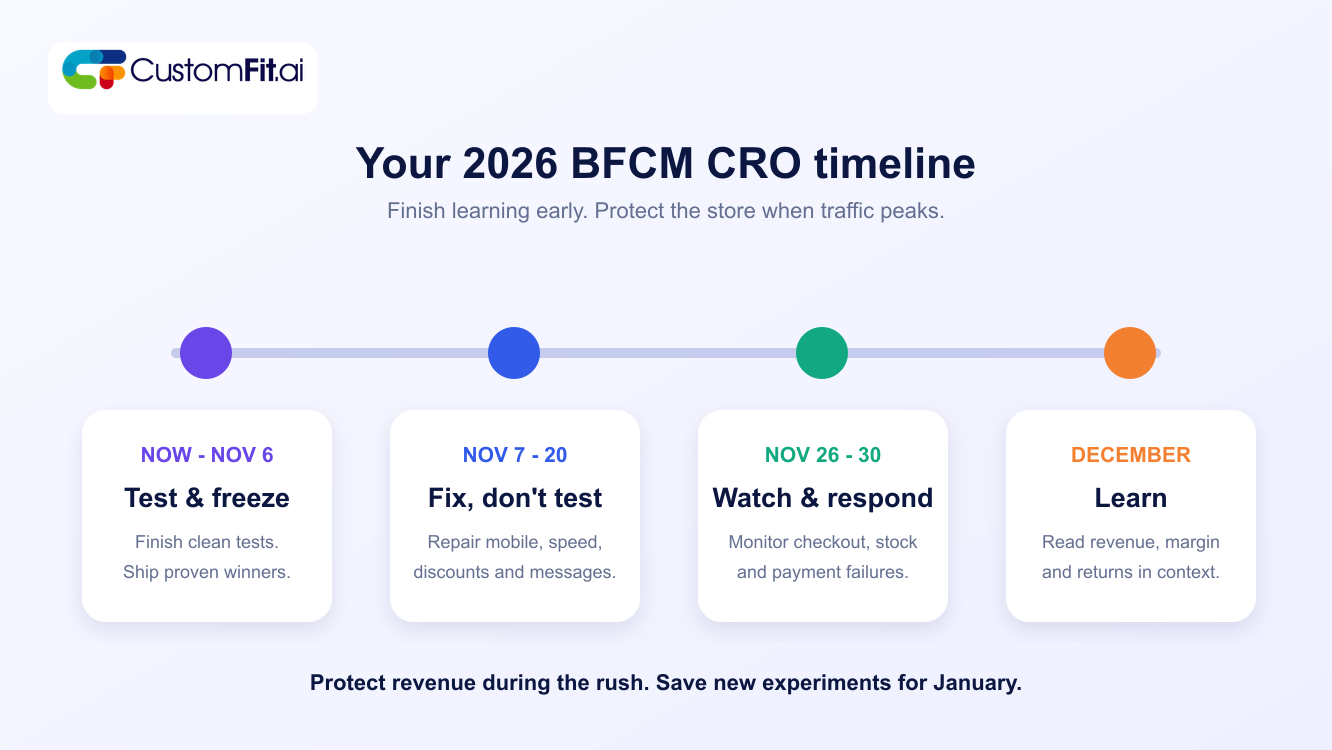
A four-stage Black Friday and Cyber Monday CRO timeline covering testing and freezing, fixing, monitoring the sales weekend, and learning in December

Read Also: How Long Should You Run an A/B Test?

Where to spend your CRO effort

Mobile first

With more than half of sale-day orders on phones, your mobile experience is your store. Check these on a real device:

  • Can a shopper find the sale from the home screen in one tap?
  • Does the product page show the price, discount, size picker and buy button without a lot of scrolling?
  • Is the add to cart button always reachable?
  • Do pop-ups block the page on a small screen? Many stores run an email pop-up, sale banner and chat widget at once. On a phone, that can cover the product.

Make the offer impossible to miss and easy to understand

On sale days, shoppers decide fast. They need to see three things: what is on sale, how much they save and when it ends.

  • Show the original price and sale price clearly on the product and collection pages.
  • Put the deal end time where people will see it, but only if it is real.
  • If you have tiers such as "spend $100, get 15% off," show progress in the cart.
  • Keep offer rules short. If shoppers need a paragraph to understand them, you will lose them.

A note on honesty: compare against a real previous price. US regulators and state laws take misleading "was" prices and fake urgency seriously, and shoppers notice them. Check with someone who knows the rules where you sell.

Collection pages deserve more attention than they get

On sale days, many shoppers browse a sale collection and add several items. Make that page fast, with clear sorting such as best sellers and biggest discounts, visible filters on mobile, and a quick-add option where it makes sense.

The cart is where order value is won

The cart is a good place for gentle nudges. A progress bar towards free shipping or a gift threshold is one of the most dependable ideas in ecommerce, as long as the threshold is realistic. A well-chosen add-on near the total can lift order value without getting in the way.

Avoid stacking offers until the cart looks like an ad.

Checkout: remove every excuse to leave

Baymard's research on why US shoppers abandon carts gives a clear to-do list. In its data, 40% cite extra costs such as shipping, tax and fees; 18% say the site required an account; 17% found checkout too long or complicated; 19% did not trust the site with their card details; and 9% said there were not enough payment methods. Across 50 studies, the average abandonment rate is about 70%. Many of those people were only browsing.

For Black Friday, that means:
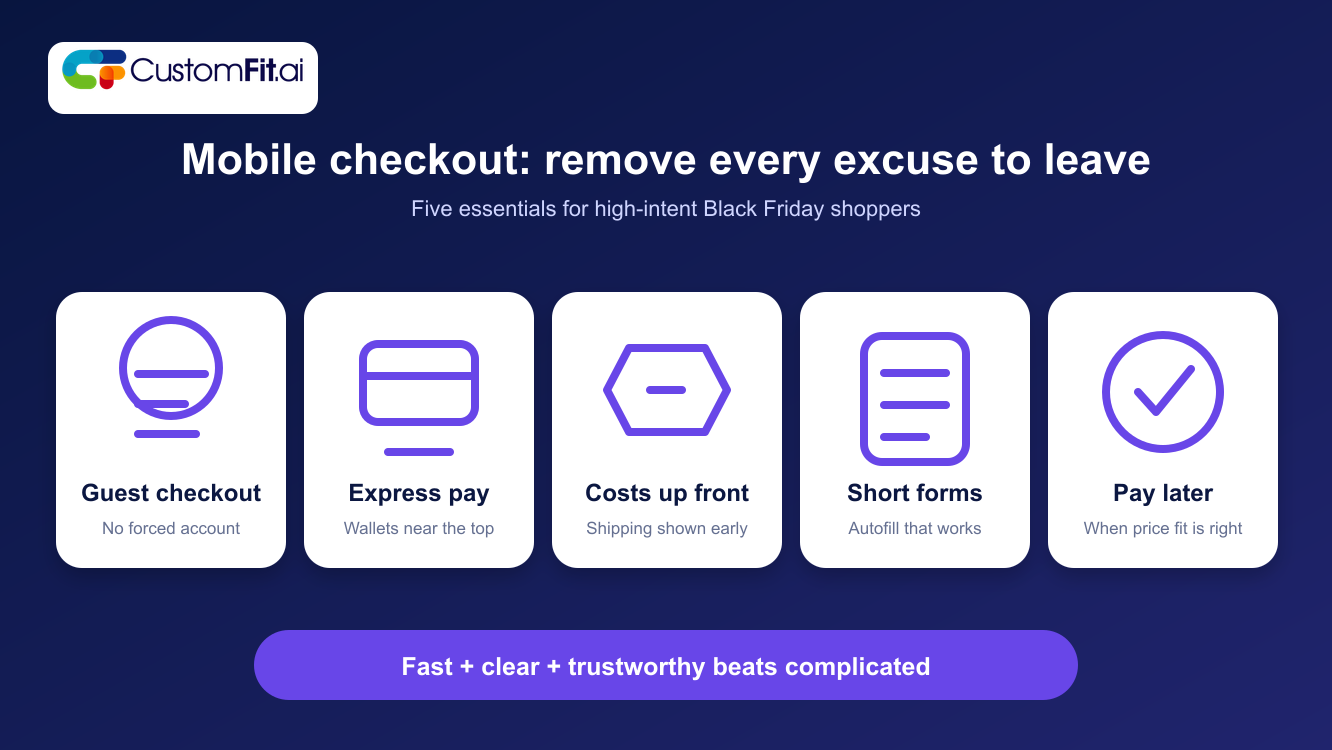
  • Offer guest checkout.
  • Offer express payment options like Shop Pay, Apple Pay and Google Pay near the top of the cart and checkout.
  • Show shipping cost and delivery estimates early.
  • Keep forms short, with autofill working properly.
  • Show recognizable payment icons and a clear returns policy.
  • Offer a pay-later option if it suits your price range.

Five mobile checkout priorities for Black Friday: guest checkout, express payment, costs shown early, short forms and pay-later options

Read Also: Guest Checkout vs. Account Creation

Speed and stability

A slow page on Black Friday costs more than on any other day because everyone is in a hurry and everyone has other tabs open.

Before the sale:

  • Run a speed test on your top pages, especially on mobile.
  • Remove or delay scripts that are not essential, including extra widgets and old tracking tags.
  • Ask your host or platform about expected load. If you use a hosted platform such as Shopify, much of this is handled, but your apps and theme can still slow things down.
  • Make sure images are the right size.

Inventory and sold-out states

Nothing hurts a sale like a hot item that is shown as available and then cannot be bought. Check stock syncing across your systems. For sold-out products, offer a "notify me" option so the interest is not wasted. Hide sold-out items from sale collection pages if they clutter the page.

Shipping promises

Holiday shipping is a major worry. Say clearly when shoppers need to order to receive items before Christmas, and put that date on the product page and in the cart. Be conservative. A late package after a promised date does lasting damage.

What to test now, if you still have time

If you can start a test this week and let it run for two weeks, these are good candidates:

  1. Free-shipping progress bar in the cart versus none, or a different threshold.
  2. Express-checkout button position in the cart.
  3. Sale-price display on the product page: savings in dollars versus percentage.
  4. Sticky add to cart button on mobile.
  5. Delivery-date message on the product page.

Judge these tests on revenue per visitor and order value, not only conversion rate, and keep an eye on discount costs.

Read Also: What Makes a Good A/B Test? Avoiding Common Mistakes

How to read your results

Black Friday numbers are easy to misread.

  • Compare like with like. Compare Black Friday to last year's Black Friday, not to a normal Tuesday.
  • Look at margin. A 30% off sale that doubles orders may not double profit.
  • Segment. Look at mobile versus desktop, new versus returning visitors, and traffic source.
  • Do not carry sale results into normal weeks. A winning variant on Black Friday may not win in February.
  • Count returns later. Sale items often come back at higher rates, so check in January.

Common mistakes

  • Starting big experiments in mid-November.
  • Piling pop-ups, banners and chat widgets on mobile.
  • Ignoring mobile because "most of our customers are on desktop" without checking sale-day data.
  • Using fake urgency and inflated "was" prices.
  • Failing to test the discount code on a real phone.
  • Having no plan for sold-out items.
  • Judging results by conversion rate alone.

A one-page checklist

  • Tests finished or stopped by mid-November.
  • Mobile pages checked on real devices.
  • Discounts tested end to end.
  • Guest checkout and express payment working.
  • Shipping and returns messaging updated.
  • Speed tested on top pages.
  • Stock sync verified, with "notify me" for sold-out items.
  • Someone on call through Cyber Monday.
  • Plan prepared for January analysis.

Next step

If you would like to start testing before the rush, CustomFit.ai can help you run A/B tests on your Shopify store and decide what to keep for the sale. Start with one or two tests, and let them finish.

Read Also:

  • Holiday Ecommerce Optimization for D2C Stores
  • Flash Sale Optimization: Prepare for Traffic, Scarcity and Checkout

Frequently asked questions

When should I stop running A/B tests before Black Friday?
Aim to have tests finished about two weeks before the sale. A test needs at least two full weeks, and sale traffic behaves differently from normal traffic, so results from that period will not tell you much about the rest of the year.
What is the most important thing to optimize for Black Friday?
Mobile checkout. Most sale-day orders come from phones, and checkout is where many shoppers leave. Guest checkout, express payment options, clear shipping costs and fast loading do the most.
Should I run a test during Black Friday?
You can, but treat the result as a read on sale behavior only. It will not necessarily hold for normal weeks. For most stores, it is safer to avoid new experiments on key pages that week.
How do I measure whether my Black Friday changes worked?
Compare against last year's same days, look at revenue per visitor and margin, and split results by device and traffic source. Check return rates in January.

Want to protect conversion through the busiest shopping weekend of the year? See how CustomFit.ai helps ecommerce teams test earlier, ship proven changes and monitor the experience through the rush.

Book a CRO strategy call