CustomFit.ai — Website personalization, A/B testing and CRO for Shopify and D2C
Product
Features
✱
Website Personalization
Adapt to each visitor's behavior & intent
⧖
A/B & Multivariate Testing
Rigorous experimentation
✨
AI CopilotNEW
Personalize with a prompt
🤖
AI WingmanNEW
Auto-optimize toward winners
🎯
AI Conversion OptimizerNEW
GPT-grade test ideas
✎
No-Code Visual Editor
Drag-and-drop edit any element
▦
Product Recommendations
Personalized recs that lift AOV
⚑
Feature Flags
Ship safely with kill-switches
◧
Chrome Extension
Edit your store in the browser
⧉
Shopify, WooCommerce & more
All platform integrations
View all features →
Use Cases
$
Price A/B Testing
Test price points to maximize revenue
▦
Theme A/B Testing
Compare whole layouts & designs
🗂
Template A/B Testing
Test whole PDP/PLP templates
🏷
Discount A/B Testing
Find the offer that converts
🚚
Shipping A/B Testing
Thresholds, speed & copy
✍
Content A/B Testing
Copy, images & reviews
💳
Checkout Gateway A/B
Payments & one-click
⌖
Geo-Based Personalization
Per-location content & offers
⚡
Buyer-Intent Nudges
Exit-intent & retargeting
↔
Split-URL / Redirection
Full-page redirect tests
View all use cases →
Solutions & Guides
⤢
Conversion Rate Optimization
The complete CRO guide
⧖
A/B Testing Software
Buyer's guide for D2C
🛒
Cart Abandonment Recovery
Win back lost carts
📰
Landing Page Optimization
Convert more paid traffic
S
Shopify A/B Testing
Test your store, no code
S
Shopify Personalization
Tailor the store per shopper
◔
First-Time Visitor Offers
Convert new shoppers with trust & offers
★
Repeat-Customer Experiences
Reward and re-engage loyal buyers
◎
Campaign-Matched Pages
Match the landing page to the ad
⌖
Location-Based Experiences
Currency, language & regional offers
Explore CRO →
Customer stories
GIVA
+32%
conversion via personalized recs
GIVA
Mamaearth
+18%
revenue lift from PDP A/B tests
ME
The Sleep Company
+24%
AOV from product recommendations
TSC
Read customer stories →
Integrations
SWsfGA+15
✦
Not sure where to start?
Let AI Copilot pick your first tests

“We wake up to evidence-backed tests ready to deploy — not a backlog of maybe ideas.”

AN
Anirudh S.
Growth · Chargebee
★★★★★4.8on G2 · 2,400+ brands
Talk to our team →
Widgets
Integrations
Ecommerce & Checkout
Shopify
Shopline
Shoplazza
GoKwik
ShopFlo
Razorpay Magic Checkout
Breeze
Shiprocket
View all integrations →
Analytics & Behavior
Google Analytics 4
Microsoft Clarity
Hotjar
Mixpanel
Amplitude
Heap
Adobe Analytics
Segment (CDP)
View all integrations →
Engagement, CRM & More
Klaviyo
MoEngage
CleverTap
WebEngage
HubSpot
Salesforce
Slack
Meta Ads
View all integrations →
CustomersPricing
Resources
CRO
▤
Playbooks
Proven strategies to boost conversions
🎙
Interviews
D2C leaders & marketing experts
▶
Webinars
Live deep dives & product sessions
Learn
✎
Blog
Tips, experiments & best practices
📕
Free E-Books
Mastering personalization
📖
Conversion Glossary
Every CRO term, defined
✦AI CopilotNEWLog inBook a demo
Start free trial
Select your platform — Install in 2 minsWe'll tailor the setup
⚡ Risk-free 14-day trial · No credit card · Cancel anytime
S
Shopify
Install from Shopify App Store
›
W
WooCommerce
Install the WooCommerce plugin
›
B
BigCommerce
Install from BigCommerce App Marketplace
›
SL
Shopline
Install from Shopline App Store
›
M
Salesforce / Magento
Install from the marketplace
›
SZ
Shoplazza
Install from Shoplazza App Store
›
WP
WordPress / Webflow
Install plugin or paste the script
›
◧
Others
Custom-built on React, Next.js, etc.
›
Tip: pick your platform — we handle the restBook a demo →
Product
Website PersonalizationA/B & Multivariate TestingAI CopilotAI WingmanAI Conversion OptimizerNo-Code Visual EditorProduct RecommendationsFeature FlagsView all features →
Use Cases
Price A/B TestingTheme A/B TestingTemplate A/B TestingDiscount A/B TestingShipping A/B TestingContent A/B TestingCheckout Gateway A/BGeo-Based PersonalizationBuyer-Intent NudgesSplit-URL / Redirection
Solutions & Guides
Conversion Rate OptimizationA/B Testing SoftwareCart Abandonment RecoveryLanding Page OptimizationShopify A/B TestingShopify Personalization
Explore
WidgetsIntegrationsCustomersPricing
Resources
BlogPlaybooksWebinarsInterviewsE-BooksConversion Glossary
Platforms
ShopifyShoplineShoplazzaChrome ExtensionAll integrations
Start free trialBook a demo
Home›Blog›d2c ecommerce›Ecommerce Inventory Display: In-Stock, Low-Stock, Pre-Order

Ecommerce Inventory Display: In-Stock, Low-Stock, Pre-Order

SJSapna JoharHead of Growth & CRO, CustomFit.aiJanuary 15, 20256 min read
On this page
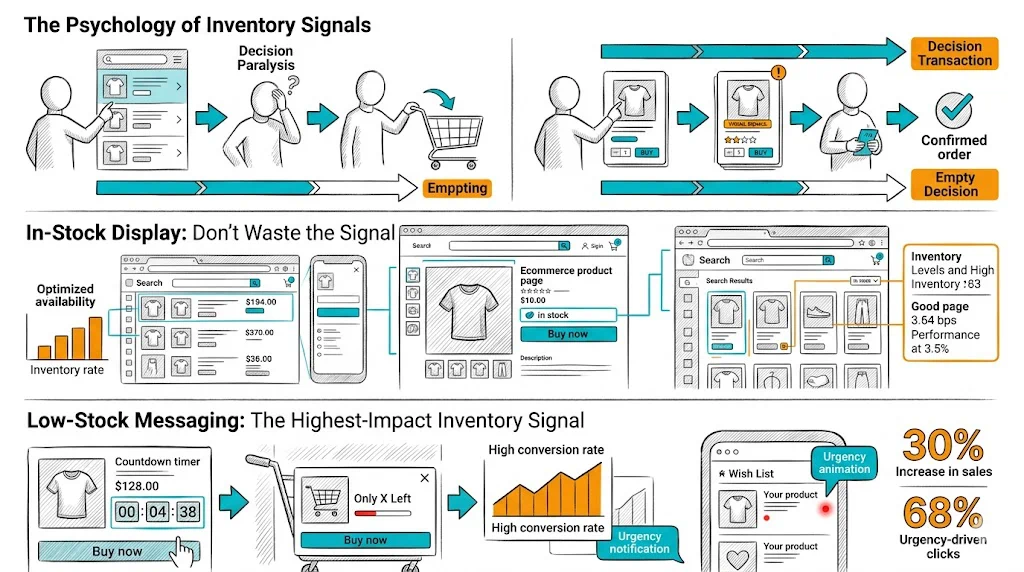
  1. The Psychology of Inventory Signals
  2. In-Stock Display: Don't Waste the Signal
  3. Low-Stock Messaging: The Highest-Impact Inventory Signal
  4. Out-of-Stock Handling
  5. Pre-Order: When and How
  6. Testing Your Inventory Display
  7. Tips / Best Practices
  8. Key Takeaways
0%
Ecommerce Inventory Display: In-Stock, Low-Stock, Pre-Order

From the conversion glossary

Concepts referenced in this article, defined.

Definition
What Is Urgency? Definition & Guide
Definition
What Is Variant? Definition, Formula & Guide
Definition
What Is Lift? Definition, Formula & Guide
Definition
What Is Social Proof? Definition & Guide
Definition
What Is Scarcity? Definition & Guide
← Back to D2c Ecommerce guide
Try CustomFit.ai

Run A/B tests and personalize your store without code. 14-day free trial, no credit card.

Start free trial →
Share
XLinkedInEmail

Related articles

d2c ecommerce

Wishlist Feature: Impact on Conversions & Retargeting

Sapna Johar· 7 min read
d2c ecommerce

User-Generated Content Strategy for D2C

Sapna Johar· 9 min read
d2c ecommerce

Seasonal Demand Planning for Ecommerce

Sapna Johar· 6 min read

Start lifting conversions today.

Run rigorous A/B tests and personalize every visit on Shopify or any storefront — no engineers required.

Start free trialBook a demo

Built for every D2C category

🧴
Skincare
💄
Beauty
🌿
Wellness
☕
F&B
👟
Apparel
💍
Jewelry
🛋️
Home
🍼
Baby
Live · Right now
Mamaearth — free-shipping band +12.4% AOVGIVA — festive collection page +34% revenueBellavita — PDP CTA test +27.4% CVRKapiva — Quiz-driven recs +9.48% CTRThe Sleep Co — landing personalized 2× capturesPlum — Returning shopper swap +18.2% CVRMamaearth — free-shipping band +12.4% AOVGIVA — festive collection page +34% revenueBellavita — PDP CTA test +27.4% CVRKapiva — Quiz-driven recs +9.48% CTRThe Sleep Co — landing personalized 2× capturesPlum — Returning shopper swap +18.2% CVR
Get in touch

Tell us about your store.

We reply within an hour during business hours. No sales pitch, no spam — just answers from someone who's seen 2,400+ D2C stores.

✓ Reply within 1 hour✓ No spam, ever✓ Free demo & setup help
✓ Thanks! We'll be in touch shortly.
CustomFit.ai

The all-in-one website personalization, A/B testing & CRO platform for high-growth D2C brands. Made by marketers, fueled by coffee.

in𝕏◎▶f
Product
  • Features
  • A/B Testing
  • Personalization
  • AI Copilot
  • AI Wingman
  • AI Conversion Optimizer
  • Feature Flags
  • Widgets
  • Integrations
  • ROI Calculator
Platforms
  • Shopify
  • Shopline
  • Shoplazza
  • Salesforce
  • Chrome Extension
  • All Integrations
Resources
  • Blog
  • Playbooks
  • Webinars
  • GrowthFit Interviews
  • Free E-Books
  • Conversion Glossary
  • Case Studies
Compare
  • vs VWO
  • vs Optimizely
  • vs Google Optimize
  • vs Mutiny
  • vs Intelligems
  • vs Shoplift
  • vs AB Tasty
  • vs Convert
  • vs Kameleoon
Company
  • About Us
  • Partners
  • CustomFit Awards
  • Recognition
  • Contact
  • Privacy Policy
  • Terms & Conditions
© 2026 CustomFit.ai · Valley Monks Pvt Ltd · Made by marketers, fueled by coffee, and obsessed with conversions.
SOC 2 Type II · GDPR · CCPA · ISO 27001

How you display inventory status on your product page is a conversion decision, not just an operational one. The difference between "Add to Cart" and "Only 2 Left — Add to Cart" can mean a 15–25% lift in add-to-cart rate for the same product. Handled well, inventory messaging creates honest urgency that accelerates purchase decisions. Handled poorly, it either fails to motivate action or, worse, destroys trust.

The Psychology of Inventory Signals

Availability signals work through two psychological mechanisms:

Scarcity: When something is limited, people want it more. This is well-documented in consumer psychology. A product with visible low stock feels more desirable than one with infinite availability.

Social proof: Low stock implies that others have been buying. "Only 4 left" suggests that 96 other units have been claimed, which validates your interest in the product.

Both effects are real—and both are undermined when the signals are fabricated. Indian shoppers are increasingly skeptical of fake countdown timers and perpetually "almost sold out" products. Authentic inventory signals convert; manufactured urgency backfires.

In-Stock Display: Don't Waste the Signal

When a product is comfortably in stock, there is no urgency signal to show—and that is fine. Focus the in-stock display on:

Availability confirmation: A simple "In Stock" badge near the variant selector reassures shoppers who have had bad experiences with stocking issues elsewhere. This is especially valuable for size-dependent products (apparel, footwear) where shoppers worry their size will be unavailable.

Delivery timeline: "In Stock — ships in 1–2 days" is more conversion-positive than a generic "In Stock" label. Showing a specific delivery date ("Estimated delivery: Monday, 20 Jan") even better—specificity reduces uncertainty and increases purchase intent.

Pincode-based delivery estimate: Showing a delivery date personalized to the shopper's location ("Delivers to 400001 by Thursday") significantly outperforms generic timelines. Most Shopify delivery estimate apps support this. CustomFit.ai can dynamically surface delivery personalization without custom development.

Low-Stock Messaging: The Highest-Impact Inventory Signal

Low-stock messaging is where most of the conversion impact lives. Best practices:

Set the right threshold. Start displaying "low stock" when quantity drops below 10–15 units for most SKUs. For high-velocity products, the threshold might be 20–25. For niche or premium products, even 5–8 units is appropriate. Test your thresholds with A/B testing to find the level that drives urgency without creating customer service problems when stock runs out mid-session.

Show counts when they are genuinely low. "Only 3 left!" converts significantly better than "Low Stock." However, avoid single-digit displays unless you are certain those are real numbers—nothing damages trust faster than adding a product to cart only to receive a "sorry, that item is no longer available" message.

Placement matters. Low-stock messages near the variant selector (size/color/quantity) perform better than those near the add-to-cart button. The variant stage is where shoppers make their final selection; showing urgency here drives faster decision-making.

Variant-specific stock display. If you have 47 units of a kurta in Medium but only 2 in Large, showing the Large-specific low stock signal when a shopper selects Large is far more powerful than a generic page-level message. Many Shopify themes support variant-level stock display; customizing it requires minimal development or can be configured through apps.

Message wording options to test:

  • "Only [X] left in stock"
  • "Almost gone — [X] remaining"
  • "[X] left at this price"
  • "Selling fast — [X] left"

The third and fourth options add additional context (price lock, velocity) that can increase urgency further—but test these carefully, as the "at this price" framing raises expectations of an upcoming price increase.

Out-of-Stock Handling

The out-of-stock state is a conversion decision too—it does not have to be a dead end.

Back-in-stock notification: An email/SMS/WhatsApp waitlist is the highest-value action an out-of-stock visitor can take. A simple "Notify me when available" form captures demand and allows you to recover sales you would otherwise lose entirely. Conversion rates on back-in-stock notifications run 15–30%—far higher than cold traffic conversion.

Show related products: When a product is OOS, automatically surface the best alternatives in the same category or from the same collection. Do not let the shopper hit a dead end.

Maintain SEO value: Keep the product page live (do not 404 it) even when OOS. Add a "currently unavailable" message and the notify-me form. Removing pages destroys accumulated SEO equity.

Transparent communication: If you know the restock date, show it. "Back in stock around 15 February" dramatically improves notify-me sign-up rates and reduces frustrated contacts to your support team.

Pre-Order: When and How

Pre-order converts well under specific conditions:

When to offer pre-order:

  • You have a confirmed restock or production date within 3–5 weeks
  • The product has strong demand (proven by past sales or notify-me list size)
  • Your brand has established trust (returning customers are the best pre-order buyers)
  • You can communicate dispatch dates clearly and honor them

Pre-order display best practices:

  • Show the expected ship date prominently—"Pre-order today, ships 5 Feb"
  • Explain clearly that payment is charged immediately (or at dispatch, if you offer that)
  • Show social proof: "243 people have pre-ordered this"
  • Offer a small pre-order incentive (priority shipping, a bonus sample) to reward early commitment

What to avoid with pre-order: Vague timelines ("ships soon"), multiple repeated pre-order cycles for the same product without delivery, and pre-orders with no communication updates between order and dispatch. Each of these erodes the trust that makes pre-order work.

Testing Your Inventory Display

Inventory display is highly testable with A/B experiments:

  • Test the low-stock threshold (5, 10, 15 units)
  • Test message wording and placement
  • Test whether showing the exact count vs. a range ("fewer than 10 left") performs better
  • Test pre-order incentive amounts

CustomFit.ai's no-code testing environment lets you run these experiments on your Shopify store without developer involvement.

Tips / Best Practices

  • Accuracy is non-negotiable. Never show low-stock signals on products with comfortable inventory—it destroys trust.
  • Sync inventory display in real time. Stale counts that show "4 left" when you are actually OOS create terrible purchase experiences.
  • Capture demand from OOS visitors. A back-in-stock waitlist is worth as much as any paid acquisition channel for high-demand products.
  • Make pre-order feel like a reward, not a compromise. Framing matters: "Be first to get it" vs. "Sorry, it's not available yet."
  • Review your inventory display setup after every restock. Thresholds that made sense at scale may be too high or low as velocity changes.

Key Takeaways

  • In-stock messaging should focus on delivery speed and specificity, not just availability confirmation.
  • Low-stock signals drive the highest conversion lift; display them at the variant level with accurate counts.
  • Out-of-stock states should capture demand via notify-me rather than losing visitors entirely.
  • Pre-order works when you have confirmed timelines, established trust, and clear communication.
  • Test all inventory display elements—threshold, wording, placement—to find what drives urgency for your specific audience.

Related reading: Conversion Rate Optimization | Product Page | Cart Abandonment | A/B Testing | Ecommerce Product Launch Checklist

See also: D2C & Ecommerce Growth Pillar