From the conversion glossary
Concepts referenced in this article, defined.
Concepts referenced in this article, defined.
Run rigorous A/B tests and personalize every visit on Shopify or any storefront — no engineers required.
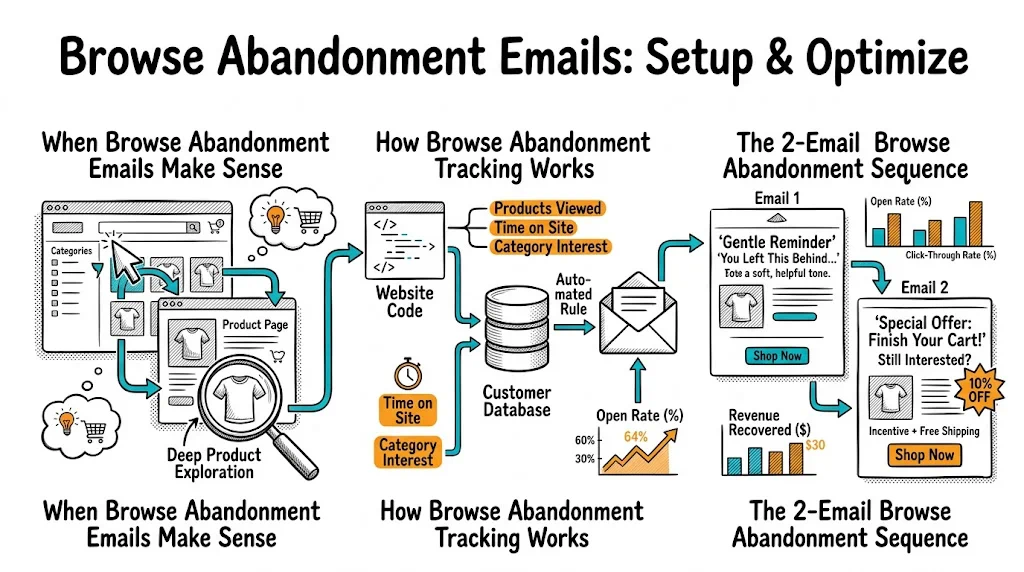
Browse abandonment emails are sent to subscribers who visited a product page and left without adding anything to cart. They're not as high-intent as cart abandoners, but there are far more of them—for every visitor who adds to cart, 3–5 more look at a product page and leave. Recapturing even 2% of those browsers adds meaningful revenue. Here's how to set them up and make them worth sending.
Not every store should prioritize browse abandonment. It's worth setting up if:
For new brands or those with small email lists, cart abandonment emails give more return per hour spent. Build that first.
For browse abandonment to work, three things must happen:
Visitor identification: The visitor must be identified—either logged into an account, or their email must be known from a previous session cookie matched to a Klaviyo/MoEngage profile.
Page view tracking: Your email platform must receive a "product viewed" event with the specific product ID and URL. In Klaviyo on Shopify, this happens automatically via the Klaviyo pixel. In other platforms, you may need to configure the event via GTM.
Filter for add-to-cart: Only send the email if the visitor viewed the product but did not add it to cart (and did not purchase). Without this filter, you'll email buyers mid-checkout—a poor experience.
Job: Surface the product they looked at, gently. Not pushy. Like a friend saying "hey, you were looking at this."
Subject line options:
Template:
Hi [First Name],
We saw you checking out [Product Name] earlier.
[Product Image]
[Product Name] — [One-line benefit description]
If you had questions or weren't sure if it's right for you, here's what [X] customers say:
"[Short, specific review]" — [Name, City]
[View [Product Name] →]
No pressure — just wanted to make sure you didn't lose track of something you liked.
Key rules:
Job: Address hesitation. Provide more proof. Add a light incentive if needed.
Subject line options:
Template:
Hi [First Name],
[Product Name] keeps coming back to mind? Here's what you should know:
✓ [Key differentiator 1] ✓ [Key differentiator 2] ✓ [Trust signal — e.g., "10,000+ orders shipped", "4.7 stars across 900 reviews"]
Frequently asked questions:
Is it suitable for [common concern relevant to your category]? Yes, [clear answer].
How long before I see results? [Honest answer.]
[Buy [Product Name] Now →]
P.S. We offer [free returns / COD / free shipping above ₹X] so there's no risk in trying it.
Key rules:
Immediacy matters, but don't be creepy: Sending within 1 hour of a browse session can feel too fast—the visitor may still be on your site. 2–4 hours is the recommended first send for most categories.
Consider shopping hours: Indian shoppers browse heavily between 9–11 PM. A browse abandonment email sent at midnight often performs worse than one sent the next morning at 10 AM. Test timing by when it reaches the inbox, not just when the browse happened.
Weekend vs. weekday: Saturday browse abandonment emails get opened less than Tuesday-Thursday sends. If you browse-track on Saturday, consider sending Monday morning.
Not all browsers are equal. Segment for better results:
High-value category browsers: Visitors who browsed your ₹2,000+ products are worth a slightly more generous incentive than someone browsing your ₹299 entry-level items. The AOV justifies the offer.
Repeat browsers: Someone who has browsed the same product twice or three times in a week has strong intent. Escalate the sequence—offer a stronger incentive or create urgency ("Only 8 left in stock").
New subscribers vs. long-time subscribers: New subscribers who browse immediately after signing up may just be exploring. Long-time subscribers who rarely browse but suddenly look at a specific product have unusual intent—treat them as high-priority.
Category-specific messaging: A subscriber browsing your men's grooming section should get a browse abandonment email that's specifically framed for men. Sending a generic "you viewed something" email feels impersonal when you know exactly what they looked at and who they are.
If a visitor viewed 3–5 products, most automation tools will default to the most recently viewed product. This is usually right, but consider:
When browse abandoners click through your email, show them the product they viewed immediately—don't send them to your homepage and make them hunt.
CustomFit.ai lets you create personalized landing experiences for email traffic. When someone comes back via a browse abandonment email, you can show them a page that highlights the specific product they viewed, with relevant reviews, and a trust-forward layout. This continuity between email and page lifts conversion meaningfully—visitors who see a matching experience convert at 1.5–2x the rate of those sent to a generic page.
See how to build email-to-landing-page continuity with CustomFit.ai →
COD shoppers in India often have a different hesitation profile. The barrier isn't payment risk (COD eliminates that) but uncertainty about:
Your browse abandonment emails for COD audiences should address these specifically:
These trust signals matter more than discounts for many COD-heavy segments.