CustomFit.ai β€” Website personalization, A/B testing and CRO for Shopify and D2C
Product
Features
✱
Website Personalization
Adapt to each visitor's behavior & intent
β§–
A/B & Multivariate Testing
Rigorous experimentation
✨
AI CopilotNEW
Personalize with a prompt
πŸ€–
AI WingmanNEW
Auto-optimize toward winners
🎯
AI Conversion OptimizerNEW
GPT-grade test ideas
✎
No-Code Visual Editor
Drag-and-drop edit any element
β–¦
Product Recommendations
Personalized recs that lift AOV
βš‘
Feature Flags
Ship safely with kill-switches
β—§
Chrome Extension
Edit your store in the browser
⧉
Shopify, WooCommerce & more
All platform integrations
View all features β†’
Use Cases
$
Price A/B Testing
Test price points to maximize revenue
β–¦
Theme A/B Testing
Compare whole layouts & designs
πŸ—‚
Template A/B Testing
Test whole PDP/PLP templates
🏷
Discount A/B Testing
Find the offer that converts
🚚
Shipping A/B Testing
Thresholds, speed & copy
✍
Content A/B Testing
Copy, images & reviews
πŸ’³
Checkout Gateway A/B
Payments & one-click
βŒ–
Geo-Based Personalization
Per-location content & offers
⚑
Buyer-Intent Nudges
Exit-intent & retargeting
↔
Split-URL / Redirection
Full-page redirect tests
View all use cases β†’
Solutions & Guides
β€’
Conversion Rate Optimization
The complete CRO guide
β§–
A/B Testing Software
Buyer's guide for D2C
πŸ›’
Cart Abandonment Recovery
Win back lost carts
πŸ“°
Landing Page Optimization
Convert more paid traffic
S
Shopify A/B Testing
Test your store, no code
S
Shopify Personalization
Tailor the store per shopper
β—”
First-Time Visitor Offers
Convert new shoppers with trust & offers
β˜…
Repeat-Customer Experiences
Reward and re-engage loyal buyers
β—Ž
Campaign-Matched Pages
Match the landing page to the ad
βŒ–
Location-Based Experiences
Currency, language & regional offers
Explore CRO β†’
Customer stories
GIVA
+32%
conversion via personalized recs
GIVA
Mamaearth
+18%
revenue lift from PDP A/B tests
ME
The Sleep Company
+24%
AOV from product recommendations
TSC
Read customer stories β†’
Integrations
SWsfGA+15
✦
Not sure where to start?
Let AI Copilot pick your first tests

β€œWe wake up to evidence-backed tests ready to deploy β€” not a backlog of maybe ideas.”

AN
Anirudh S.
Growth Β· Chargebee
β˜…β˜…β˜…β˜…β˜…4.8on G2 Β· 2,400+ brands
Talk to our team β†’
Widgets
Integrations
Ecommerce & Checkout
Shopify
Shopline
Shoplazza
GoKwik
ShopFlo
Razorpay Magic Checkout
Breeze
Shiprocket
View all integrations β†’
Analytics & Behavior
Google Analytics 4
Microsoft Clarity
Hotjar
Mixpanel
Amplitude
Heap
Adobe Analytics
Segment (CDP)
View all integrations β†’
Engagement, CRM & More
Klaviyo
MoEngage
CleverTap
WebEngage
HubSpot
Salesforce
Slack
Meta Ads
View all integrations β†’
CustomersPricing
Resources
CRO
β–€
Playbooks
Proven strategies to boost conversions
πŸŽ™
Interviews
D2C leaders & marketing experts
β–Ά
Webinars
Live deep dives & product sessions
Learn
✎
Blog
Tips, experiments & best practices
πŸ“•
Free E-Books
Mastering personalization
πŸ“–
Conversion Glossary
Every CRO term, defined
✦AI CopilotNEWLog inBook a demo
Start free trial
Select your platform β€” Install in 2 minsWe'll tailor the setup
⚑ Risk-free 14-day trial · No credit card · Cancel anytime
S
Shopify
Install from Shopify App Store
β€Ί
W
WooCommerce
Install the WooCommerce plugin
β€Ί
B
BigCommerce
Install from BigCommerce App Marketplace
β€Ί
SL
Shopline
Install from Shopline App Store
β€Ί
M
Salesforce / Magento
Install from the marketplace
β€Ί
SZ
Shoplazza
Install from Shoplazza App Store
β€Ί
WP
WordPress / Webflow
Install plugin or paste the script
β€Ί
β—§
Others
Custom-built on React, Next.js, etc.
β€Ί
Tip: pick your platform β€” we handle the restBook a demo β†’
Product
Website PersonalizationA/B & Multivariate TestingAI CopilotAI WingmanAI Conversion OptimizerNo-Code Visual EditorProduct RecommendationsFeature FlagsView all features β†’
Use Cases
Price A/B TestingTheme A/B TestingTemplate A/B TestingDiscount A/B TestingShipping A/B TestingContent A/B TestingCheckout Gateway A/BGeo-Based PersonalizationBuyer-Intent NudgesSplit-URL / Redirection
Solutions & Guides
Conversion Rate OptimizationA/B Testing SoftwareCart Abandonment RecoveryLanding Page OptimizationShopify A/B TestingShopify Personalization
Explore
WidgetsIntegrationsCustomersPricing
Resources
BlogPlaybooksWebinarsInterviewsE-BooksConversion Glossary
Platforms
ShopifyShoplineShoplazzaChrome ExtensionAll integrations
Start free trialBook a demo
Homeβ€ΊBlogβ€Ίemail retentionβ€ΊEmail Deliverability for Ecommerce Brands

Email Deliverability for Ecommerce Brands

SJSapna JoharHead of Growth & CRO, CustomFit.aiJanuary 15, 20259 min read
On this page
  1. What Deliverability Actually Means
  2. The Authentication Foundation
  3. SPF (Sender Policy Framework)
  4. DKIM (DomainKeys Identified Mail)
  5. DMARC (Domain-based Message Authentication)
  6. Checking Your Authentication
  7. List Hygiene: The Engagement Variable
  8. Hard Bounce Management
  9. Soft Bounce Management
  10. Inactive Subscriber Management
  11. Spam Trap Avoidance
  12. Sending Practices That Protect Deliverability
  13. Engagement-Based Sending
  14. Sending Volume Ramp-Up (IP Warming)
  15. Send Time and Frequency
  16. Monitoring Deliverability
  17. Key Metrics to Watch
  18. Tools for Monitoring
  19. India-Specific Deliverability Considerations
  20. Tips and Best Practices
  21. Key Takeaways
0%
Email Deliverability for Ecommerce Brands

From the conversion glossary

Concepts referenced in this article, defined.

Definition
What Is Engagement Rate? Definition, Formula & Guide
Definition
What Is Segmentation? Definition & Guide
← Back to Email Retention guide
Try CustomFit.ai

Run A/B tests and personalize your store without code. 14-day free trial, no credit card.

Start free trial β†’
Share
XLinkedInEmail

Related articles

email retention

Win-Back Email Campaigns for D2C Brands

Sapna JoharΒ· 8 min read
email retention

WhatsApp Marketing for D2C in India

Sapna JoharΒ· 7 min read
email retention

Welcome Email Series: Templates for Ecommerce

Sapna JoharΒ· 8 min read

Start lifting conversions today.

Run rigorous A/B tests and personalize every visit on Shopify or any storefront β€” no engineers required.

Start free trialBook a demo

Built for every D2C category

🧴
Skincare
πŸ’„
Beauty
🌿
Wellness
β˜•
F&B
πŸ‘Ÿ
Apparel
πŸ’
Jewelry
πŸ›‹οΈ
Home
🍼
Baby
Live Β· Right now
Mamaearth β€” free-shipping band +12.4% AOVGIVA β€” festive collection page +34% revenueBellavita β€” PDP CTA test +27.4% CVRKapiva β€” Quiz-driven recs +9.48% CTRThe Sleep Co β€” landing personalized 2Γ— capturesPlum β€” Returning shopper swap +18.2% CVRMamaearth β€” free-shipping band +12.4% AOVGIVA β€” festive collection page +34% revenueBellavita β€” PDP CTA test +27.4% CVRKapiva β€” Quiz-driven recs +9.48% CTRThe Sleep Co β€” landing personalized 2Γ— capturesPlum β€” Returning shopper swap +18.2% CVR
Get in touch

Tell us about your store.

We reply within an hour during business hours. No sales pitch, no spam β€” just answers from someone who's seen 2,400+ D2C stores.

βœ“ Reply within 1 hourβœ“ No spam, everβœ“ Free demo & setup help
βœ“ Thanks! We'll be in touch shortly.
CustomFit.ai

The all-in-one website personalization, A/B testing & CRO platform for high-growth D2C brands. Made by marketers, fueled by coffee.

inπ•β—Žβ–Άf
Product
  • Features
  • A/B Testing
  • Personalization
  • AI Copilot
  • AI Wingman
  • AI Conversion Optimizer
  • Feature Flags
  • Widgets
  • Integrations
  • ROI Calculator
Platforms
  • Shopify
  • Shopline
  • Shoplazza
  • Salesforce
  • Chrome Extension
  • All Integrations
Resources
  • Blog
  • Playbooks
  • Webinars
  • GrowthFit Interviews
  • Free E-Books
  • Conversion Glossary
  • Case Studies
Compare
  • vs VWO
  • vs Optimizely
  • vs Google Optimize
  • vs Mutiny
  • vs Intelligems
  • vs Shoplift
  • vs AB Tasty
  • vs Convert
  • vs Kameleoon
Company
  • About Us
  • Partners
  • CustomFit Awards
  • Recognition
  • Contact
  • Privacy Policy
  • Terms & Conditions
Β© 2026 CustomFit.ai Β· Valley Monks Pvt Ltd Β· Made by marketers, fueled by coffee, and obsessed with conversions.
SOC 2 Type II Β· GDPR Β· CCPA Β· ISO 27001

Your email campaign only works if it reaches the inbox. An email that lands in spam is not just unhelpful β€” it actively teaches email providers that your mail is unwanted, which makes future campaigns harder to deliver. Email deliverability is the infrastructure layer under your email marketing programme, and for most D2C brands, it is either ignored until something breaks or never properly configured. This guide covers everything needed to get emails into inboxes reliably.

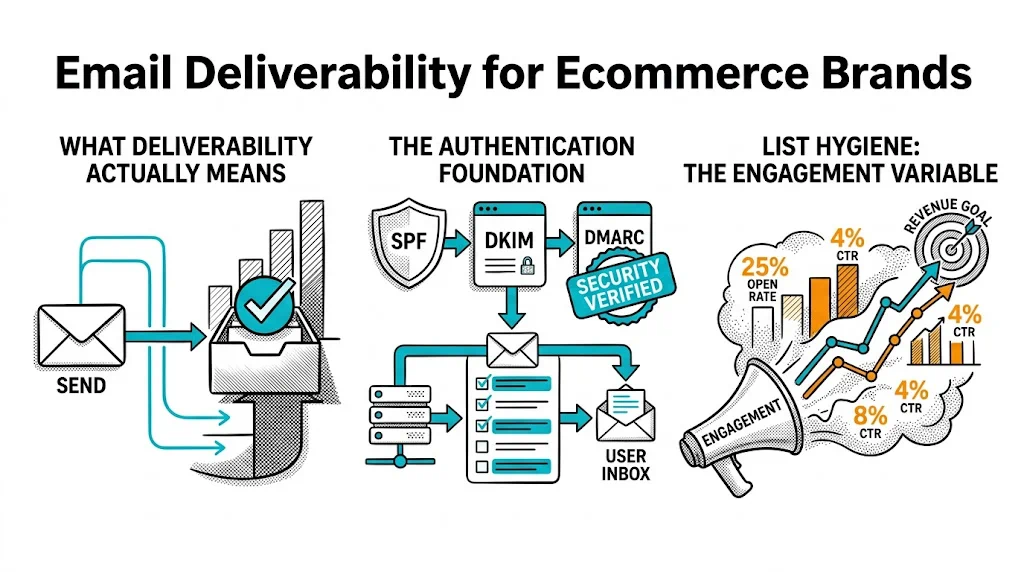
What Deliverability Actually Means

Deliverability has two layers:

Delivery rate: Did the email successfully reach the recipient's email server? This measures whether the email was accepted (not bounced). Most emails from established brands have high delivery rates (95%+) because bounce management removes bad addresses over time.

Inbox placement rate: Of the emails that were delivered, how many landed in the inbox (vs. spam or promotions folder)? This is the meaningful metric. An email that lands in the Promotions tab in Gmail is technically "delivered" but has a fraction of the open rate of an inbox email.

Most brands measure open rate and click rate. When these drop, they assume the content or subject lines are the problem. Often the real problem is inbox placement β€” emails are going to spam, and only the small percentage of subscribers who check their spam folder ever see them.

The Authentication Foundation

The technical foundation of email deliverability is three DNS records that tell email providers your emails are legitimate:

SPF (Sender Policy Framework)

SPF defines which servers are authorised to send email from your domain. It is a DNS TXT record that looks like:

v=spf1 include:sendgrid.net include:klaviyo.com ~all

This tells email providers: "Emails from our domain that come from SendGrid or Klaviyo servers are legitimate."

Without SPF: email providers have no way to verify your emails are not being spoofed, which reduces trust and inbox placement.

DKIM (DomainKeys Identified Mail)

DKIM adds a cryptographic signature to every email you send. The signature is generated with a private key, and email providers verify it against a public key published in your DNS.

For ecommerce brands using Klaviyo, Mailchimp, or similar ESPs: the platform generates DKIM keys for you and provides the DNS records to add. The process takes 10 minutes if you have access to your domain's DNS settings.

Without DKIM: emails fail authentication checks and are more likely to be filtered to spam, even if their content is perfectly clean.

DMARC (Domain-based Message Authentication)

DMARC builds on SPF and DKIM to specify what should happen when an email fails authentication: quarantine it (spam folder) or reject it (block delivery entirely).

A minimal DMARC record: v=DMARC1; p=none; rua=mailto:dmarc@yourbrand.com

p=none is the starting policy β€” it monitors failures but does not act on them. Once you have confirmed SPF and DKIM are configured correctly, you can escalate to p=quarantine or p=reject for stronger protection against email spoofing in your brand's name.

Without DMARC: your domain is more vulnerable to phishing attacks using your brand's email address, and major email providers (particularly Google and Yahoo) have been increasingly requiring DMARC for commercial sending.

Checking Your Authentication

Use Google's MX Toolbox or your ESP's built-in authentication check to verify all three records are correctly configured before every major campaign.

List Hygiene: The Engagement Variable

Authentication handles the technical layer. List hygiene handles the engagement layer.

Email providers like Gmail use engagement signals (opens, clicks, replies, moves to inbox from spam) to evaluate whether your mail is wanted. A list with a large inactive segment drags your engagement rate down, which reduces inbox placement across your entire list β€” including for your active, engaged subscribers.

Hard Bounce Management

A hard bounce means the email address is permanently invalid (account deleted, domain does not exist). Most ESPs automatically suppress hard bounces after one occurrence. Ensure this is enabled.

Hard bounce rate above 2% signals a list quality problem β€” likely from old list imports, manual additions without email verification, or lack of double opt-in.

Soft Bounce Management

A soft bounce means temporary delivery failure (recipient's mailbox is full, server temporarily unavailable). ESPs typically retry soft bounces 3–5 times before suppressing. This is handled automatically by most platforms.

Inactive Subscriber Management

The most important list hygiene practice for D2C brands. As described in the re-engagement email campaigns guide:

  • Run a re-engagement sequence for 90-day inactive subscribers
  • Suppress (do not mail) subscribers who do not respond to re-engagement
  • Review suppressed subscribers annually

A clean, engaged list of 10,000 subscribers will outperform a dirty list of 50,000 on both open rate and deliverability metrics.

Spam Trap Avoidance

Spam traps are email addresses placed by email providers and anti-spam organisations to identify senders who are importing bad lists. They look like legitimate addresses but are never used for legitimate signups.

How to avoid spam traps:

  • Never purchase email lists
  • Never scrape email addresses
  • Always use confirmed (double) opt-in for new subscribers
  • Regularly clean addresses that have never opened an email after 3+ sends

If you hit a spam trap, your sending domain's reputation can be severely damaged, affecting inbox placement for all your subscribers.

Sending Practices That Protect Deliverability

Engagement-Based Sending

Do not send every campaign to your full list. Segment by engagement level and send more frequently to engaged subscribers, less frequently to low-engagement subscribers.

A practical segmentation:

  • Highly engaged (opened in last 30 days): full campaign frequency, full content range
  • Engaged (opened in last 90 days): full campaign frequency
  • Low engagement (no opens in 90–180 days): send re-engagement sequence only, not regular campaigns
  • Suppressed (no opens after re-engagement): do not mail

This approach protects your sending reputation by keeping your active campaign engagement rates high.

Sending Volume Ramp-Up (IP Warming)

If you are using a new sending domain, new dedicated IP, or migrating to a new ESP, you cannot immediately send high volumes. Providers treat sudden high volumes from new senders as suspicious.

Warm up gradually:

  • Week 1: 500–1,000 emails/day to your most engaged subscribers
  • Week 2: 2,000–5,000 emails/day
  • Week 3: 10,000–25,000 emails/day
  • Week 4+: increase to full volume

During warming, monitor bounce rates, complaint rates, and spam folder placement closely.

Send Time and Frequency

Consistent sending cadence (same days of the week) builds a predictable pattern that helps email providers classify your mail. Irregular sending (nothing for 3 weeks, then 5 emails in 2 days) looks like burst-sending spam behaviour.

For Indian D2C audiences, high-performance send windows: 8–10 AM (morning commute), 12–1 PM (lunch), 8–10 PM (evening relaxation). Test send time with your list β€” the optimal window varies by audience.

Monitoring Deliverability

Key Metrics to Watch

MetricHealthy rangeConcern threshold
Hard bounce rateUnder 0.5%Above 2%
Spam complaint rateUnder 0.08%Above 0.1%
Open rate (active list)20–45%Below 15%
Inbox placement rateAbove 90%Below 80%

Tools for Monitoring

Google Postmaster Tools: Free Google tool that shows your domain and IP reputation with Gmail. Essential for any brand sending significant volume to @gmail.com addresses (which is most of your list).

MXToolbox: Checks if your sending domain or IP is on any public blacklists. Check monthly and after any sudden drop in open rates.

Litmus or Email on Acid: Email rendering and spam filter testing tools that preview your email across major clients and flag potential spam triggers before you send.

Your ESP's native reporting: Klaviyo, Mailchimp, and similar platforms report bounce rates, complaint rates, and unsubscribe rates per campaign. Review after every campaign.

India-Specific Deliverability Considerations

Telecom provider email domains: A non-trivial share of Indian subscribers use @rediffmail.com or @sify.com addresses (older providers). These providers have less sophisticated spam filtering than Gmail/Outlook but also lower engagement rates. Monitor bounce rates separately for these domains.

Mobile email clients: Over 70% of Indian users open email on mobile. Email clients like Samsung Mail and default Android Mail use different spam filters than Gmail. Test rendering and deliverability across these clients.

Diwali send volume: Many brands significantly increase send frequency during the Diwali shopping season (October–November). A sudden 3x increase in send volume triggers deliverability problems. Begin increasing volume 4–6 weeks before peak season and warm up gradually.

Tips and Best Practices

Audit authentication quarterly. DNS records can be accidentally deleted during domain renewals or CMS migrations. Check SPF, DKIM, and DMARC are still correctly configured every three months.

Use double opt-in for new subscribers. Double opt-in (confirmation email required before adding to list) reduces spam trap hits and invalid addresses. It reduces list growth rate slightly but improves list quality significantly.

Monitor complaint rate per campaign. A spike in spam complaints from a specific campaign indicates the subject line, content, or audience was wrong. Investigate immediately rather than letting it compound.

Do not re-use suppressed subscribers. Once a subscriber is suppressed for inactivity, do not re-import them from a CRM export or other source. The suppression exists to protect your deliverability.

Key Takeaways

  • Email deliverability = emails reaching the inbox, not just being technically delivered. Inbox placement below 80% is a serious revenue problem.
  • Configure SPF, DKIM, and DMARC on your sending domain β€” these are non-negotiable technical foundations.
  • List hygiene (inactive subscriber management, hard bounce suppression) is the most impactful ongoing deliverability practice.
  • Send to engaged segments preferentially β€” protect your reputation by keeping engagement rates high on your active sends.
  • Monitor Google Postmaster Tools and your ESP's complaint and bounce metrics after every campaign.

For more on email strategy, see the Email & Retention pillar guide and the article on re-engagement email campaigns.