CustomFit.ai — Website personalization, A/B testing and CRO for Shopify and D2C
Product
Features
✱
Website Personalization
Adapt to each visitor's behavior & intent
⧖
A/B & Multivariate Testing
Rigorous experimentation
✨
AI CopilotNEW
Personalize with a prompt
🤖
AI WingmanNEW
Auto-optimize toward winners
🎯
AI Conversion OptimizerNEW
GPT-grade test ideas
✎
No-Code Visual Editor
Drag-and-drop edit any element
▦
Product Recommendations
Personalized recs that lift AOV
⚑
Feature Flags
Ship safely with kill-switches
◧
Chrome Extension
Edit your store in the browser
⧉
Shopify, WooCommerce & more
All platform integrations
View all features →
Use Cases
$
Price A/B Testing
Test price points to maximize revenue
▦
Theme A/B Testing
Compare whole layouts & designs
🗂
Template A/B Testing
Test whole PDP/PLP templates
🏷
Discount A/B Testing
Find the offer that converts
🚚
Shipping A/B Testing
Thresholds, speed & copy
✍
Content A/B Testing
Copy, images & reviews
💳
Checkout Gateway A/B
Payments & one-click
⌖
Geo-Based Personalization
Per-location content & offers
⚡
Buyer-Intent Nudges
Exit-intent & retargeting
↔
Split-URL / Redirection
Full-page redirect tests
View all use cases →
Solutions & Guides
⤢
Conversion Rate Optimization
The complete CRO guide
⧖
A/B Testing Software
Buyer's guide for D2C
🛒
Cart Abandonment Recovery
Win back lost carts
📰
Landing Page Optimization
Convert more paid traffic
S
Shopify A/B Testing
Test your store, no code
S
Shopify Personalization
Tailor the store per shopper
◔
First-Time Visitor Offers
Convert new shoppers with trust & offers
★
Repeat-Customer Experiences
Reward and re-engage loyal buyers
◎
Campaign-Matched Pages
Match the landing page to the ad
⌖
Location-Based Experiences
Currency, language & regional offers
Explore CRO →
Customer stories
GIVA
+32%
conversion via personalized recs
GIVA
Mamaearth
+18%
revenue lift from PDP A/B tests
ME
The Sleep Company
+24%
AOV from product recommendations
TSC
Read customer stories →
Integrations
SWsfGA+15
✦
Not sure where to start?
Let AI Copilot pick your first tests

“We wake up to evidence-backed tests ready to deploy — not a backlog of maybe ideas.”

AN
Anirudh S.
Growth · Chargebee
★★★★★4.8on G2 · 2,400+ brands
Talk to our team →
Widgets
Integrations
Ecommerce & Checkout
Shopify
Shopline
Shoplazza
GoKwik
ShopFlo
Razorpay Magic Checkout
Breeze
Shiprocket
View all integrations →
Analytics & Behavior
Google Analytics 4
Microsoft Clarity
Hotjar
Mixpanel
Amplitude
Heap
Adobe Analytics
Segment (CDP)
View all integrations →
Engagement, CRM & More
Klaviyo
MoEngage
CleverTap
WebEngage
HubSpot
Salesforce
Slack
Meta Ads
View all integrations →
CustomersPricing
Resources
CRO
▤
Playbooks
Proven strategies to boost conversions
🎙
Interviews
D2C leaders & marketing experts
▶
Webinars
Live deep dives & product sessions
Learn
✎
Blog
Tips, experiments & best practices
📕
Free E-Books
Mastering personalization
📖
Conversion Glossary
Every CRO term, defined
✦AI CopilotNEWLog inBook a demo
Start free trial
Select your platform — Install in 2 minsWe'll tailor the setup
⚡ Risk-free 14-day trial · No credit card · Cancel anytime
S
Shopify
Install from Shopify App Store
›
W
WooCommerce
Install the WooCommerce plugin
›
B
BigCommerce
Install from BigCommerce App Marketplace
›
SL
Shopline
Install from Shopline App Store
›
M
Salesforce / Magento
Install from the marketplace
›
SZ
Shoplazza
Install from Shoplazza App Store
›
WP
WordPress / Webflow
Install plugin or paste the script
›
◧
Others
Custom-built on React, Next.js, etc.
›
Tip: pick your platform — we handle the restBook a demo →
Product
Website PersonalizationA/B & Multivariate TestingAI CopilotAI WingmanAI Conversion OptimizerNo-Code Visual EditorProduct RecommendationsFeature FlagsView all features →
Use Cases
Price A/B TestingTheme A/B TestingTemplate A/B TestingDiscount A/B TestingShipping A/B TestingContent A/B TestingCheckout Gateway A/BGeo-Based PersonalizationBuyer-Intent NudgesSplit-URL / Redirection
Solutions & Guides
Conversion Rate OptimizationA/B Testing SoftwareCart Abandonment RecoveryLanding Page OptimizationShopify A/B TestingShopify Personalization
Explore
WidgetsIntegrationsCustomersPricing
Resources
BlogPlaybooksWebinarsInterviewsE-BooksConversion Glossary
Platforms
ShopifyShoplineShoplazzaChrome ExtensionAll integrations
Start free trialBook a demo
Home›Blog›platforms›A/B Testing on Magento: Setup & Optimize

A/B Testing on Magento: Setup & Optimize

SKSharan KumarCo-Founder & CTO, CustomFit.aiJanuary 15, 20258 min read
On this page
  1. Magento's A/B Testing Landscape
  2. The Magento Caching Problem
  3. How to Set Up A/B Testing on Magento
  4. Step 1: Choose Your Testing Tool
  5. Step 2: Install the Testing Script
  6. Step 3: Configure Conversion Tracking
  7. Step 4: Validate the Setup
  8. Step 5: Build and Launch Your First Test
  9. What to Test on Magento
  10. Product Detail Pages
  11. Category Pages
  12. Checkout (High Complexity)
  13. Measuring Results on Magento
  14. Tips and Best Practices
  15. When to Consider Platform Migration
  16. Key Takeaways
0%
A/B Testing on Magento: Setup & Optimize

From the conversion glossary

Concepts referenced in this article, defined.

Definition
What Is Variant? Definition, Formula & Guide
Definition
What Is Control? Definition, Formula & Guide
Definition
What Is Significance? Definition, Formula & Guide
Definition
What Is Statistical Significance? Definition & Guide
Definition
What Is Experiment? Definition, Formula & Guide
← Back to Platforms guide
Try CustomFit.ai

Run A/B tests and personalize your store without code. 14-day free trial, no credit card.

Start free trial →
Share
XLinkedInEmail

Related articles

platforms

Website Personalization for WooCommerce

Ashwin Kumar· 9 min read
platforms

Website Personalization for Magento

Ashwin Kumar· 8 min read
platforms

Website Personalization for BigCommerce

Ashwin Kumar· 9 min read

Start lifting conversions today.

Run rigorous A/B tests and personalize every visit on Shopify or any storefront — no engineers required.

Start free trialBook a demo

Built for every D2C category

🧴
Skincare
💄
Beauty
🌿
Wellness
☕
F&B
👟
Apparel
💍
Jewelry
🛋️
Home
🍼
Baby
Live · Right now
Mamaearth — free-shipping band +12.4% AOVGIVA — festive collection page +34% revenueBellavita — PDP CTA test +27.4% CVRKapiva — Quiz-driven recs +9.48% CTRThe Sleep Co — landing personalized 2× capturesPlum — Returning shopper swap +18.2% CVRMamaearth — free-shipping band +12.4% AOVGIVA — festive collection page +34% revenueBellavita — PDP CTA test +27.4% CVRKapiva — Quiz-driven recs +9.48% CTRThe Sleep Co — landing personalized 2× capturesPlum — Returning shopper swap +18.2% CVR
Get in touch

Tell us about your store.

We reply within an hour during business hours. No sales pitch, no spam — just answers from someone who's seen 2,400+ D2C stores.

✓ Reply within 1 hour✓ No spam, ever✓ Free demo & setup help
✓ Thanks! We'll be in touch shortly.
CustomFit.ai

The all-in-one website personalization, A/B testing & CRO platform for high-growth D2C brands. Made by marketers, fueled by coffee.

in𝕏◎▶f
Product
  • Features
  • A/B Testing
  • Personalization
  • AI Copilot
  • AI Wingman
  • AI Conversion Optimizer
  • Feature Flags
  • Widgets
  • Integrations
  • ROI Calculator
Platforms
  • Shopify
  • Shopline
  • Shoplazza
  • Salesforce
  • Chrome Extension
  • All Integrations
Resources
  • Blog
  • Playbooks
  • Webinars
  • GrowthFit Interviews
  • Free E-Books
  • Conversion Glossary
  • Case Studies
Compare
  • vs VWO
  • vs Optimizely
  • vs Google Optimize
  • vs Mutiny
  • vs Intelligems
  • vs Shoplift
  • vs AB Tasty
  • vs Convert
  • vs Kameleoon
Company
  • About Us
  • Partners
  • CustomFit Awards
  • Recognition
  • Contact
  • Privacy Policy
  • Terms & Conditions
© 2026 CustomFit.ai · Valley Monks Pvt Ltd · Made by marketers, fueled by coffee, and obsessed with conversions.
SOC 2 Type II · GDPR · CCPA · ISO 27001

A/B testing on Magento is more technically demanding than on hosted platforms like Shopify or BigCommerce. The full-page cache, complex layout XML structure, and developer-heavy customization model mean you can't just drop in a JavaScript snippet and start testing. This guide covers how to properly set up A/B testing on Magento, what technical limitations to plan for, and how to run effective experiments on one of the most powerful but complex ecommerce platforms.

Magento's A/B Testing Landscape

Magento Open Source (Community Edition): No built-in A/B testing. Requires a third-party testing tool.

Adobe Commerce (Enterprise Edition): Includes Content Staging for scheduling content changes, but this is not A/B testing — it's content scheduling. There's no statistical significance tracking or controlled experiment infrastructure.

Adobe Commerce Cloud: Same as above. Some enterprise integrations with Adobe Target are possible, but this requires significant implementation work.

For controlled A/B testing with statistical significance, you need an external tool regardless of your Magento edition.

The Magento Caching Problem

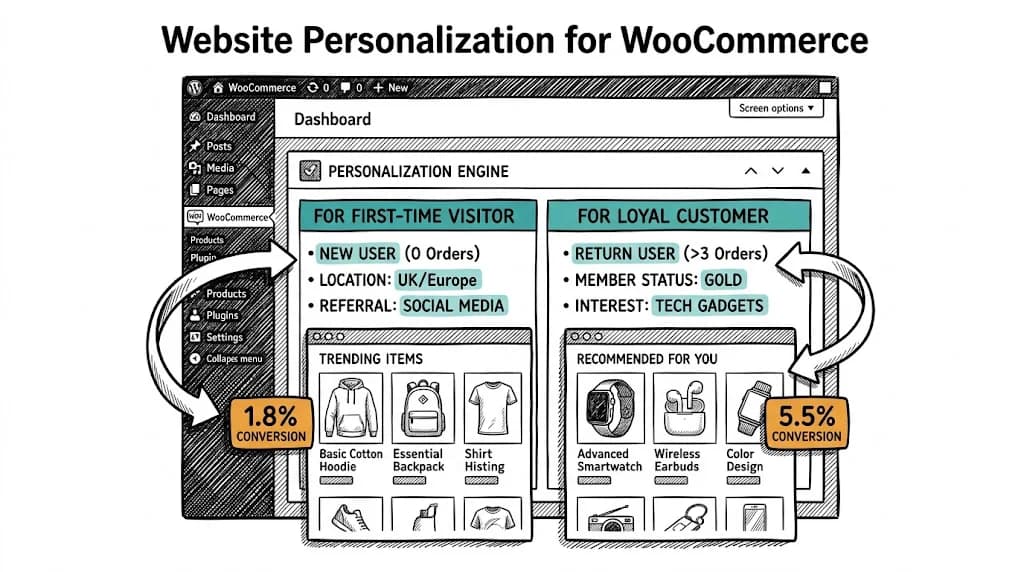
Magento's Full Page Cache (FPC) is designed for performance — it serves pre-cached HTML pages, dramatically reducing server load and improving page speed. But it creates a fundamental problem for client-side A/B testing.

How the problem occurs:

  1. Visitor A is assigned to the "Variant" version of your test by your testing tool
  2. The testing tool JavaScript tries to modify the page to show the variant
  3. But the page was served from cache — the server sent a pre-rendered HTML page before JavaScript ran
  4. Result: The variant flickers briefly, then the cached original version loads
  5. Or worse: Variant and control pages are cached separately and served inconsistently

How to solve it:

Option 1: Disable full-page cache for test pages (not recommended for production) Testing on pages with FPC disabled shows accurate results but degrades page performance for all visitors, including the control group. This affects your test validity (control performance is artificially worse) and user experience.

Option 2: Server-side testing The cleanest solution. Your testing tool handles variant assignment at the server level before the page is cached. Optimizely's full-stack product, Adobe Target, and custom Magento modules can implement this. Requires developer involvement.

Option 3: Varnish cache-aware configuration If you're using Varnish as your caching layer (common in Magento deployments), configure Varnish to pass A/B testing cookies through to Magento without caching them. This requires Varnish VCL configuration and developer expertise.

Option 4: Use Hole Punching / ESI Edge Side Includes (ESI) allow Magento to cache most of a page while leaving specific sections dynamic. Your variant sections can be ESI blocks that are served dynamically even on cached pages. Complex to implement but powerful.

Recommended approach for most Magento stores: Work with your developer to configure VWO, Convert, or Optimizely in a cache-aware manner. Don't run tests without addressing the caching problem — results will be unreliable.

How to Set Up A/B Testing on Magento

Step 1: Choose Your Testing Tool

Section 1

For mid-market Magento stores:

  • VWO: Solid visual editor, requires developer configuration for Magento caching
  • Convert: Privacy-focused, good support for Magento-specific setups
  • AB Tasty: Strong personalization features alongside testing

For enterprise Magento (Adobe Commerce):

  • Adobe Target: Native integration with Adobe Commerce, server-side testing capability, premium pricing
  • Optimizely Full Stack: Full-stack testing handles caching correctly, enterprise pricing

Step 2: Install the Testing Script

Section 2

For client-side tools, add the script via Magento's layout XML or a custom module:

<!-- In your theme's default_head_blocks.xml -->
<referenceContainer name="head.additional">
    <block class="Magento\Framework\View\Element\Template" name="ab_testing_script">
        <action method="setTemplate">
            <argument name="template" xsi:type="string">Vendor_Module::ab_testing.phtml</argument>
        </action>
    </block>
</referenceContainer>

This is more reliable than injecting scripts via the Magento Admin CMS block, which can be inconsistent across page types.

Step 3: Configure Conversion Tracking

Magento's checkout generates these trackable events:

  • Product view: Fires when a product detail page loads
  • Add to cart: checkout_cart_add_product_complete event in Magento's JavaScript event system
  • Checkout progress: Each checkout step fires events in Magento's checkout steps
  • Purchase: checkout_success event fires on the order confirmation page; also available via the window.dataLayer push if you're using GTM

For most testing tools, configure:

  • Primary conversion: Purchase (checkout success)
  • Secondary conversion: Add to cart
  • Micro-conversion: Product detail page view for category page tests

Step 4: Validate the Setup

Use your testing tool's QA mode alongside your browser's developer console:

  1. Confirm your testing script loads on all page types
  2. Confirm variant assignment is consistent across pages in the same session
  3. Confirm conversion events fire correctly in the testing tool's dashboard
  4. Test the checkout flow end-to-end in test mode

Step 5: Build and Launch Your First Test

Start with a page that has high traffic and doesn't require complex Magento customization. Good first tests:

  • Product page headline (copy change only)
  • Trust badge placement (CSS/JS modification)
  • CTA button text
  • Product image aspect ratio or hover behavior

These can be implemented by modifying DOM elements via JavaScript without interfering with Magento's page template structure.

What to Test on Magento

Product Detail Pages

Magento PDPs are heavily customizable, which means they often have accumulated design debt — elements added over time without testing whether they help or hurt.

High-value PDP tests:

  • Above-the-fold layout: How much product information is visible before scrolling on desktop and mobile?
  • Reviews placement: Magento's native review system often places reviews below the fold. Test whether surfacing an average star rating + count near the CTA improves add-to-cart rate.
  • Related products widget: Magento shows "Related Products" by default. Test the placement, style, and algorithm (related vs. upsell vs. cross-sell) for impact on AOV.
  • Configurable product options UI: For products with color/size options, test dropdown selects vs. visual swatches vs. image selectors.

Category Pages

Magento category pages are heavily cached and performance-sensitive. Keep tests simple:

  • Sort order default
  • Grid vs. list view default
  • Filter sidebar position
  • Number of products per page

Checkout (High Complexity)

Magento's checkout is a multi-step React-based application (in Magento 2). A/B testing checkout changes requires either:

  • A server-side testing tool
  • Developer-built Magento checkout customization module
  • A checkout replacement (e.g., OneStepCheckout extensions that are A/B testable)

Simple checkout tests (headline text, trust badge placement) can be done client-side; structural changes require development.

Measuring Results on Magento

Magento's native analytics are limited. Connect to:

  • Google Analytics 4: Via Magento's GA4 extension or GTM implementation
  • Your testing tool's dashboard: For experiment-specific results
  • Magento's built-in reports: For sales and revenue validation

After a test concludes, cross-reference:

  1. Testing tool's reported CVR for control vs. variant
  2. GA4's purchase event counts for the test period, segmented by variant (if using GA4 audience integration)
  3. Magento's actual order count for the test period

Discrepancies between the testing tool's reported conversions and actual Magento orders are common and usually indicate tracking issues. Investigate before implementing winning variants.

Tips and Best Practices

  • Never test without addressing caching first. Results from tests on cached pages are unreliable. This is the #1 Magento A/B testing mistake.
  • Use GTM for flexible event management. Google Tag Manager on Magento lets you add and modify tracking events without Magento module deployments. This dramatically speeds up test setup.
  • Plan for longer test durations. Complex B2B or enterprise Magento stores often have lower daily transaction volumes than pure D2C stores. Expect 4–8 week test durations for statistical significance.
  • Test on staging first. Magento's complexity means variants can break page rendering in non-obvious ways. Always QA on a staging environment before pushing test variants to production.
  • Invest in proper Magento expertise. Magento A/B testing is not a no-code activity. Budget for developer time in your CRO program. The alternative is unreliable results that lead to bad decisions.

When to Consider Platform Migration

For brands finding Magento's A/B testing complexity a persistent bottleneck, it's worth evaluating whether Shopify or BigCommerce is a better fit. Shopify's testing ecosystem—particularly no-code tools like CustomFit.ai—dramatically reduces the technical overhead of CRO. If your team is spending more on CRO tool implementation than on running actual tests, the platform may be part of the problem.

See how CustomFit.ai makes A/B testing no-code for Shopify stores →
Key Takeaways

  • Magento doesn't have native A/B testing; third-party tools are required
  • Magento's full-page cache must be addressed before running any client-side A/B test — unconfigured tests produce unreliable results
  • Server-side testing (Optimizely Full Stack, Adobe Target) is the cleanest solution but requires significant developer investment
  • Product detail pages offer the most testing value; checkout requires developer involvement for anything beyond cosmetic changes
  • Use GTM for event management — it's faster than Magento module deployments for most tracking needs
  • Factor developer time into your CRO budget; Magento testing is not a self-service activity