From the conversion glossary
Concepts referenced in this article, defined.
Concepts referenced in this article, defined.
Run rigorous A/B tests and personalize every visit on Shopify or any storefront — no engineers required.
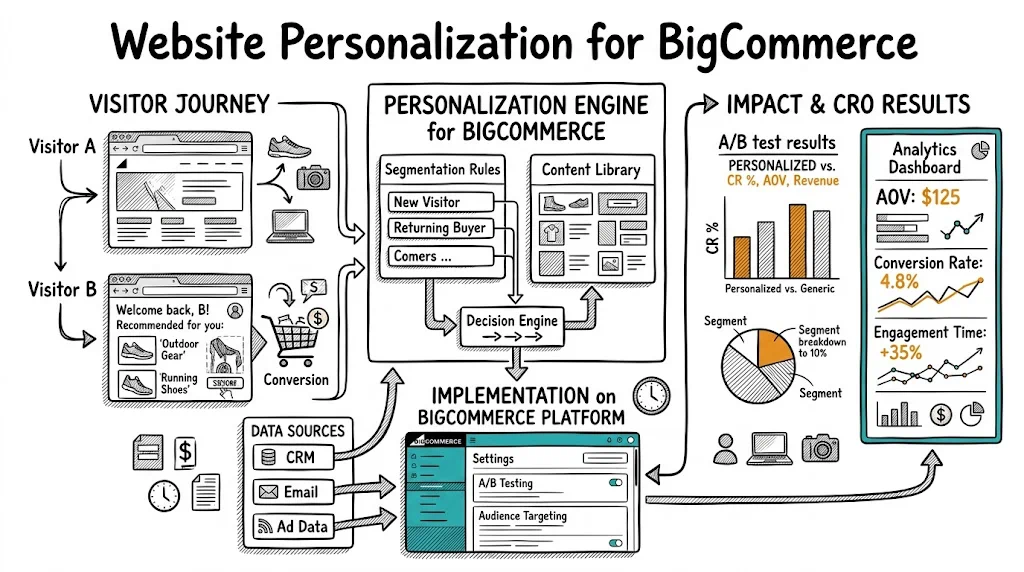
BigCommerce powers a wide range of merchants — from mid-market D2C brands to B2B businesses — and its personalization ecosystem has matured significantly. While it doesn't match Shopify's sheer breadth of third-party personalization apps, BigCommerce offers solid native features and integrates well with external personalization tools. For merchants who want to move beyond showing the same experience to every visitor and start delivering content, offers, and messaging that match each buyer's context, this guide covers everything you need to implement personalization effectively on BigCommerce.
Before diving into implementation, it's worth understanding what personalization actually changes:
For new visitors: Show trust-heavy messaging (certifications, reviews, return policy), social proof ("10,000+ happy customers"), and first-order incentives. New visitors need trust before they'll buy.
For returning visitors who haven't purchased: Show urgency cues, the products they previously browsed, and a gentle incentive to complete their first purchase.
For existing customers: Show "Welcome back," recently purchased products (for reorder), and new arrivals in categories they've purchased from before.
For traffic from specific sources: A visitor from a "best protein powder India" Google search has different intent than one from an Instagram ad. Match your hero messaging to the channel.
For cart abandoners returning to the site: Show a recovery message ("You left something behind") and the specific products in their abandoned cart.
Each of these is a personalization scenario that can lift CVR meaningfully — typically 10–25% depending on how many visitors fall into each segment.
BigCommerce's Customer Groups feature is one of the most powerful native personalization tools on any ecommerce platform. It allows you to:
Practical use cases:
To set up: Go to Customers > Customer Groups in your BigCommerce admin, create groups with their rules, and assign customers manually or through rules.
BigCommerce's Promotions engine allows condition-based offers:
Promotions aren't behavioral personalization in the richest sense, but they're powerful levers that BigCommerce merchants often underutilize.
BigCommerce's Stencil theme framework allows conditional content blocks via Handlebars templating. Developers can show different content based on:
This requires theme development work but creates a permanent, server-side personalization layer without relying on JavaScript tools.
For behavioral personalization beyond what native features support, external tools are the right approach.
BigCommerce's Script Manager (Storefront > Script Manager) is the easiest way to add third-party scripts without editing theme files:
Script Manager is available on Plus, Pro, and Enterprise plans. On Essentials, you'll need to edit theme files directly.
For Essentials plan merchants or those who need more control:
templates/layout/base.html<head> sectionSeveral personalization apps are available natively in the BigCommerce App Marketplace:
LimeSpot: Product recommendation personalization — "Recently viewed," "Customers also bought," "Trending in this category." Works natively with BigCommerce product data.
Nosto: AI-driven product recommendations and behavioral personalization. Strong integration with BigCommerce, including collection page and email personalization.
Klaviyo: Primarily an email tool, but Klaviyo's BigCommerce integration also enables onsite personalization for email-identified visitors — showing personalized content to visitors whose email you've captured.
CustomFit.ai: Loaded via Script Manager, provides behavioral A/B testing and personalization targeting based on visitor behavior (new vs. returning, traffic source, device, geo, cart value) with a no-code visual editor.
Target: Visitors with no cookies / first session on the site
What to show: Trust-heavy hero banner ("10,000+ happy customers," "Free returns in 30 days"), review count prominently, certification badges above the fold, first-order welcome offer
What to hide or de-emphasize: Loyalty program prompts (irrelevant until they've bought), "Welcome back" copy
Expected impact: 8–15% improvement in new visitor CVR
Setup in CustomFit.ai: Create a segment rule "Is new visitor = yes" and apply different hero content to that segment. No developer needed.
Target: Visitors who have been to the site before but have never completed a purchase
What to show: The products they previously browsed, a compelling "Still thinking about it?" message, an incentive to complete first purchase (₹100 off, free shipping)
Setup: "Visited site before AND no previous orders = yes" segment rule
Target: Visitors from specific campaigns or search queries
What to show: Hero messaging that matches the ad creative or keyword — "Seen our beard oil ad? Here's why 50,000 men switched" for Facebook traffic from beard oil ads
Setup: UTM parameter targeting — visitors arriving with utm_campaign=beard-oil-aug25 see the beard oil-specific hero
Expected impact: 15–25% CVR improvement for traffic-matched pages vs. generic homepage
Target: Visitors with cart value between ₹800 and ₹999 (just below a ₹1,000 free shipping threshold)
What to show: A progress bar ("Add ₹200 more for free shipping!") and complementary product recommendations in the cart sidebar
Setup: Cart value segment + dynamic progress bar widget + curated recommendations
Target: Visitors from Tier 2/3 Indian cities (based on IP geolocation)
What to show: COD availability prominently featured, value-for-money messaging, regional language product descriptions if available
Setup: Geolocation segment rule in your personalization tool
A/B test your personalization rules: Don't assume personalization is working — test it. Show your personalized experience to 50% of the target segment and the default experience to the other 50%. Measure CVR, AOV, and revenue per session for each group.
Connect to GA4: BigCommerce integrates with Google Analytics 4. Ensure your personalization tool fires a custom event (or custom dimension) when a personalization rule is applied. Then segment GA4 reports by this dimension to compare personalized vs. non-personalized sessions.
BigCommerce Ecommerce Analytics: BigCommerce's built-in analytics can validate macro-level trends, though it doesn't natively segment by personalization rule.
Revenue per session by segment: The most useful metric for personalization impact. A 20% higher revenue per session for personalized visitors vs. control tells you the personalization is working.
A common concern: does personalization hurt SEO? For BigCommerce, the key principles:
For technical SEO questions specific to your BigCommerce setup, consult with an SEO specialist who knows the platform.
Related reading: Platforms Pillar | Personalization Pillar | A/B Testing on Salesforce Commerce Cloud | A/B Testing on Shoplazza | Website Personalization