CustomFit.ai — Website personalization, A/B testing and CRO for Shopify and D2C
Product
Features
✱
Website Personalization
Adapt to each visitor's behavior & intent
⧖
A/B & Multivariate Testing
Rigorous experimentation
✨
AI CopilotNEW
Personalize with a prompt
🤖
AI WingmanNEW
Auto-optimize toward winners
🎯
AI Conversion OptimizerNEW
GPT-grade test ideas
✎
No-Code Visual Editor
Drag-and-drop edit any element
▦
Product Recommendations
Personalized recs that lift AOV
⚑
Feature Flags
Ship safely with kill-switches
◧
Chrome Extension
Edit your store in the browser
⧉
Shopify, WooCommerce & more
All platform integrations
View all features →
Use Cases
$
Price A/B Testing
Test price points to maximize revenue
▦
Theme A/B Testing
Compare whole layouts & designs
🗂
Template A/B Testing
Test whole PDP/PLP templates
🏷
Discount A/B Testing
Find the offer that converts
🚚
Shipping A/B Testing
Thresholds, speed & copy
✍
Content A/B Testing
Copy, images & reviews
💳
Checkout Gateway A/B
Payments & one-click
⌖
Geo-Based Personalization
Per-location content & offers
⚡
Buyer-Intent Nudges
Exit-intent & retargeting
↔
Split-URL / Redirection
Full-page redirect tests
View all use cases →
Solutions & Guides
⤢
Conversion Rate Optimization
The complete CRO guide
⧖
A/B Testing Software
Buyer's guide for D2C
🛒
Cart Abandonment Recovery
Win back lost carts
📰
Landing Page Optimization
Convert more paid traffic
S
Shopify A/B Testing
Test your store, no code
S
Shopify Personalization
Tailor the store per shopper
◔
First-Time Visitor Offers
Convert new shoppers with trust & offers
★
Repeat-Customer Experiences
Reward and re-engage loyal buyers
◎
Campaign-Matched Pages
Match the landing page to the ad
⌖
Location-Based Experiences
Currency, language & regional offers
Explore CRO →
Customer stories
GIVA
+32%
conversion via personalized recs
GIVA
Mamaearth
+18%
revenue lift from PDP A/B tests
ME
The Sleep Company
+24%
AOV from product recommendations
TSC
Read customer stories →
Integrations
SWsfGA+15
✦
Not sure where to start?
Let AI Copilot pick your first tests

“We wake up to evidence-backed tests ready to deploy — not a backlog of maybe ideas.”

AN
Anirudh S.
Growth · Chargebee
★★★★★4.8on G2 · 2,400+ brands
Talk to our team →
Widgets
Integrations
Ecommerce & Checkout
Shopify
Shopline
Shoplazza
GoKwik
ShopFlo
Razorpay Magic Checkout
Breeze
Shiprocket
View all integrations →
Analytics & Behavior
Google Analytics 4
Microsoft Clarity
Hotjar
Mixpanel
Amplitude
Heap
Adobe Analytics
Segment (CDP)
View all integrations →
Engagement, CRM & More
Klaviyo
MoEngage
CleverTap
WebEngage
HubSpot
Salesforce
Slack
Meta Ads
View all integrations →
CustomersPricing
Resources
CRO
▤
Playbooks
Proven strategies to boost conversions
🎙
Interviews
D2C leaders & marketing experts
▶
Webinars
Live deep dives & product sessions
Learn
✎
Blog
Tips, experiments & best practices
📕
Free E-Books
Mastering personalization
📖
Conversion Glossary
Every CRO term, defined
✦AI CopilotNEWLog inBook a demo
Start free trial
Select your platform — Install in 2 minsWe'll tailor the setup
⚡ Risk-free 14-day trial · No credit card · Cancel anytime
S
Shopify
Install from Shopify App Store
›
W
WooCommerce
Install the WooCommerce plugin
›
B
BigCommerce
Install from BigCommerce App Marketplace
›
SL
Shopline
Install from Shopline App Store
›
M
Salesforce / Magento
Install from the marketplace
›
SZ
Shoplazza
Install from Shoplazza App Store
›
WP
WordPress / Webflow
Install plugin or paste the script
›
◧
Others
Custom-built on React, Next.js, etc.
›
Tip: pick your platform — we handle the restBook a demo →
Product
Website PersonalizationA/B & Multivariate TestingAI CopilotAI WingmanAI Conversion OptimizerNo-Code Visual EditorProduct RecommendationsFeature FlagsView all features →
Use Cases
Price A/B TestingTheme A/B TestingTemplate A/B TestingDiscount A/B TestingShipping A/B TestingContent A/B TestingCheckout Gateway A/BGeo-Based PersonalizationBuyer-Intent NudgesSplit-URL / Redirection
Solutions & Guides
Conversion Rate OptimizationA/B Testing SoftwareCart Abandonment RecoveryLanding Page OptimizationShopify A/B TestingShopify Personalization
Explore
WidgetsIntegrationsCustomersPricing
Resources
BlogPlaybooksWebinarsInterviewsE-BooksConversion Glossary
Platforms
ShopifyShoplineShoplazzaChrome ExtensionAll integrations
Start free trialBook a demo
Home›Blog›shopify ecommerce ab testing
Pillar Guideshopifya-b-testingecommerce

Shopify & Ecommerce A/B Testing: The Complete Guide

Everything you need to know about A/B testing for Shopify and ecommerce stores — from setup to statistical significance to conversion wins.

SJSapna JoharHead of Growth & CRO, CustomFit.aiMarch 24, 20268 min read
On this page
  1. What Is Ecommerce A/B Testing?
  2. Why Shopify Stores Need A/B Testing
  3. How A/B Testing Works on Shopify
  4. What to A/B Test on Your Shopify Store
  5. Product Pages (Highest Impact)
  6. Homepage and Category Pages
  7. Checkout Page
  8. Shopify Theme A/B Testing
  9. Statistical Significance in Ecommerce A/B Tests
  10. Platform-Specific A/B Testing: Shopify vs. WooCommerce vs. BigCommerce
  11. Common Shopify A/B Testing Mistakes
  12. Getting Started with A/B Testing on Shopify
  13. Frequently Asked Questions
0%
Shopify & Ecommerce A/B Testing: The Complete Guide

From the conversion glossary

Concepts referenced in this article, defined.
Definition
What Is Significance? Definition, Formula & Guide
Definition
What Is Statistical Significance? Definition & Guide
Definition
What Is Variant? Definition, Formula & Guide
Definition
What Is Lift? Definition, Formula & Guide
Definition
What Is Segmentation? Definition & Guide
Try CustomFit.ai

Run A/B tests and personalize your store without code. 14-day free trial, no credit card.

Start free trial →
Share
XLinkedInEmail

Related articles

shopify ecommerce ab testing

Shopify Theme A/B Testing: How to Test a New Theme Before Going Live

Shopify theme A/B testing lets you split traffic between your current theme and a new one — so you can measure conversion rate impact before committing. Here's how to do it with CustomFit.ai.
Sapna Johar· 6 min read
shopify ecommerce ab testing

A/B Testing Shopify Product Pages: What to Test and How to Do It

Learn how to A/B test Shopify product pages — the right elements, the right metrics, and how to run statistically valid tests without developer involvement using CustomFit.ai.

Sapna Johar· 6 min read

Start lifting conversions today.

Run rigorous A/B tests and personalize every visit on Shopify or any storefront — no engineers required.

Start free trialBook a demo

Built for every D2C category

🧴
Skincare
💄
Beauty
🌿
Wellness
☕
F&B
👟
Apparel
💍
Jewelry
🛋️
Home
🍼
Baby
Live · Right now
Mamaearth — free-shipping band +12.4% AOVGIVA — festive collection page +34% revenueBellavita — PDP CTA test +27.4% CVRKapiva — Quiz-driven recs +9.48% CTRThe Sleep Co — landing personalized 2× capturesPlum — Returning shopper swap +18.2% CVRMamaearth — free-shipping band +12.4% AOVGIVA — festive collection page +34% revenueBellavita — PDP CTA test +27.4% CVRKapiva — Quiz-driven recs +9.48% CTRThe Sleep Co — landing personalized 2× capturesPlum — Returning shopper swap +18.2% CVR
Get in touch

Tell us about your store.

We reply within an hour during business hours. No sales pitch, no spam — just answers from someone who's seen 2,400+ D2C stores.

✓ Reply within 1 hour✓ No spam, ever✓ Free demo & setup help
✓ Thanks! We'll be in touch shortly.
CustomFit.ai

The all-in-one website personalization, A/B testing & CRO platform for high-growth D2C brands. Made by marketers, fueled by coffee.

in𝕏◎▶f
Product
  • Features
  • A/B Testing
  • Personalization
  • AI Copilot
  • AI Wingman
  • AI Conversion Optimizer
  • Feature Flags
  • Widgets
  • Integrations
  • ROI Calculator
Platforms
  • Shopify
  • Shopline
  • Shoplazza
  • Salesforce
  • Chrome Extension
  • All Integrations
Resources
  • Blog
  • Playbooks
  • Webinars
  • GrowthFit Interviews
  • Free E-Books
  • Conversion Glossary
  • Case Studies
Compare
  • vs VWO
  • vs Optimizely
  • vs Google Optimize
  • vs Mutiny
  • vs Intelligems
  • vs Shoplift
  • vs AB Tasty
  • vs Convert
  • vs Kameleoon
Company
  • About Us
  • Partners
  • CustomFit Awards
  • Recognition
  • Contact
  • Privacy Policy
  • Terms & Conditions
© 2026 CustomFit.ai · Valley Monks Pvt Ltd · Made by marketers, fueled by coffee, and obsessed with conversions.
SOC 2 Type II · GDPR · CCPA · ISO 27001

A/B testing for Shopify and ecommerce stores is the practice of running controlled experiments on your storefront to determine which version of a page, element, or experience drives more conversions. By showing variant A to one group of visitors and variant B to another, you can make data-backed decisions about your product pages, checkout flow, pricing displays, and more — without guessing.

CustomFit.ai helps 1,000+ D2C brands run Shopify A/B tests without writing a single line of code.

What Is Ecommerce A/B Testing?

Ecommerce A/B testing (also called split testing) is a method of comparing two or more versions of a page element to determine which one performs better against a defined conversion goal. For Shopify stores, this typically means testing:

  • Product page layouts and copy
  • CTA button text, colour, and placement
  • Hero banner images and headlines
  • Price display formats and discount messaging
  • Checkout page elements
  • Navigation structure and category pages

Unlike website analytics, which tells you what is happening, A/B testing tells you why and gives you a statistically valid answer you can act on.
Why Shopify Stores Need A/B Testing

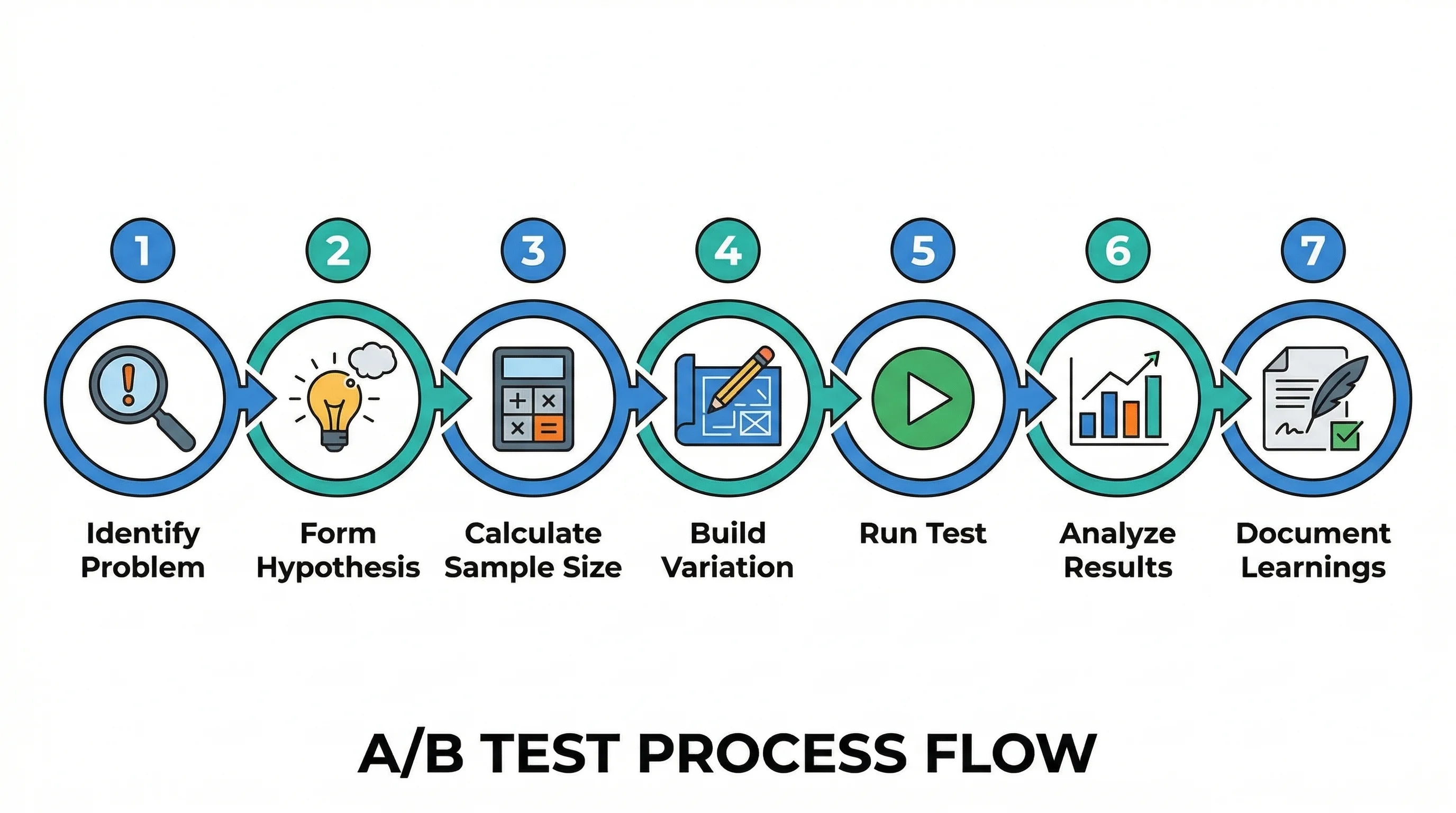
7 step process flow

Shopify's default theme handles the technical side of your store, but it can't tell you whether a green "Add to Cart" button outperforms a red one for your specific audience. Every D2C brand has a unique customer base with different preferences, price sensitivities, and decision-making patterns.

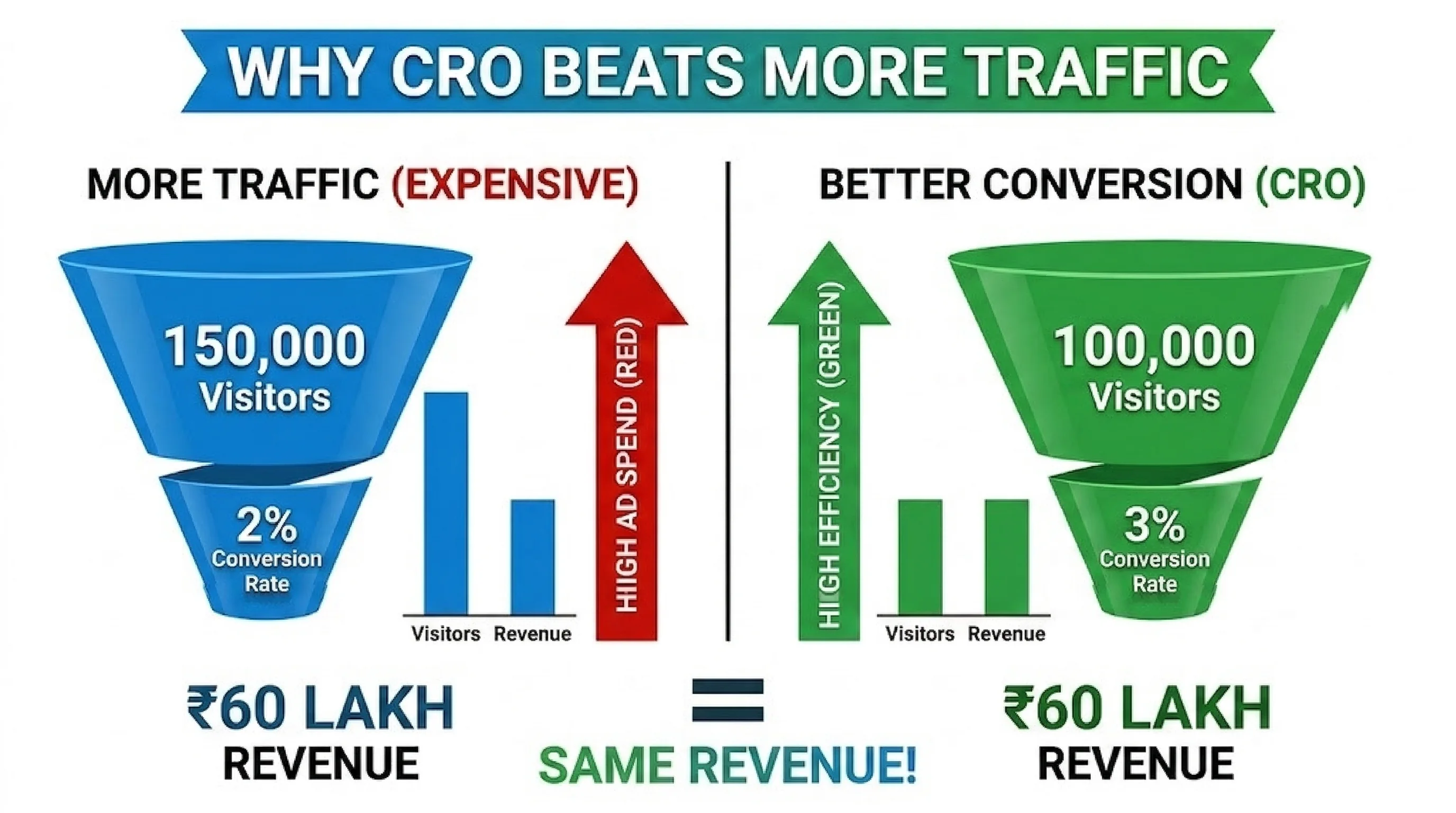
The business case is clear: A 1% increase in conversion rate on a store doing ₹1 crore/month in revenue means ₹1 lakh more revenue per month — with the same ad spend.

Key reasons Shopify merchants run A/B tests:

  1. Reduce bounce rate on product pages by optimising the above-the-fold experience
  2. Increase add-to-cart rate through smarter product page layouts
  3. Improve checkout completion by removing friction in the purchase flow
  4. Validate pricing and discount messaging before rolling it out sitewide
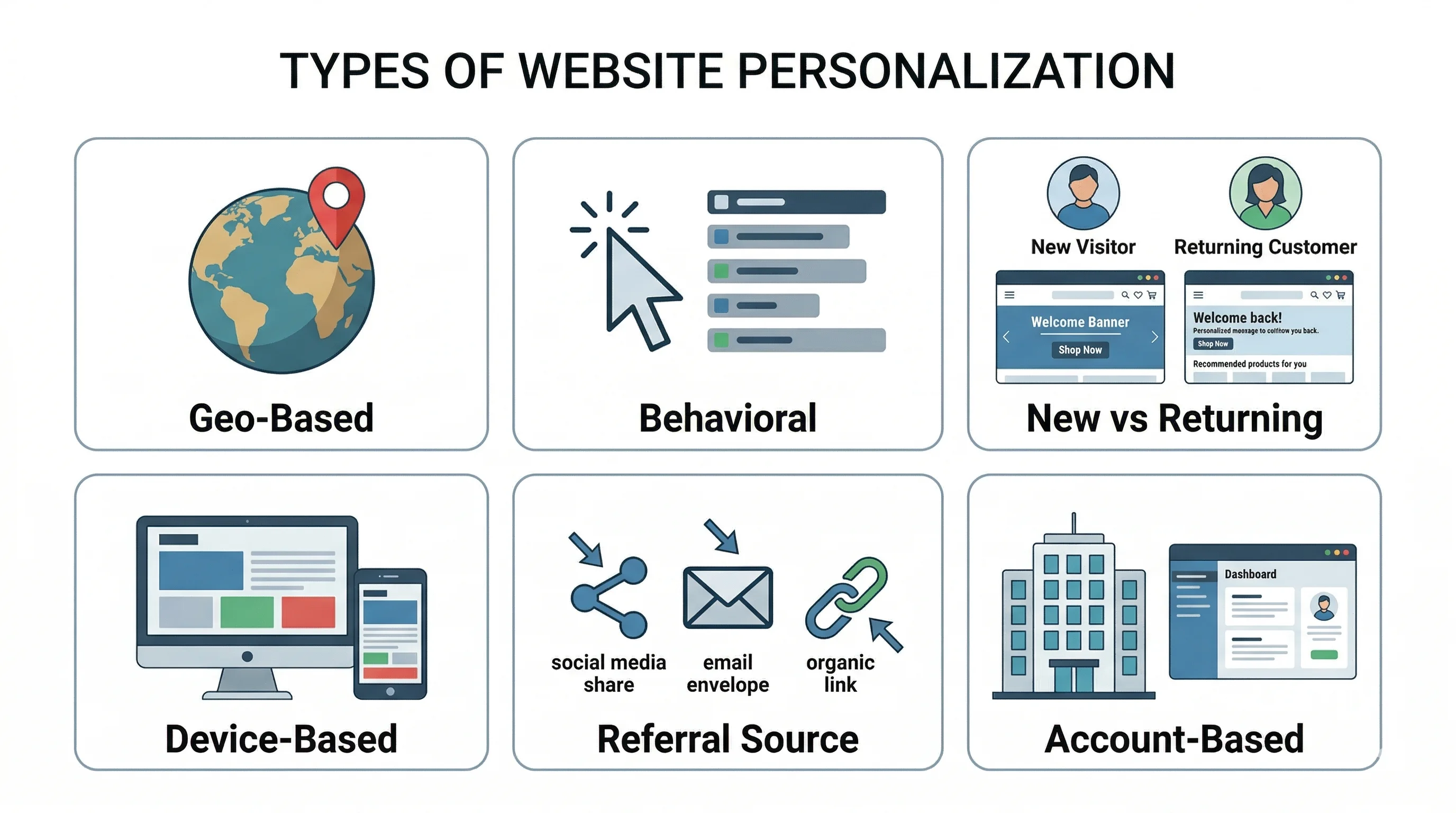
  5. Personalize experiences for different audience segments (new vs. returning, mobile vs. desktop, geo-based)

How A/B Testing Works on Shopify

Running an A/B test on Shopify follows a consistent process regardless of the tool you use:

  1. Identify a hypothesis — "Changing the CTA from 'Add to Cart' to 'Buy Now' will increase checkout initiation by 15%"
  2. Define your success metric — conversion rate, add-to-cart rate, revenue per visitor, or click-through rate
  3. Set up the variant — create version B of the page element without changing version A
  4. Determine sample size — calculate the number of visitors needed for statistical significance (typically 95% confidence)
  5. Run the test — split traffic evenly between A and B (50/50 or weighted by segment)
  6. Analyse results — wait until statistical significance is reached before declaring a winner
  7. Implement the winner — roll out the winning variant to 100% of traffic

With CustomFit.ai, steps 3–7 are managed through a no-code visual editor directly on your Shopify storefront.

What to A/B Test on Your Shopify Store

Product Pages (Highest Impact)

Product pages are where purchase decisions are made. Key elements to test:

  • Product images: Single hero image vs. image carousel; lifestyle vs. product-only shots
  • Product title and description: Long-form vs. bullet points; benefit-led vs. feature-led copy
  • Price display: ₹999 vs. ₹999.00; with/without original price strikethrough
  • CTA button: Text ("Add to Cart" vs. "Buy Now"), colour, size, and placement
  • Trust badges: Placement of "Secure Checkout," "Free Returns," and "Authentic Product" badges
  • Social proof: Number of reviews shown, star rating prominence, "X people bought this week" nudges
  • Urgency and scarcity: Stock countdown timers, "Only 3 left" indicators

Homepage and Category Pages

  • Hero banner: Headline copy, image, and CTA
  • Featured collection: Which products to surface first (bestsellers vs. new arrivals vs. seasonal)
  • Navigation structure: Category naming and menu depth

Checkout Page

  • Form field order: Email first vs. shipping first
  • Guest checkout: Prominent vs. deprioritised
  • Upsell and cross-sell placement: In-cart vs. post-purchase
  • Progress indicator: Showing checkout steps to reduce abandonment

Shopify Theme A/B Testing

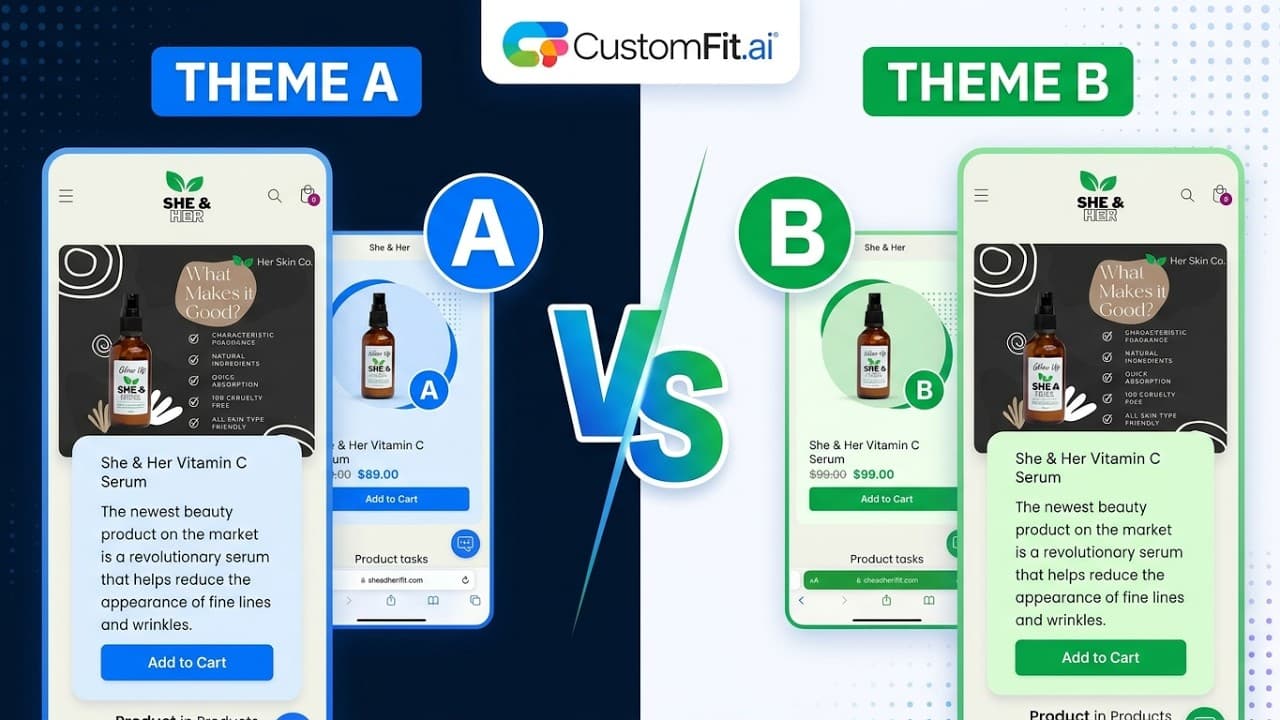
Theme-level A/B testing allows you to test two entirely different Shopify themes or major layout variants against each other. This is more complex than element-level testing but can surface insights about overall information architecture and brand presentation.

CustomFit.ai supports theme-level A/B testing on Shopify through its visual editor, which can apply changes at the theme component level without needing to publish a new theme.

When to use theme A/B testing:
  • Migrating from one theme to another (e.g., Dawn to a custom theme)
  • Testing significantly different homepage layouts
  • Validating a full design system rebrand before committing

Statistical Significance in Ecommerce A/B Tests

Statistical significance 95 confidence

Statistical significance tells you how confident you can be that your test results are not due to random chance. In ecommerce, the standard threshold is 95% confidence (p < 0.05).

Practical guidelines:

  • Never stop a test early just because one variant is ahead — wait for significance
  • Run tests for at least 2 weeks to account for weekly traffic patterns (weekday vs. weekend behaviour differs)
  • Calculate your minimum detectable effect before starting: a 5% conversion rate lift requires more traffic than a 20% lift
  • Use a sample size calculator to determine how many visitors you need before starting

For most Shopify stores doing 10,000+ monthly visitors, you can reach significance on high-traffic pages (homepage, bestseller product pages) within 2–4 weeks.

Platform-Specific A/B Testing: Shopify vs. WooCommerce vs. BigCommerce

FeatureShopifyWooCommerceBigCommerce
Native A/B testingNoneNoneNone
CustomFit.ai support✓ Full✓ Full✓ Full
Theme-level testing✓✓✓
Checkout testing✓ (Shopify Plus)✓✓
No-code setup✓✓✓
Audience segmentation✓✓✓

Common Shopify A/B Testing Mistakes

Common mistakes

  1. Running too many tests at once — concurrent tests contaminate results; run one test per page section at a time
  2. Stopping tests too early — a test that looks like a winner at day 3 may reverse by day 14
  3. Ignoring mobile vs. desktop segmentation — a variant that wins on desktop may lose on mobile
  4. Testing without a hypothesis — "let's see what happens" wastes traffic; every test needs a clear prediction and success metric
  5. Not accounting for seasonality — avoid running tests during flash sales or major events that skew traffic intent
  6. Testing low-traffic pages — a page with 200 visitors/month cannot reach statistical significance in a reasonable timeframe

Getting Started with A/B Testing on Shopify

  1. Install CustomFit.ai from the Shopify App Store
  2. Connect your Shopify store (no developer access required)
  3. Use the visual editor to create a variant on any page element
  4. Set your success metric (conversion rate, revenue per visitor, or custom event)
  5. Set the traffic split (50/50 default) and audience targeting (all visitors, new visitors, geo-based, etc.)
  6. Launch the test — CustomFit.ai handles the traffic splitting and data collection
  7. View real-time results in the analytics dashboard; get notified when significance is reached

Frequently Asked Questions

What is the difference between A/B testing and multivariate testing? A/B testing compares two versions of a single element (e.g., two CTA button texts). Multivariate testing compares multiple variations of multiple elements simultaneously to find the best combination. A/B testing is better for stores with lower traffic; multivariate testing requires significantly more visitors.

How long should I run an A/B test on Shopify? Run tests for a minimum of 2 weeks and until you reach 95% statistical significance. For most Shopify stores with 10,000+ monthly visitors, 2–4 weeks is sufficient for high-traffic pages. Lower-traffic pages may require 4–8 weeks.

Can I A/B test on Shopify without coding? Yes. Tools like CustomFit.ai provide a visual editor that works directly on your live Shopify store — no theme code changes, no developer required.

Does A/B testing slow down my Shopify store? CustomFit.ai loads asynchronously and does not block page rendering. The performance impact is negligible (typically < 50ms added to page load). Core Web Vitals are not affected.

What conversion rate improvement can I expect from A/B testing? Results vary widely. CustomFit.ai customers see an average 11% conversion rate lift across their first 3 tests. The highest impact tests tend to be on product pages and the checkout initiation step.

Can I target specific segments in my Shopify A/B tests? Yes. CustomFit.ai supports audience segmentation by: new vs. returning visitors, geographic location, device type (mobile/desktop), traffic source (paid vs. organic), and custom events (e.g., customers who viewed a specific collection).

What pages can I A/B test on Shopify? With CustomFit.ai, you can test any page on your Shopify store: homepage, product pages, collection pages, cart page, checkout (Shopify Plus), and custom landing pages.

Is A/B testing safe for my Shopify store's SEO? Yes, when done correctly. Google accepts A/B testing as a legitimate practice. Use rel="canonical" to point to the original URL, avoid cloaking (showing different content to Googlebot vs. users), and don't run tests for an excessively long time.