From the conversion glossary
Concepts referenced in this article, defined.
Concepts referenced in this article, defined.
Run rigorous A/B tests and personalize every visit on Shopify or any storefront — no engineers required.
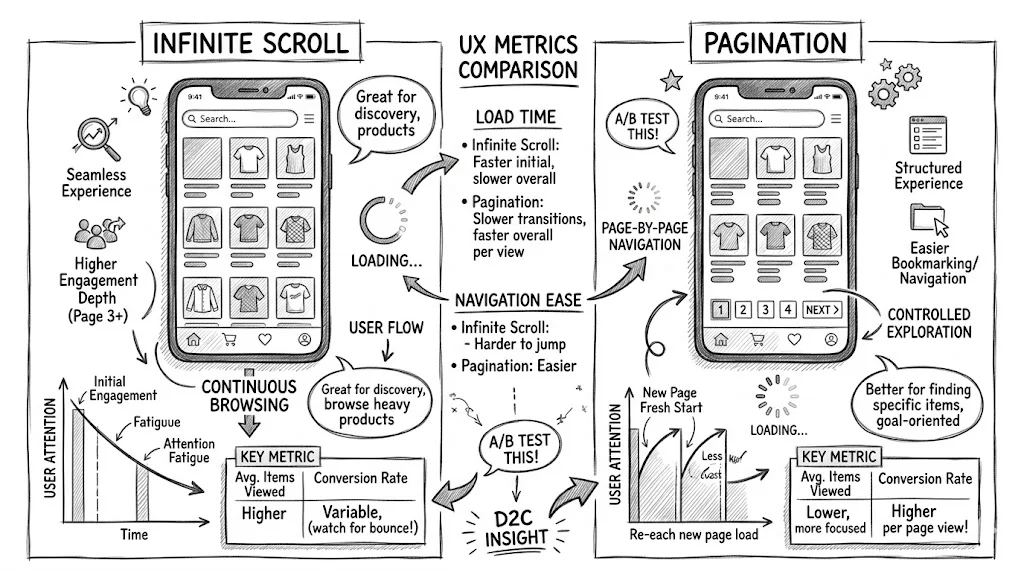
Infinite scroll feels modern: no page turns, content just keeps appearing. Pagination feels structured and sometimes old-fashioned. But for ecommerce category pages, the data consistently points toward pagination (or a "Load More" button hybrid) outperforming infinite scroll for conversion rate, user satisfaction, and SEO. Here is the full comparison with the context Indian D2C brands need to make the right choice.
Infinite scroll was designed for content discovery platforms where the user's goal is to browse indefinitely: social media feeds, news aggregators, content recommendation engines. The user has no specific destination in mind, and more content is always welcome.
Shopping is different. Even when a customer is in discovery mode, they are managing a mental comparison list. They look at product A, think about product B they saw earlier, scan for price anchors, and make relative comparisons. That work requires a sense of position and the ability to return to specific items.
Infinite scroll disrupts position, and pagination preserves it. This is the central difference, and it explains most of what the data shows.
Merchant-side tests and published studies on ecommerce category pages tend to show a few consistent patterns:
The most consistent finding is that the back-button problem is the biggest measurable harm of infinite scroll. A user who scrolls through 80 products, taps one to view it, and returns to the category page lands at the top, not at product 72 where they were. On mobile, where every scroll costs time and thumb effort, this frustration causes users to abandon rather than re-scroll.
Infinite scroll is not universally bad for ecommerce. It has specific cases where it does better:
New arrivals and trending feeds. When the user's intent is "show me what is new", infinite scroll matches the mental model. The products are implicitly ordered by recency, there is no "right" product to find, and position does not matter.
Visual discovery on mobile. For fashion, home décor, and gift categories where the user is in pure browsing mode, infinite scroll can work, provided the back-button problem is handled with session state that returns the user to their last position.
Content sections adjacent to products. A blog feed, lookbook, or editorial content section on a landing page can use infinite scroll without the category page problems, since users are consuming content rather than comparing products.
Traditional pagination, whether numbered pages (1, 2, 3, ... 10) or previous/next navigation, wins in a few situations.
Users are goal-oriented. A user searching for "Vitamin C serum under ₹500" wants to scan efficiently and return to items they are comparing. Pagination gives them a framework.
Product count is high. A category with 200+ products across 20 pages is genuinely navigable with pagination. The user can jump to page 3 to find mid-range items (if products are sorted by price) or share a specific page with a friend.
SEO matters for category pages. Each paginated page has its own URL (/skincare?page=3), which can be indexed. Products on page 3 are discoverable from search engines. Infinite scroll products loaded after page 1 often are not indexed at all.
Return visits are common. A customer who researches products over multiple sessions needs to find their reference point again. "I saw it on page 2" is navigable. "I saw it somewhere in an infinite scroll about 80 products in" is not.
The Load-More pattern combines advantages of both approaches:
This pattern avoids the back-button problem, since returning to the page shows all previously loaded products. It gives users control over when they load more, unlike auto-loading infinite scroll. It is more SEO-friendly than infinite scroll when properly implemented, and it feels more modern than numbered pagination.
Testing across Indian D2C stores shows Load-More performing within 5% of traditional pagination for conversion rate, while generating 15 to 20% more scroll engagement. For stores that care about both metrics, it is often the best starting point.
This is where the comparison is clearest. Infinite scroll, without JavaScript rendering in Google's crawler, can leave a large share of your product catalogue invisible to search engines.
Pagination SEO setup:
/running-shoes?page=2rel="next" and rel="prev" HTML tags to help search engines understand the pagination chainInfinite scroll SEO setup:
pushState to update the URL as new products load, creating addressable sectionsLoad-More SEO setup:
For Indian D2C brands investing in organic search as a growth channel, pagination is the safest SEO choice. A category page that ranks for "[product type] buy online India" should show all its products to Google.
On mobile, the tradeoffs shift slightly.
Infinite scroll feels more native on mobile. Social media has trained mobile users to expect endless scroll, and the pattern matches their mental model for browsing content.
But the back-button problem is worse on mobile. Re-scrolling 80 products on a 5-inch screen is a significantly worse experience than re-scrolling on desktop. The frustration is higher, and so is the likelihood of abandoning rather than finding the product again.
Load-More with session restoration is the best mobile solution. Show a reasonable initial set (12 to 16 products on mobile, since the grid is one column or two), then load more on tap, but preserve the loaded state so returning to the page shows the products the user had loaded.
Start with Load-More. If you are currently using infinite scroll and want to test, a Load-More button is the lowest-disruption alternative. Measure:
Run an A/B test. CustomFit.ai or your Shopify theme's built-in experimentation (if available) can split category page visitors between infinite scroll and Load-More. Track conversion rate as the primary metric over at least 2 weeks with 500+ visitors per variant.
Check analytics for the back-button problem. In Google Analytics (GA4), look at the flow from category pages to product pages and back to category pages. High back-navigation rates to the category page suggest users are trying to return to their position and failing.
Always show total product count. "Showing 24 of 186 products" tells the user how much more exists and helps them decide whether to load more or refine their filters.
Add a sticky "Back to Top" button. If you use infinite scroll or Load-More and the user has scrolled far, a sticky back-to-top button reduces the effort of resetting.
Sort by most relevant by default. Whichever navigation pattern you use, the first 12 to 24 products visible are the most important. Sort by relevance, bestsellers, or new arrivals, not by internal database ID.
Test filter persistence with both patterns. If a user filters by "Price: Under ₹999" and then loads more products, the filter must persist. Filters being lost on Load-More or back-navigation is a common bug worth auditing.
For more on ecommerce UX decisions, see the UX pillar guide and the UX audit checklist.