From the conversion glossary
Concepts referenced in this article, defined.
Concepts referenced in this article, defined.
Run rigorous A/B tests and personalize every visit on Shopify or any storefront — no engineers required.
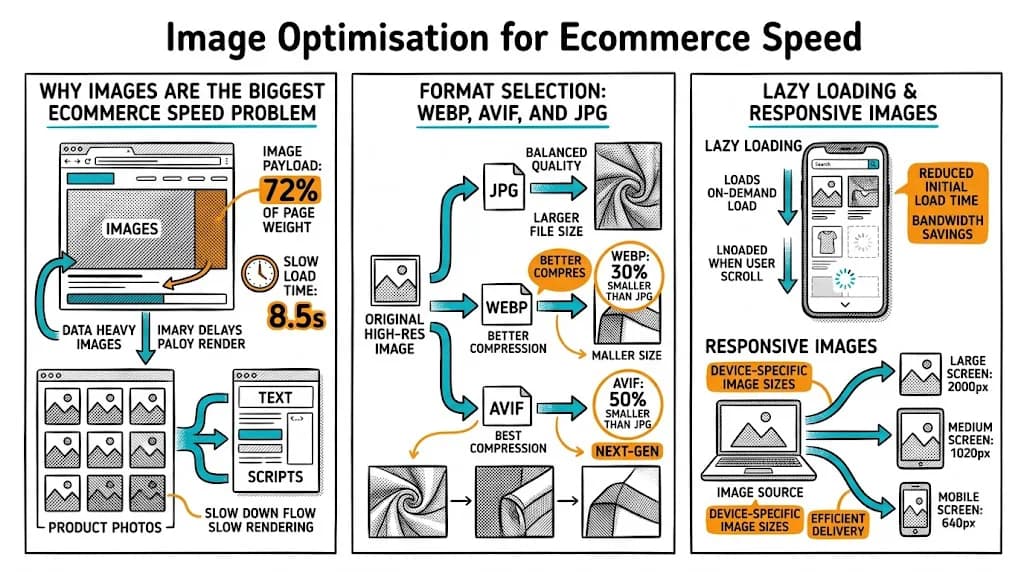
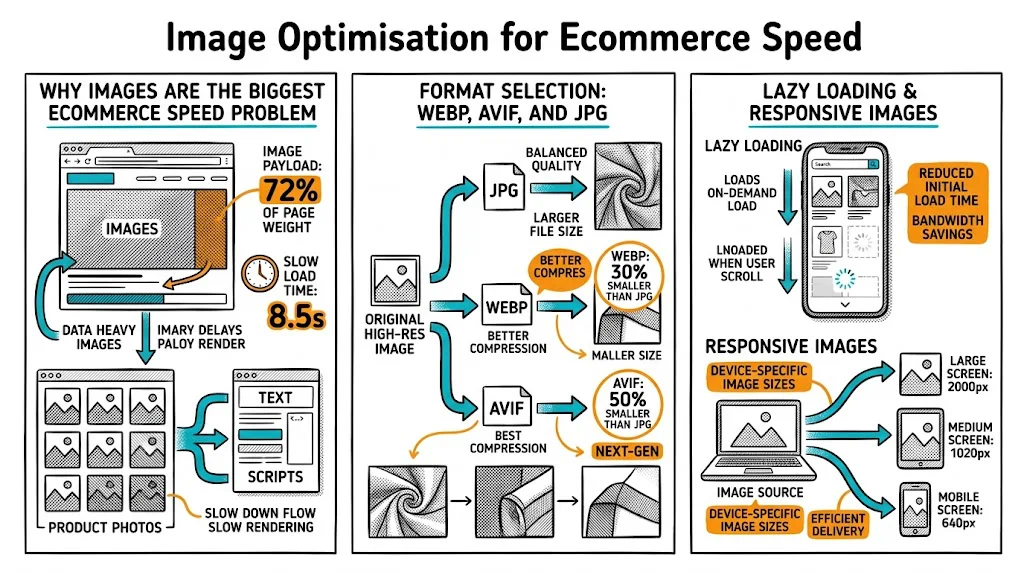
Your product images are simultaneously your most important sales tool and your biggest performance risk. They sell products — but if they're not optimized, they also silently kill your conversion rate by making your store feel slow. For Indian D2C brands where 70%+ of traffic is mobile and a significant portion is on 4G connections in tier-2/3 cities, image optimization is not a nice-to-have — it's revenue-critical.
On a typical unoptimized Shopify product page:
The conversion math is stark. Portent's research shows:
Every second you shave off image load time is a measurable revenue gain.
| Format | Best For | Typical Savings vs. PNG |
|---|---|---|
| WebP | All product images | 25–35% smaller |
| AVIF | Future-proofing (Safari 16+) | 40–50% smaller |
| JPEG | Photos, lifestyle images | Baseline |
| PNG | Images with transparency (logos, icons) | N/A |
| SVG | Logos, icons, simple graphics | Variable |
Shopify's automatic WebP conversion: When you upload images via the Shopify admin, they are stored and served as WebP to browsers that support it (all modern browsers). This means your upload format matters less than the file size and resolution you upload.
Action: Check your store's actual served image format using Chrome DevTools → Network → filter by "Img" and check the "Type" column. If you see jpeg instead of webp, your theme may be bypassing Shopify's CDN image pipeline.
Even with WebP serving, upload file size affects processing time and CDN caching efficiency. Compress images before uploading:
Target: product images under 300KB before Shopify's CDN processes them. Lifestyle and hero images can be up to 500KB. Anything larger is costing you load time without visible quality gain.
Serving a 2000×2000px image to a 375px-wide mobile screen is wasteful — the browser downloads the full image and then displays it at 1/28th the size. This is called "oversized images" in PageSpeed Insights and is extremely common on Shopify stores.
Fix with Shopify's Image Transformation API:
Shopify allows you to append size parameters to any CDN image URL:
https://cdn.shopify.com/s/files/.../product.jpg?width=600
In Liquid:
{{ product.featured_image | image_url: width: 600 | image_tag }}Use srcset to serve different sizes to different screen widths:
{{ product.featured_image | image_url: width: 800 | image_tag:
   srcset: product.featured_image | image_url: width: 400 | append: ' 400w, ' |
           append: (product.featured_image | image_url: width: 800) | append: ' 800w',
   sizes: '(max-width: 600px) 400px, 800px' }}
This tells the browser to download the 400px image on small screens and 800px on larger screens — cutting download size by 75% for mobile visitors.
Images that are not visible when the page first loads do not need to load immediately. Lazy loading defers these images until the user scrolls toward them.
Modern Shopify themes (Dawn and newer) include lazy loading by default. Check your theme:
loading="lazy" in the HTML attributeIf absent, add it manually to your theme's image Liquid tags, or use a Shopify app that handles it.
Exception: Never lazy load the hero image (the first image above the fold). It should load as fast as possible — use loading="eager" and fetchpriority="high".
The hero image is your LCP (Largest Contentful Paint) element — the single metric most correlated with conversion rates and SEO ranking. Treat it differently from all other images:
<link rel="preload"> tag in your theme's <head> for the hero imageIn Shopify's Dawn theme, the hero section supports srcset natively. If using a custom theme, implement it explicitly.
Shopify product pages often have 5–8 product images. Unoptimized galleries can push page weight above 10MB. Fix:
Every product image should have descriptive alt text. This is:
In Shopify, set alt text in the admin when uploading product images. Use format: "[Product Name] — [Color/Variant] — [Brand Name]"
Example: "Bellavita Rose Glow Face Serum — 30ml — Bellavita Organics"
Use these tools to baseline and measure improvements:
Google PageSpeed Insights (pagespeed.web.dev)
WebPageTest (webpagetest.org)
Shopify Analytics
| Metric | Before Optimization | After Optimization |
|---|---|---|
| Product page size (mobile) | 6.2MB | 1.8MB |
| LCP (mobile, 4G) | 5.1 seconds | 2.3 seconds |
| Bounce rate (mobile) | 68% | 51% |
| Add-to-cart rate | 5.2% | 7.8% |
| Estimated CVR impact | Baseline | +38% |
These figures are from a mid-sized Indian beauty D2C brand that underwent image optimization as part of a broader technical CRO project.
srcset to serve appropriately sized images to mobile vs. desktop — the biggest single image optimization win for Indian mobile traffic.fetchpriority="high" — it's your LCP element.Learn more: Ecommerce Tech Pillar | Core Web Vitals & Conversion Rates | D2C Growth Pillar