From the conversion glossary
Concepts referenced in this article, defined.
Concepts referenced in this article, defined.
Run rigorous A/B tests and personalize every visit on Shopify or any storefront — no engineers required.
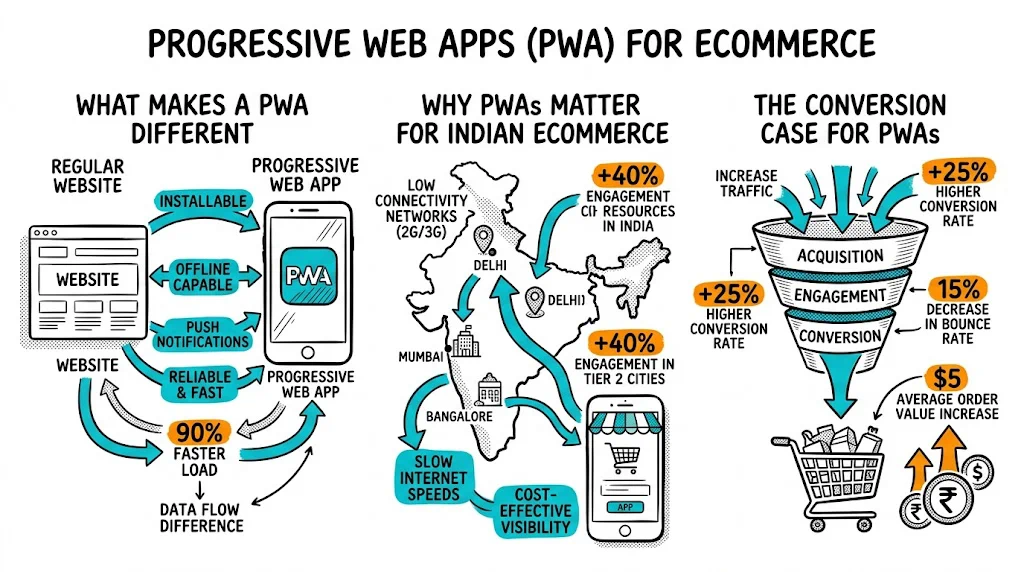
A PWA is a website that earns mobile-app behaviour: installable on home screens, fast on slow connections, able to send push notifications. For Indian D2C ecommerce — where 70%+ of traffic is mobile, 4G connections are the norm, and app install friction is high — a well-executed PWA can lift conversion rate 20–40% over a standard mobile website. But the technology alone doesn't convert; you still need to run tests on the PWA experience to realize the full gain.
A Progressive Web App uses three core technologies on top of a standard website:
1. Service Workers A background JavaScript process that intercepts network requests. It can:
2. Web App Manifest A JSON file that tells the browser how to install the app:
3. HTTPS PWAs require a secure connection. Most ecommerce sites already have this.
These three components together enable the "install to home screen" experience, offline capability, and push notifications — the features that make a PWA behave like a native app.
India's mobile internet context makes PWAs particularly compelling:
Device diversity: A large percentage of Indian smartphone users are on Android devices with 2–3 GB RAM. Native apps can consume significant storage and memory. A PWA runs in the browser — no installation required, minimal storage impact.
Variable connectivity: 4G penetration is high but signal quality varies — especially in tier-2/3 cities, rural areas, and during peak congestion. Service workers cache key assets so the store loads fast even on weak connections.
App install friction: Getting a user to discover your brand, tap "install," go through App Store/Play Store, wait for download, and then open the app — this funnel has enormous drop-off. A PWA installs with one tap from the browser, no store required.
Push notification re-engagement: Email open rates in India for ecommerce sit at 15–25%. Web push notifications from PWAs can achieve 5–10% click rates — a meaningful re-engagement channel for abandoned carts and sale announcements.
Google indexing: Native apps are not indexed by Google. PWAs are — every page is a crawlable URL, contributing to SEO and organic traffic.
The performance data from major implementations:
The mechanism is speed. Google's research shows that a 1-second improvement in mobile load time corresponds to a 27% improvement in CVR. PWAs are typically 2–5x faster than standard mobile sites for repeat visitors (where service worker caching kicks in).
For a brand doing ₹2 crore/month at 2% CVR with 70% mobile traffic, improving mobile CVR to 2.8% (a 40% lift) adds roughly ₹45 lakh monthly — before any additional A/B testing.
A common mistake: brands launch a PWA and assume the conversion improvement is automatic. The technical foundation improves speed; CRO on top of that foundation realizes the revenue potential.
When should you prompt users to install the PWA? Too early (on first visit, before they've seen value) leads to dismissal. Too late (never) means you miss the re-engagement advantage of home screen placement.
Test timing:
The variant tied to a product engagement signal (variant A or B) typically generates higher acceptance rates and better subsequent engagement.
The default browser push notification prompt ("This site wants to send notifications") has a 5–15% opt-in rate. A pre-permission dialog — a custom in-app prompt before the browser's native prompt — can increase opt-in to 30–50%.
Test pre-permission messaging:
The order shipping variant (C) typically has the highest opt-in because it's transactionally motivated — everyone wants their shipping notification.
What do visitors see when they lose connectivity mid-browse? The default browser offline page is a dead end. A PWA can serve a cached offline experience.
Test your offline page:
This test won't have high traffic volume but can prevent abandonment for the meaningful percentage of Indian mobile users who experience connection drops mid-session.
PWA full-screen mode removes the browser address bar and back button. This is more app-like but changes navigation behaviour. Test:
Some visitors (especially first-time users unfamiliar with PWAs) feel trapped without browser navigation controls. Others find the cleaner full-screen experience more immersive.
Once users opt in to push notifications, test your abandoned cart notification:
Variant C (with cart value + specific offer) typically outperforms generic copy by 20–35%.
For Indian D2C brands, here is a practical framework:
| Factor | PWA | Native App |
|---|---|---|
| Development cost | ₹5–20 lakh (if built on existing web stack) | ₹20–50 lakh (iOS + Android) |
| Time to launch | 1–3 months | 4–8 months |
| App store approval | Not required | Required (and can be rejected) |
| Google indexing | Full SEO benefit | None |
| Offline capability | Partial (cached pages) | Full |
| Push notifications | Web push (Android good, iOS improving) | Native push (full iOS + Android) |
| Low-end device performance | Good | Varies |
| Update mechanism | Instant (deploy like a website) | Requires user to update app |
Recommendation for most Indian D2C brands:
Service worker caching and A/B test reliability: If your A/B testing tool delivers different variants via JavaScript, the service worker may cache the control variant and serve it to users who should see the test variant in subsequent visits. Ensure your A/B testing tool's responses are excluded from service worker caching or are properly invalidated when tests change.
PWA sessions are longer. Home screen users typically have sessions 3–5x longer than first-time mobile browser visitors. This means:
Push notification timing matters for conversion. An abandoned cart notification sent during the evening (7–9 PM) consistently outperforms one sent immediately after abandonment — evening is when purchase decisions are revisited.
Step 1: Audit your Core Web Vitals (Lighthouse or PageSpeed Insights). If your LCP is above 4 seconds, fix fundamental performance before adding PWA features.
Step 2: Add a service worker. Use Workbox (Google's service worker library) for a sensible default caching strategy.
Step 3: Create a Web App Manifest. Set display to "standalone," add high-quality icons in multiple sizes, and set your brand theme colour.
Step 4: Implement a pre-permission push notification prompt. Use a tool like OneSignal or build a custom prompt.
Step 5: Set up CustomFit.ai or your chosen A/B testing tool on the PWA, ensuring service worker caching does not interfere with experiment delivery.
Step 6: Create your offline page. Cache your 5 most-visited category pages and your cart page for offline access.
Related reading: