CustomFit.ai โ€” Website personalization, A/B testing and CRO for Shopify and D2C
Product
Features
โœฑ
Website Personalization
Adapt to each visitor's behavior & intent
โง–
A/B & Multivariate Testing
Rigorous experimentation
โœจ
AI CopilotNEW
Personalize with a prompt
๐Ÿค–
AI WingmanNEW
Auto-optimize toward winners
๐ŸŽฏ
AI Conversion OptimizerNEW
GPT-grade test ideas
โœŽ
No-Code Visual Editor
Drag-and-drop edit any element
โ–ฆ
Product Recommendations
Personalized recs that lift AOV
โš‘
Feature Flags
Ship safely with kill-switches
โ—ง
Chrome Extension
Edit your store in the browser
โง‰
Shopify, WooCommerce & more
All platform integrations
View all features โ†’
Use Cases
$
Price A/B Testing
Test price points to maximize revenue
โ–ฆ
Theme A/B Testing
Compare whole layouts & designs
๐Ÿ—‚
Template A/B Testing
Test whole PDP/PLP templates
๐Ÿท
Discount A/B Testing
Find the offer that converts
๐Ÿšš
Shipping A/B Testing
Thresholds, speed & copy
โœ
Content A/B Testing
Copy, images & reviews
๐Ÿ’ณ
Checkout Gateway A/B
Payments & one-click
โŒ–
Geo-Based Personalization
Per-location content & offers
โšก
Buyer-Intent Nudges
Exit-intent & retargeting
โ†”
Split-URL / Redirection
Full-page redirect tests
View all use cases โ†’
Solutions & Guides
โคข
Conversion Rate Optimization
The complete CRO guide
โง–
A/B Testing Software
Buyer's guide for D2C
๐Ÿ›’
Cart Abandonment Recovery
Win back lost carts
๐Ÿ“ฐ
Landing Page Optimization
Convert more paid traffic
S
Shopify A/B Testing
Test your store, no code
S
Shopify Personalization
Tailor the store per shopper
โ—”
First-Time Visitor Offers
Convert new shoppers with trust & offers
โ˜…
Repeat-Customer Experiences
Reward and re-engage loyal buyers
โ—Ž
Campaign-Matched Pages
Match the landing page to the ad
โŒ–
Location-Based Experiences
Currency, language & regional offers
Explore CRO โ†’
Customer stories
GIVA
+32%
conversion via personalized recs
GIVA
Mamaearth
+18%
revenue lift from PDP A/B tests
ME
The Sleep Company
+24%
AOV from product recommendations
TSC
Read customer stories โ†’
Integrations
SWsfGA+15
โœฆ
Not sure where to start?
Let AI Copilot pick your first tests

โ€œWe wake up to evidence-backed tests ready to deploy โ€” not a backlog of maybe ideas.โ€

AN
Anirudh S.
Growth ยท Chargebee
โ˜…โ˜…โ˜…โ˜…โ˜…4.8on G2 ยท 2,400+ brands
Talk to our team โ†’
Widgets
Integrations
Ecommerce & Checkout
Shopify
Shopline
Shoplazza
GoKwik
ShopFlo
Razorpay Magic Checkout
Breeze
Shiprocket
View all integrations โ†’
Analytics & Behavior
Google Analytics 4
Microsoft Clarity
Hotjar
Mixpanel
Amplitude
Heap
Adobe Analytics
Segment (CDP)
View all integrations โ†’
Engagement, CRM & More
Klaviyo
MoEngage
CleverTap
WebEngage
HubSpot
Salesforce
Slack
Meta Ads
View all integrations โ†’
CustomersPricing
Resources
CRO
โ–ค
Playbooks
Proven strategies to boost conversions
๐ŸŽ™
Interviews
D2C leaders & marketing experts
โ–ถ
Webinars
Live deep dives & product sessions
Learn
โœŽ
Blog
Tips, experiments & best practices
๐Ÿ“•
Free E-Books
Mastering personalization
๐Ÿ“–
Conversion Glossary
Every CRO term, defined
โœฆAI CopilotNEWLog inBook a demo
Start free trial
Select your platform โ€” Install in 2 minsWe'll tailor the setup
โšก Risk-free 14-day trial ยท No credit card ยท Cancel anytime
S
Shopify
Install from Shopify App Store
โ€บ
W
WooCommerce
Install the WooCommerce plugin
โ€บ
B
BigCommerce
Install from BigCommerce App Marketplace
โ€บ
SL
Shopline
Install from Shopline App Store
โ€บ
M
Salesforce / Magento
Install from the marketplace
โ€บ
SZ
Shoplazza
Install from Shoplazza App Store
โ€บ
WP
WordPress / Webflow
Install plugin or paste the script
โ€บ
โ—ง
Others
Custom-built on React, Next.js, etc.
โ€บ
Tip: pick your platform โ€” we handle the restBook a demo โ†’
Product
Website PersonalizationA/B & Multivariate TestingAI CopilotAI WingmanAI Conversion OptimizerNo-Code Visual EditorProduct RecommendationsFeature FlagsView all features โ†’
Use Cases
Price A/B TestingTheme A/B TestingTemplate A/B TestingDiscount A/B TestingShipping A/B TestingContent A/B TestingCheckout Gateway A/BGeo-Based PersonalizationBuyer-Intent NudgesSplit-URL / Redirection
Solutions & Guides
Conversion Rate OptimizationA/B Testing SoftwareCart Abandonment RecoveryLanding Page OptimizationShopify A/B TestingShopify Personalization
Explore
WidgetsIntegrationsCustomersPricing
Resources
BlogPlaybooksWebinarsInterviewsE-BooksConversion Glossary
Platforms
ShopifyShoplineShoplazzaChrome ExtensionAll integrations
Start free trialBook a demo
Homeโ€บBlogโ€บecommerce techโ€บThird-Party Scripts Audit for Speed & CRO

Third-Party Scripts Audit for Speed & CRO

SJSapna JoharHead of Growth & CRO, CustomFit.aiJanuary 15, 202510 min read
On this page
  1. What Are Third-Party Scripts?
  2. Why Third-Party Scripts Hurt More Than You Think
  3. Step-by-Step: Running a Third-Party Script Audit
  4. Step 1 โ€” Discover All Scripts (30 minutes)
  5. Step 2 โ€” Measure Each Script's Impact (1โ€“2 hours)
  6. Step 3 โ€” Categorize Each Script
  7. Step 4 โ€” Take Action
  8. Step 5 โ€” Measure the Results
  9. The GTM Audit: A Specific Sub-Process
  10. Script Audit Priorities for Indian D2C
  11. Tips and Best Practices
  12. Key Takeaways
0%
Third-Party Scripts Audit for Speed & CRO

From the conversion glossary

Concepts referenced in this article, defined.

Definition
What Is Pixel? Definition & Guide
Definition
What Is Control? Definition, Formula & Guide
Definition
What Is Session Recording? Definition & Guide
Definition
What Is Tag Management? Definition & Guide
โ† Back to Ecommerce Tech guide
Try CustomFit.ai

Run A/B tests and personalize your store without code. 14-day free trial, no credit card.

Start free trial โ†’
Share
XLinkedInEmail

Related articles

ecommerce tech

Progressive Web Apps (PWA) for Ecommerce

Sapna Joharยท 9 min read
ecommerce tech

Page Speed & Conversion Rate Correlation

Sapna Joharยท 9 min read
ecommerce tech

JavaScript Impact on Ecommerce Performance

Sharan Kumarยท 8 min read

Start lifting conversions today.

Run rigorous A/B tests and personalize every visit on Shopify or any storefront โ€” no engineers required.

Start free trialBook a demo

Built for every D2C category

๐Ÿงด
Skincare
๐Ÿ’„
Beauty
๐ŸŒฟ
Wellness
โ˜•
F&B
๐Ÿ‘Ÿ
Apparel
๐Ÿ’
Jewelry
๐Ÿ›‹๏ธ
Home
๐Ÿผ
Baby
Live ยท Right now
Mamaearth โ€” free-shipping band +12.4% AOVGIVA โ€” festive collection page +34% revenueBellavita โ€” PDP CTA test +27.4% CVRKapiva โ€” Quiz-driven recs +9.48% CTRThe Sleep Co โ€” landing personalized 2ร— capturesPlum โ€” Returning shopper swap +18.2% CVRMamaearth โ€” free-shipping band +12.4% AOVGIVA โ€” festive collection page +34% revenueBellavita โ€” PDP CTA test +27.4% CVRKapiva โ€” Quiz-driven recs +9.48% CTRThe Sleep Co โ€” landing personalized 2ร— capturesPlum โ€” Returning shopper swap +18.2% CVR
Get in touch

Tell us about your store.

We reply within an hour during business hours. No sales pitch, no spam โ€” just answers from someone who's seen 2,400+ D2C stores.

โœ“ Reply within 1 hourโœ“ No spam, everโœ“ Free demo & setup help
โœ“ Thanks! We'll be in touch shortly.
CustomFit.ai

The all-in-one website personalization, A/B testing & CRO platform for high-growth D2C brands. Made by marketers, fueled by coffee.

in๐•โ—Žโ–ถf
Product
  • Features
  • A/B Testing
  • Personalization
  • AI Copilot
  • AI Wingman
  • AI Conversion Optimizer
  • Feature Flags
  • Widgets
  • Integrations
  • ROI Calculator
Platforms
  • Shopify
  • Shopline
  • Shoplazza
  • Salesforce
  • Chrome Extension
  • All Integrations
Resources
  • Blog
  • Playbooks
  • Webinars
  • GrowthFit Interviews
  • Free E-Books
  • Conversion Glossary
  • Case Studies
Compare
  • vs VWO
  • vs Optimizely
  • vs Google Optimize
  • vs Mutiny
  • vs Intelligems
  • vs Shoplift
  • vs AB Tasty
  • vs Convert
  • vs Kameleoon
Company
  • About Us
  • Partners
  • CustomFit Awards
  • Recognition
  • Contact
  • Privacy Policy
  • Terms & Conditions
ยฉ 2026 CustomFit.ai ยท Valley Monks Pvt Ltd ยท Made by marketers, fueled by coffee, and obsessed with conversions.
SOC 2 Type II ยท GDPR ยท CCPA ยท ISO 27001

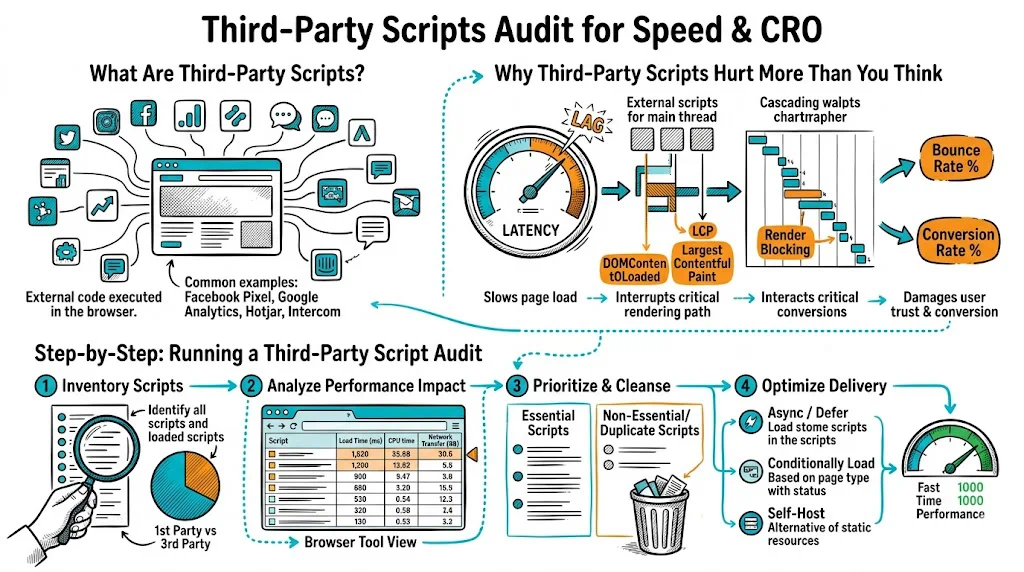
The average ecommerce site loads 15โ€“25 third-party scripts on every page. Most were added by different team members at different times, none was ever removed, and collectively they add 2โ€“4 seconds to your page load and cost you 10โ€“25% of your mobile conversions. A third-party script audit is a systematic process to find this hidden tax, eliminate what's not earning its keep, and optimize what remains. You can run one in a day, and the conversion gains often rival months of A/B testing.

What Are Third-Party Scripts?

Third-party scripts are JavaScript files hosted on external domains โ€” not your own origin โ€” that you've added to your site. They typically arrive via a <script> tag pointing to another company's server.

Common examples on ecommerce sites:

  • Analytics: Google Analytics / GA4, Mixpanel, Amplitude
  • Tag management: Google Tag Manager (which then loads more scripts)
  • Advertising pixels: Meta Pixel, Google Ads conversion tag, Pinterest tag, Snapchat pixel
  • Heatmaps and session recording: Hotjar, FullStory, Microsoft Clarity
  • Live chat: Intercom, Freshchat, Tidio, Zendesk Chat
  • Email marketing: Klaviyo embed, Mailchimp pop-up
  • Review widgets: Yotpo, Stamped, Judge.me, Trustpilot
  • Loyalty programs: Smile.io, LoyaltyLion
  • Push notifications: OneSignal, PushOwl
  • A/B testing: CustomFit.ai, VWO, Optimizely
  • Affiliate tracking: Impact, Commission Junction, ShareASale
  • Product recommendations: Nosto, Recomatic
  • Payment trust badges: Razorpay, PayU badges, SSL certificates display scripts

Each one makes you faster to use the tool and slower to serve your customers.

Why Third-Party Scripts Hurt More Than You Think

The performance hit from third-party scripts is not just the script file size. It is the cascade of costs:

1. DNS lookup: Before downloading a script, the browser must resolve the domain (e.g., connect.facebook.net). Each unique domain adds 50โ€“150ms of DNS lookup time. If you have 15 scripts from 15 different domains, that's 15 DNS lookups.

2. Connection establishment: Each new domain requires a TCP handshake and TLS negotiation โ€” another 100โ€“300ms per unique domain.

3. Download: The script file itself. Even a "small" 50KB script adds download time, especially on mobile.

4. Parse and execute: The browser must parse and execute every script. Heavy scripts (heatmap recorders, complex chat widgets) take 200โ€“800ms of main thread time.

5. Render blocking: Scripts without async or defer pause the browser from rendering anything until they finish loading.

6. Origin dependence: Third-party scripts are served from servers you don't control. If Hotjar's CDN has a bad day, your site slows down. If a vendor's script has an error, it can break your entire page.

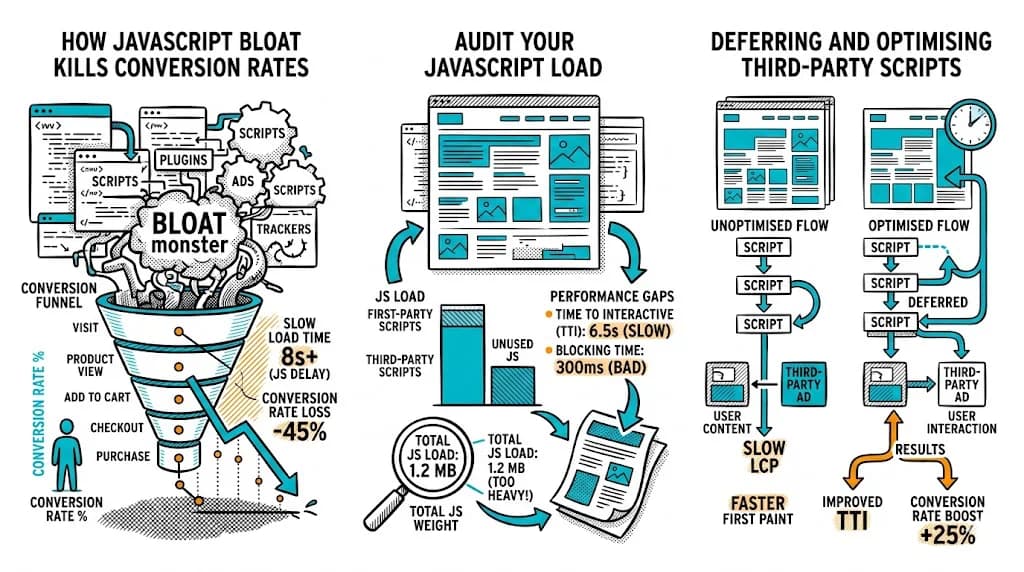
The cumulative result: A typical ecommerce site with 20 third-party scripts can have 2โ€“4 seconds of load time entirely attributable to third-party overhead โ€” before your own code, images, or platform scripts load.

Step-by-Step: Running a Third-Party Script Audit

Step 1 โ€” Discover All Scripts (30 minutes)

You need a complete inventory before you can make decisions.

Method 1 โ€” Chrome DevTools:

  1. Open Chrome, go to your homepage in incognito mode
  2. DevTools โ†’ Network tab โ†’ check "Disable cache"
  3. Reload the page
  4. Click "Domain" column header to sort by domain
  5. Any domain that is not your own is a third-party script source
  6. List every third-party domain and the files it serves

Method 2 โ€” Request Map: Go to requestmap.webperf.tools, enter your URL, and generate a visual map of every request your page makes. Third-party requests appear as nodes on the map โ€” you can instantly see which external domains are loading the most resources.

Method 3 โ€” Google Tag Manager: If you use GTM, log in and view all tags. Each active tag loads at least one external script. List them all.

Create a spreadsheet with columns:

  • Script/tool name
  • Domain
  • File size (KB, gzipped)
  • Load order (render-blocking vs async)
  • Business owner (who added it, who uses it)
  • Last verified active use date

Step 2 โ€” Measure Each Script's Impact (1โ€“2 hours)

Not all scripts are equally harmful. Measure the impact of each.

Google Lighthouse โ€” "Reduce third-party code" opportunity: Run a Lighthouse audit (Chrome DevTools โ†’ Lighthouse โ†’ Mobile). Look for the "Reduce impact of third-party code" section. It lists every third-party script with:

  • Blocking time (ms of main thread blocking)
  • Transfer size
  • Which scripts are the worst offenders

WebPageTest โ€” Third-party summary: Run a test from Mumbai or Singapore. In the results, go to "Content Breakdown" โ†’ "Third-Party" section. You'll see the exact byte count and request count attributable to each third-party domain.

Prioritize by impact: Focus your audit efforts on scripts with >200ms of blocking time or >100KB transfer size. Small, asynchronous scripts with <20KB transfer size are not your primary problem.

Step 3 โ€” Categorize Each Script

For each script in your inventory, classify it:

Essential โ€” Active and business-critical:

  • GA4 / primary analytics
  • Meta Pixel (if running active Meta ads)
  • Your checkout payment gateway scripts
  • Your A/B testing tool (if running active experiments)

Active but optimizable:

  • Heatmap tool (Hotjar): Runs on every page but you only look at data from a few pages. Load only on pages you're actively analyzing.
  • Live chat: Runs on every page but is only used on a few. Lazy-load on interaction.
  • Reviews widget: Load only on product pages, not homepage or category.

Inactive โ€” Added but no longer in use:

  • Old A/B testing tool replaced by a new one
  • Pixel for an ad platform you no longer use
  • Chat widget from a vendor you switched from 6 months ago
  • Analytics from a tool your team stopped logging into

Unknown โ€” No one knows who added it or why: Common in GTM containers that haven't been audited. These are candidates for removal (test in staging first).

Step 4 โ€” Take Action

Remove inactive scripts immediately: In Google Tag Manager, pause or delete tags for tools you no longer use. For scripts in code (not GTM), remove the <script> tag. Test in staging before pushing to production.

Lazy-load optimizable scripts:

Load live chat on interaction only:

// Load chat widget only when user clicks the chat button
document.getElementById('chat-trigger').addEventListener('click', function() {
  // Load chat script dynamically
  const script = document.createElement('script');
  script.src = 'https://chat-vendor.com/widget.js';
  document.head.appendChild(script);
});

Load heatmap only on specific pages:

// Only load Hotjar on product pages and checkout
if (window.location.pathname.includes('/products/') ||
    window.location.pathname.includes('/checkout')) {
  // Load Hotjar
}

Defer all non-critical scripts: Ensure every non-critical script uses async or defer. In GTM, this is often the default โ€” but check each tag's firing trigger to ensure it's not set to fire synchronously.

Self-host critical third-party scripts (advanced): For scripts that are essential and frequently updated, self-hosting (downloading and serving from your own domain) eliminates the DNS lookup cost. This works well for scripts that update infrequently (Google Analytics JS, for example).

Note: Self-hosting Meta Pixel or other ad network scripts violates their terms of service. Only self-host analytics and utility scripts you have the rights to host.

Step 5 โ€” Measure the Results

After making changes, re-run your Lighthouse and WebPageTest audits and compare:

MetricBeforeAfter
Total JS size (third-party)__ KB__ KB
Third-party blocking time__ ms__ ms
Time to Interactive (TTI)__ s__ s
Largest Contentful Paint__ s__ s
Bounce rate (mobile)_%_%
CVR (mobile)_%_%

Allow 2โ€“4 weeks of post-change data before drawing conclusions from CVR changes.

The GTM Audit: A Specific Sub-Process

Google Tag Manager deserves its own audit because it's where script sprawl is worst. Marketing teams add tags via GTM without touching code โ€” which means tags accumulate without developer visibility.

GTM audit steps:

  1. Log into GTM โ†’ go to Tags
  2. Filter by "Status: Paused" โ€” these are inactive but still loaded in preview mode; delete or archive
  3. For each active tag: identify the business owner and verify it's still in use
  4. Check triggers: is any tag firing on "All Pages" when it should fire only on specific pages?
  5. Review variables: are any custom variables complex scripts that could be simplified?
  6. Check preview mode: does the page load faster when GTM is excluded? (Use ?gtm_debug=false or temporarily unpublish your GTM container in staging)

Set a policy: every new GTM tag requires a business owner, a purpose, and a review date (6 months). Tags without an owner at review get paused.

Script Audit Priorities for Indian D2C

Specific to India's traffic context:

Highest priority to remove/optimize:

  1. Heatmap tools running on all pages (Hotjar, FullStory) โ€” 200โ€“500KB each. Restrict to product pages only.
  2. Chat widgets loading on every page โ€” lazy-load on interaction. Most Indian D2C visitors don't use chat.
  3. Dead pixels (ad networks you no longer use) โ€” pure overhead, zero benefit.

Essential to keep but optimize loading:

  1. GA4 โ€” load async, verify it's not blocking anything
  2. Meta Pixel โ€” load async via GTM; verify it's paired with your active ad account
  3. Razorpay/PayU scripts โ€” load only on checkout pages, not site-wide

Worth self-monitoring:

  1. CustomFit.ai or other A/B testing tool โ€” verify it loads asynchronously and is not blocking LCP

Tips and Best Practices

  • Run this audit every 6 months โ€” marketing tool changes happen faster than audits do.
  • Make every new script request a formal process. Who is the owner? What is the business case? How will it be loaded? Will it be removed when no longer needed?
  • Use GTM's built-in performance monitoring โ€” GTM shows tag firing times in preview mode.
  • Set a performance budget. "We will not exceed 500KB of third-party JS on the homepage" gives your team a measurable constraint.
  • The hidden benefit of script audits: Removing scripts also reduces your data privacy exposure. Fewer third-party scripts means fewer external entities processing your visitors' behavioral data โ€” increasingly important as privacy regulations tighten.

Key Takeaways

  • The average ecommerce site loads 15โ€“25 third-party scripts per page; a significant portion are inactive or poorly loaded.
  • Third-party scripts add DNS lookups, connection time, download, and execution time โ€” the cumulative impact is often 2โ€“4 seconds of load time.
  • Audit with Chrome DevTools Network panel, Lighthouse, and Request Map โ€” all free, takes 2โ€“3 hours for a thorough audit.
  • Lazy-load chat and heatmap tools (they load on every page but are used on very few).
  • GTM is the primary source of script sprawl โ€” audit it separately every 6 months and enforce an ownership policy for new tags.

Related reading:

  • Ecommerce Tech Pillar
  • CRO Pillar
  • JavaScript Impact on Ecommerce Performance
  • CDN for Ecommerce Performance
  • Bounce Rate