From the conversion glossary
Concepts referenced in this article, defined.
Where does AI actually help in A/B testing, and where should humans stay in charge? A plain-English guide for ecommerce teams on diagnosis, variants, QA, decisions and documentation.
 Yuvraj Singh13 min read
Concepts referenced in this article, defined.
Run rigorous A/B tests and personalize every visit on Shopify or any storefront — no engineers required.
If you run an online store, you have probably heard some version of this pitch: "Our AI runs your A/B tests for you." Set it up, walk away, watch conversions climb.
Most people who actually run tests do not buy it, and they are right to be careful. A/B testing is a way of finding out what is true about your customers. The moment you hand that job to a black box, you lose the thing that made testing useful in the first place: knowing why something worked.
But being skeptical about the pitch is not the same as ignoring the tools. Plenty of the work around a test is slow, repetitive and easy to get wrong, and that is exactly where AI can help. The trick is knowing which parts to hand over and which parts to keep.
AI is good at the work around the experiment. It is much less trustworthy at the judgment inside it.
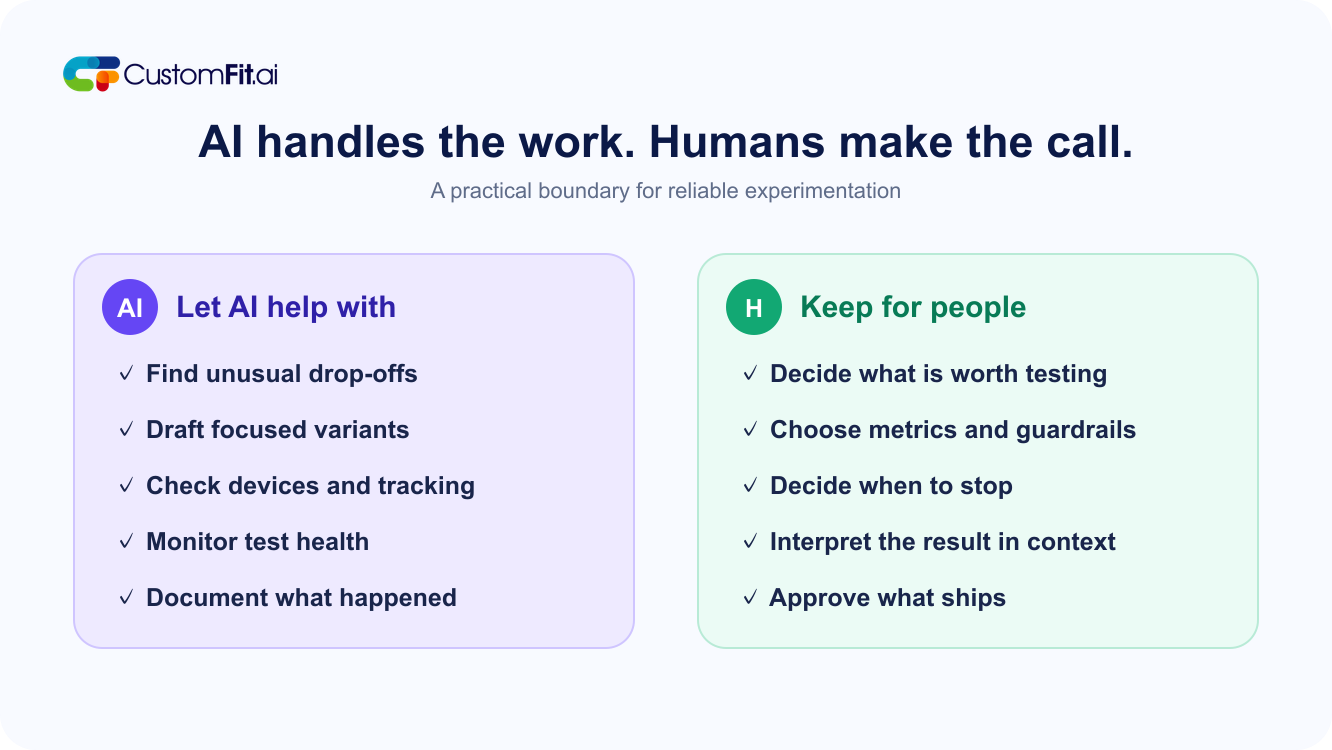
Hand over: spotting where visitors struggle, drafting variants, checking that a test is set up properly, watching for problems while it runs, writing things down and summarizing results.
Keep: deciding what is worth testing, choosing what success means, deciding when a test is done, reading the result in context and choosing what ships.
"AI" has become a label. Many tools that now say "AI-powered" do what recommendation engines and basic segmentation did years ago, with a new name on the box. In discussions among Shopify merchants, this comes up often: people suspect that some products are old features rebranded.
The basics often matter more. Merchants also point out that for a typical store, things such as clean product tags, clear navigation and good follow-up emails after a purchase often do more than a complicated personalization setup. That does not make personalization bad. It means it is rarely the first thing to fix.
Nobody wants a result they cannot explain. If a tool says "variant B won" and cannot tell you anything else, you cannot learn from it, defend it to a colleague or apply it elsewhere.
The answer is not to avoid AI. It is to point it at the right jobs.
Read Also: How AI-Powered A/B Testing Works for Ecommerce
A test is not one task. It is a chain: spot a problem, find the cause, pick an idea, build it, check it, run it, call it, read it, roll it out and write it up. AI helps at most of those steps, in different ways.
Most stores have more data than anyone has time to read. Funnels, heatmaps, recordings, search terms, support tickets and reviews. The slow part is usually noticing the problem, not fixing it.
AI is useful here as a fast first reader. It can point out that a drop-off is much worse on one device, summarize what hundreds of support emails complain about, or flag a page whose behavior changed after a site update.
The key phrase is "first reader." It tells you where to look. You still have to look, and you still have to decide whether what it found is real. A good rule is to treat anything AI flags as a lead, never as a conclusion.
Once you know what to test, building variants takes time: headline options, shorter product descriptions, alt text and resized images. This is where AI saves hours.
Use it to produce options, then edit hard:
Plenty of tests fail quietly because of a setup mistake, not a bad idea. The variant looks broken on one phone. Tracking does not fire on the thank-you page. A discount code stops working in one version.
This is checklist work, which is well suited to automation: loading each version on several screen sizes, confirming events are tracked, listing what actually differs between versions and catching broken links. A person should still do a quick manual run-through.
A running test can go wrong in quiet ways. Traffic might not split evenly. One variant might error in a certain browser. Orders might stop being recorded.
Automated monitoring never gets bored, and it can alert you the moment something looks wrong. It should raise a flag. It should not stop or change your test on its own.
This is the least glamorous job and probably the most valuable. Most teams are bad at documentation. Six months after a test, nobody remembers what was tried or why it lost.
AI can turn a setup into a clean record, draft a plain-language summary, tag tests by page and outcome, and let you search past experiments: "Have we tried moving reviews up?"
Over time, a good test log becomes a map of what your customers respond to, and that is worth more than any single win.
Read Also: How to Write a Strong A/B Testing Hypothesis
AI can generate a hundred ideas. It cannot tell which ones matter for your business because it does not know your margins, your customers' worries, your supply problems or your plans for next quarter.
Someone who understands the store needs to pick the questions. A good test starts with a reason: "People seem unsure about sizing, so let us try making the size guide easier to find." A bad one starts with: "Let us see what the AI suggests."
Choosing the main metric and the guardrails is a business decision, not a technical one. Is it revenue per visitor? Order value? Repeat purchases? Which numbers must not get worse?
If you leave this to a tool, it will quietly pick whatever is easiest to measure, often clicks or conversion rate. Plenty of changes raise conversion while hurting profit, increasing returns or attracting the wrong customers.
Decide what winning means before the test starts, and write it down.
This trips up even experienced teams. Early results are noisy. A variant that is ahead after three days can be behind after two weeks. Weekdays behave differently from weekends. A big promotion changes who is visiting. Some changes look great at first just because they're new, then fade.
Automatic "winner declared" features are tempting, but calling a result too soon is one of the most common ways to fool yourself. A person who knows the context, such as last Tuesday's sale or Friday's new ad campaign, can see problems a tool cannot.
If a tool offers automatic stopping, it is fine to use it as a prompt: "This might be ready; take a look." It should not be the final word.
A number on a dashboard is not an answer. Did the winner work on mobile and not desktop? Did returns rise a month later? AI can show you angles, but meaning is your job.
Testing different wording about health benefits, environmental claims, pricing, delivery promises or urgency can get you into trouble. AI does not know what is allowed where you sell, and it does not care whether a claim is misleading. Humans should review any test copy that makes a promise.
The same goes for tests that pressure shoppers. Just because a countdown timer wins does not mean you should use a fake one.
Two kinds of automation sit in between, and they deserve a closer look.
Automatic traffic shifting. Some tools gradually send more visitors to whichever version seems to be winning. This can be sensible when the stakes are low, the options are many and the thing you are testing is short-lived, such as which banner to show during a three-day sale. It is less sensible when you want to learn something lasting, because shifting traffic early makes it harder to understand why one option won.
Personalization. Showing different content to different visitors can help, and the lighter versions are often the most useful: a cart add-on suggestion, a different message for first-time and returning visitors, a live preview for customizable products, or follow-up emails timed to how often a customer usually buys. These are simple, understandable and easy to test.
The version that is harder to justify for most stores is the heavy one, where every part of the storefront rebuilds itself for each visitor. It is expensive, difficult to explain and often built before the basics are fixed. If your product pages are confusing or your checkout has friction, fix that first.
If you can describe the personalization in one sentence, you can test it and learn from it. If you cannot, be careful.
Read Also: What Makes a Good A/B Test? Avoiding Common Mistakes
When a vendor pitches AI for A/B testing, a handful of questions cut through the language:
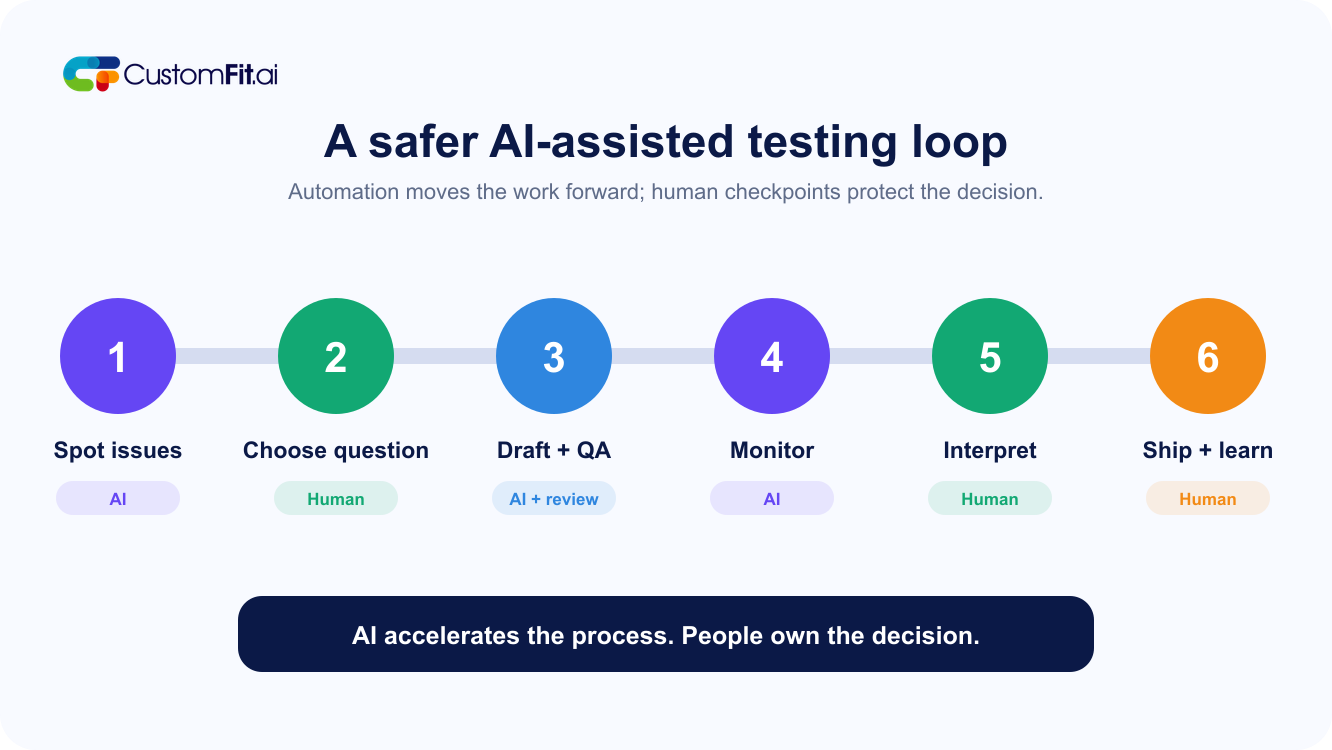
Here is a rough division you can adapt to your team:
| Step | Let AI help with | Keep for people |
|---|---|---|
| Find problems | Scanning data, summarizing feedback, flagging oddities | Deciding what is real and what matters |
| Plan the test | Suggesting ideas and angles | Choosing the question, metric and guardrails |
| Build variants | Drafting copy and layouts | Editing, fact-checking and brand voice |
| Check setup | Automated device and tracking checks | A final manual run-through |
| Run the test | Monitoring and alerts | Deciding to stop, change or extend |
| Read results | First-pass summaries and extra angles | Interpretation and context |
| Roll out | Preparing the change | Approving and reviewing it |
| Learn | Writing records, tagging and searching past tests | Deciding what to try next |
Say a skincare store keeps losing mobile shoppers at the cart. AI scans the funnel and notices the drop is steepest for first-time visitors on phones. It summarizes support emails and finds people asking about shipping costs. It drafts three shipping messages and checks that each fits a small screen. During the test, it alerts you when one day's traffic split looks odd.
You decide shipping uncertainty is the problem, and that revenue per visitor is the number that matters. You delete the message that makes a promise you cannot keep. You let the test run for two full weeks even though one version leads on day four. At the end, you see the winner only helped new visitors, so you show it only to them. Then you write it down.
AI saved time at the edges. You made every call that mattered.
AI is not a replacement for experimental judgment, and the people who say it is are usually selling something. But it is a very good assistant. It can read your data faster than you can, draft the first version of almost anything, check the dull work and keep your records tidy.
Use it to speed up the work around testing. Keep the decisions yourself. That combination gets you more tests, fewer avoidable errors and results you actually understand, which is what testing is for.
At CustomFit.ai, that is how we think about it: tools should make it easier to run good tests, not make it easier to stop thinking.
Read Also:
Want to speed up experimentation without giving away the decisions that matter? See how CustomFit.ai helps ecommerce teams build, validate and learn from better tests.
Book a CRO strategy call